Sidebar
eas-guide:expert-advisors-plus
This is an old revision of the document!
Table of Contents
Expert Advisors Plus
Expert Advisor Plus includes additional features, which can be tested in the MetaTrader's Strategy Tester only.
Expert Advisors Plus trades as an ordinary EA Studio Expert Advisor by default. All of the additional options are initially switched off.
Grid (Averaging down)
The Grid option enables possibility to open new positions at determined distance and amount when the market moves against our initial entry. Effectively, it adds lots to a losing position (Averaging Down). The Averaging Down moves the aggregate position price towards the market and sometimes recovers the loss.
Grid Inputs
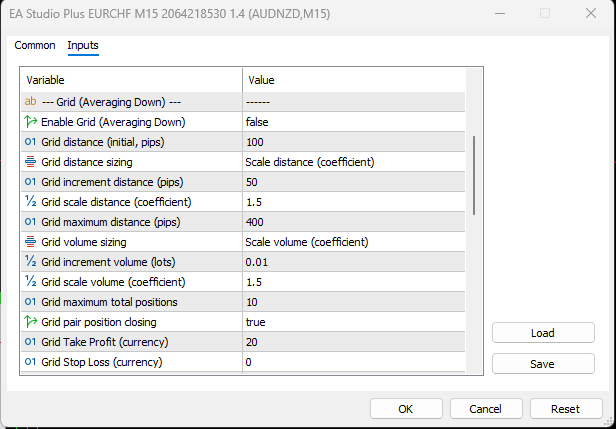
Enable Grid (Averaging Down)
Grid distance (initial, pips)
Grid distance sizing
- Item Equal distance (pips) - all grid entries are equally spaced from the initial entry
Example: Initial at 1.2000, grid entries at 1.1950, 1.1900, 1.1850 (50 pips apart each).
- Increment distance (pips) - each grid entry adds a fixed increment to the previous spacing
Example: With initial 50 pips and increment 20, entries are at: 50 pips from initial (1.1950), then 70 pips below (1.1880), then 90 pips below (1.1790).
- Scale distance (coefficient) - each spacing is multiplied by the coefficient
Example: With initial 50 pips and scale 1.25, entries are at: 50 pips from initial (1.1950), then 62 pips below, then 78 pips below.