226

Re: EA Studio - News and updates

Hello, Traders,

The base code of the EA Studio's Expert Advisors is updated.

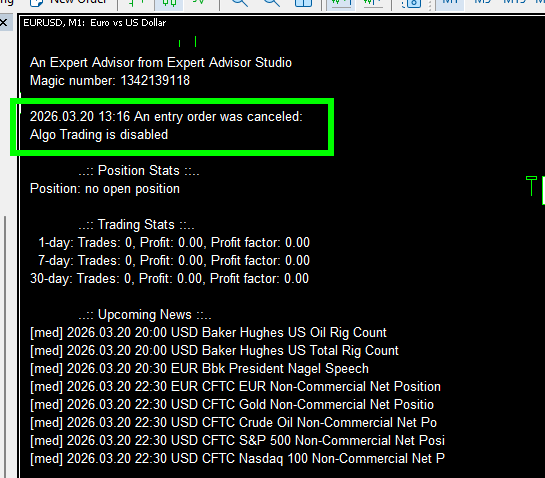
The new Expert Advisors have improved behavior when the Algorithmic Trading is disabled:
- The expert cancels the Entry, Exit, or Modify signal instead of repetitively "waiting" for trading to be enabled.
- It prevents multiple log messages
- The Expert shows a proper status message on the chart

https://image-holder.forexsb.com/store/ea-studio-expert-advisor-message-trade-disabled-thumb.png

This issue was reported by Poteree in this post: https://forexsb.com/forum/post/83171/#p83171

There are no changes to the Experts' trading logic, so re-exporting them is not necessary.


Trade Safe!

227

Re: EA Studio - News and updates

Hello Traders,

The MQL5 base code for the expert advisors has been updated.

This update improves the stability of the Expert Advisors and fixes issues with the "Grid" in Expert Advisor Plus.

There are no changes in the trading logic or indicators.

Improvements:

  • Order filling Type - when an MQL5 expert sends trading orders, it must set a parameter called "Order Filling Type". This is tricky because there are 4 options available, which differ across brokers and symbols. We detect the working one by probes and errors. This process is improved now. The probing cycle is improved, and when a correct option is found, the Expert stores it in the Terminal's Global Variables separately for each symbol. These settings are later used by the same or new experts in the same terminal.

  • Order Checking improved - we now have better detection of the broker's response when an Expert sends trading orders. The Expert analyzes the reason for a potential execution failure and attempts to resend the order if appropriate.

  • Check if Trading Allowed - there are more complete checks if the algorithmic trading is allowed at the moment.

  • Trading Repeat - the Expert repeats an order in case of trade execution or network problems. Now it makes it in a more intelligent way.

  • Grid Distance Calculation - the grid distance calculations were messed up. This Expert release  fixes:
      - fixed a bug in the calculation of the distance when "Grid distance sizing" is "Fibonacci".
      - fixed "Grid increment distance (pips)" - now it is computed correctly in "pips" (it was in points before)
      - fixed "Grid maximum distance (pips)" - now it is computed correctly in "pips" (it was in points before)

  • Grid - Max distance - fixed a bug in the calculation of the Grid distance when "Grid distance sizing" is "Fibonacci".

  • Code unification - now the source code of "Expert Advisor for MT5" and "Expert Advisor Plus for MT5" is the same, except for the additional functions (Grid - at the moment). This ensures that the Experts have similar functionality when the Grid is off.

  • Code Optimization  - we have minor optimizations and fixes of potential issues.

The Grid distance fixes change the Grid's additional entries. Please test your experts in MetaTrader 5 with "real ticks" at least once before live trading.

Please report all issues or misbehavior you may discover.

Re: EA Studio - News and updates

Thanks, Popov!

About the EA Studio Plus grid system, what you mentioned here covers all the issues highlighted in my report sent to you.

I will restart the DOE with the updated code and provide feedback to you.

Just one question:

The EAs I am using are the top EAs of the month, just uploaded in MT4, then downloaded as MT5 with the grid option flagged.

If I want to use the same, should I import the original MT4 (non-grid) or the actual MT5 grid version and then download them again?

Thx for the effort.
Vincenzo

229

Re: EA Studio - News and updates

Hello, Traders,

A new version of the Expert Advisor Plus.mq5 v6.8 has been uploaded.

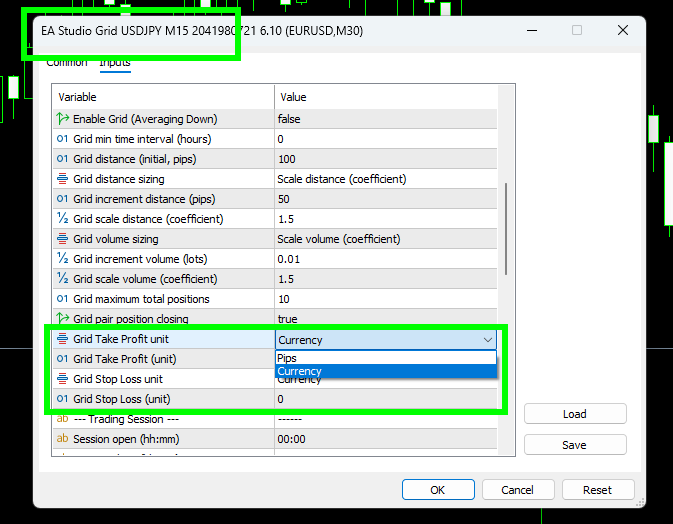
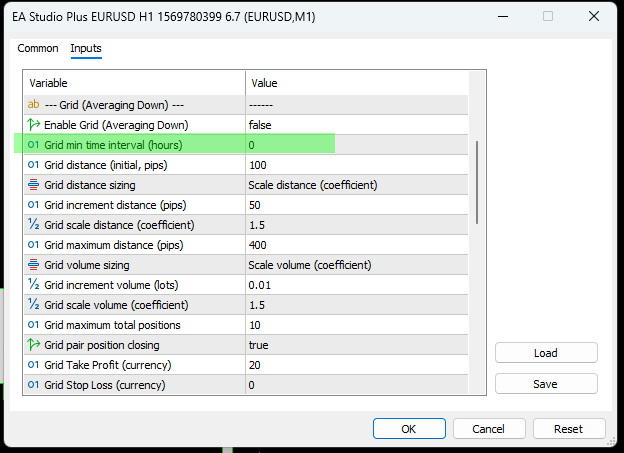
This version introduces a new option for the Grid trading - Grid min time interval (hours)
You can set a minimal time interval in hours between the Grid entries.
When the option is set to 0 (default), it is disabled.
https://image-holder.forexsb.com/store/grid-averaging-down-expert-min-time-interval.png

For example, if you set "4", it means that the Grid will wait at least 4 hours between making an Entry. That effectively means the Grid will trade when both the time interval is passed, and the price is below (above) the next Grid entry price.

The purpose of the  Grid min time interval (hours) option is to prevent too frequent entries.

Some third-party Grid Expert Advisors use 24 hours interval preset. Therefore, we make it even better for you, and you can set an interval that works best for your market.

Grid Virtues:
1. Always test your grid system in the MT5 Tester with real ticks.
2. The Grid system works well until it burns off your account.
3. The Grid systems tend to have a higher average drawdown, so they are suitable for larger accounts.


> If I want to use the same, should I import the original MT4 (non-grid) or the actual MT5 grid version and then download them again?

If your experts are tested and work well, you don't need to re-export them.

Have a fantastic weekend and meet new friends!

230

Re: EA Studio - News and updates

Hello, Traders,

New versions of the MT5 Expert Advisors have been uploaded.

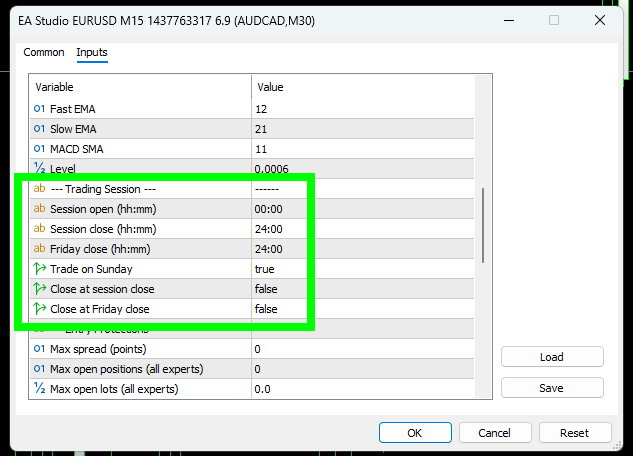
1) The Experts expose the Trading Sessions option in the "Input" panel.

https://image-holder.forexsb.com/store/ea-studio-expert-advisors-trading-session-inputs.png

These options allow fast adjustment of the session time if your broker has special requirements.

Please test the expert in the MT tester after making changes to the options.

2) Remove the option "Grid max distance".

I found out this option is cumbersome and unnecessary. We have full control over the Grid's distance by using the Distance sizing method and the Grid maximum positions.

Have a great trading week!

231

Re: EA Studio - News and updates

Hello, Traders,

I also added the "Trading Session" options to the MT4 Expert and the MT4 Portfolio Expert.

The expert's Inputs are preset based on the corresponding Trading Session options in EA Studio.

Have fun and profit!