1 (edited by DrQuant 2026-08-03 15:35:33)

Topic: optimize_by options

Hi all!

Quick question: In EA Studio we can optimise by "Balance Line" and "System Quality"... How do we do that in Express Generator? The only options mentioned for optimize_by in the gen.settings.ini file are:

NetBalance, Profit, ProfitFactor, ReturnToDrawdown, RSquared, Stagnation, WinLossRatio

Thanks!

Re: optimize_by options

"RSquared" is the same as "Balance line stability". It shows how linear is the balance line.

Express Generator does not calculate "System Quality number" so it cannot optimize on it.

Re: optimize_by options

Popov wrote:

"RSquared" is the same as "Balance line stability". It shows how linear is the balance line.

The EA Studio offers both of those, and the optimisation results are different... so they're similar but not identical, right?

Re: optimize_by options

> The EA Studio offers both of those, and the optimisation results are different... so they're similar but not identical, right?

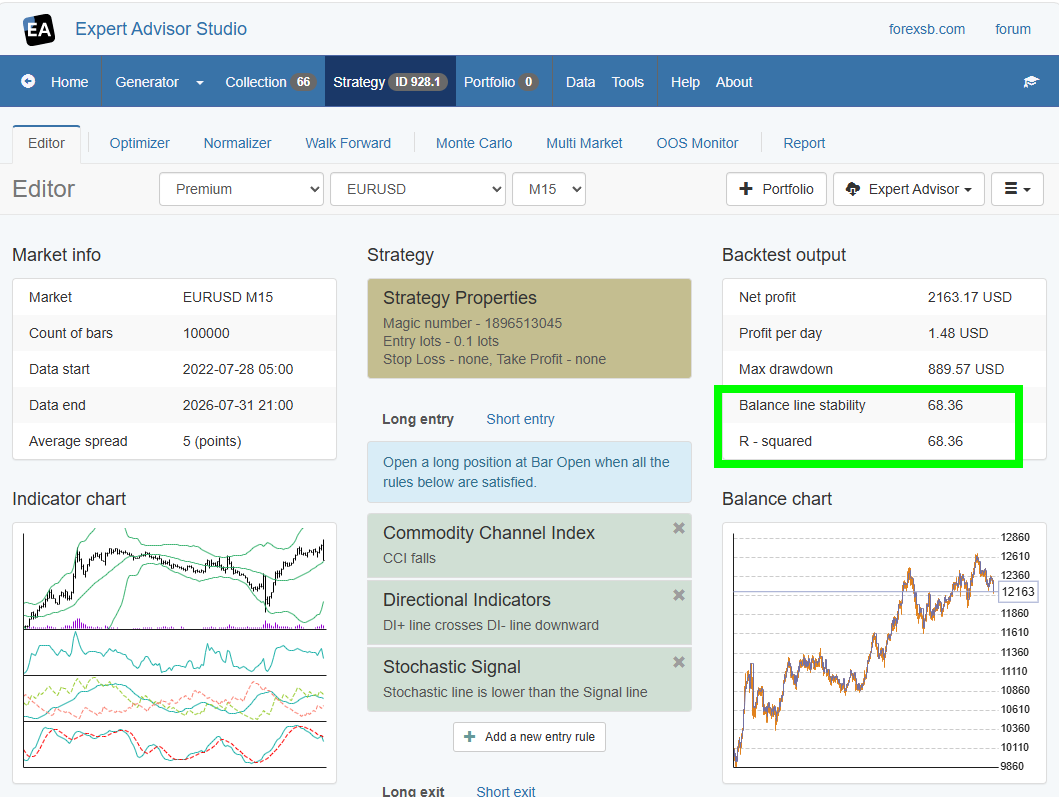
Both "Balance line stability" and "R - squared" show on the screen the value calculated by the R-squared formula.
"Balance line stability" is in EA Studio for historical reason. I created the formula by myself before knowing the R-squared formula. Later, I decided to use the industry-standard R-squared metric.

https://image-holder.forexsb.com/store/eas-r-squared-compared-with-balance-line-stability-thumb.png

Re: optimize_by options

Oh, okay. I could have sworn I was getting different Balance Charts from those two settings... but I guess not. Thanks for explaining!