1 (edited by poteree 2025-10-26 18:13:56)

Topic: EA Studio vs Every Tick Based on Real Ticks: how to avoid mismatches?

Hello all,

I personally went trough many tests where Open Price Mode backtest is positive on Ea Studio and MT5 BUT, as soon as I backtest in "Every Tick based on Real Tick" the result is very bad.

Here's an example from GBPCHF M30 in 2025, with fixed SL= 50 (no TP), on same prop firm data:

After putting the request on the wishlist to have a "Open price mode trading" input, I was wondering in the meantime if and eventually how do you mantain the same backtest result among "Open Price Mode" and "Every tick based on real ticks" mode, with the same EA downloaded from EAStudio.

Many thanks

Re: EA Studio vs Every Tick Based on Real Ticks: how to avoid mismatches?

I'm researching that problem at the moment.

I found out strategies that trade on a gap may show different performance in the MT backtest in Open price only and Real Ticks.

Such strategies use Bollinger Bands or Envelop for entries, usually when the price crosses a band.

The reason is that the spread at the opening of a bar after a gap is higher than the one shown in Meta Trader and, correspondingly, in EA Studio.

MT5 provides an averaged spread in the bar data. It can be lower than the spread at open after a gap. The difference can be 2-4 times.

When you backtest a strategy in MT5 on Real ticks, it calculates the spread for the tick data instead of using the spread of the bar data.

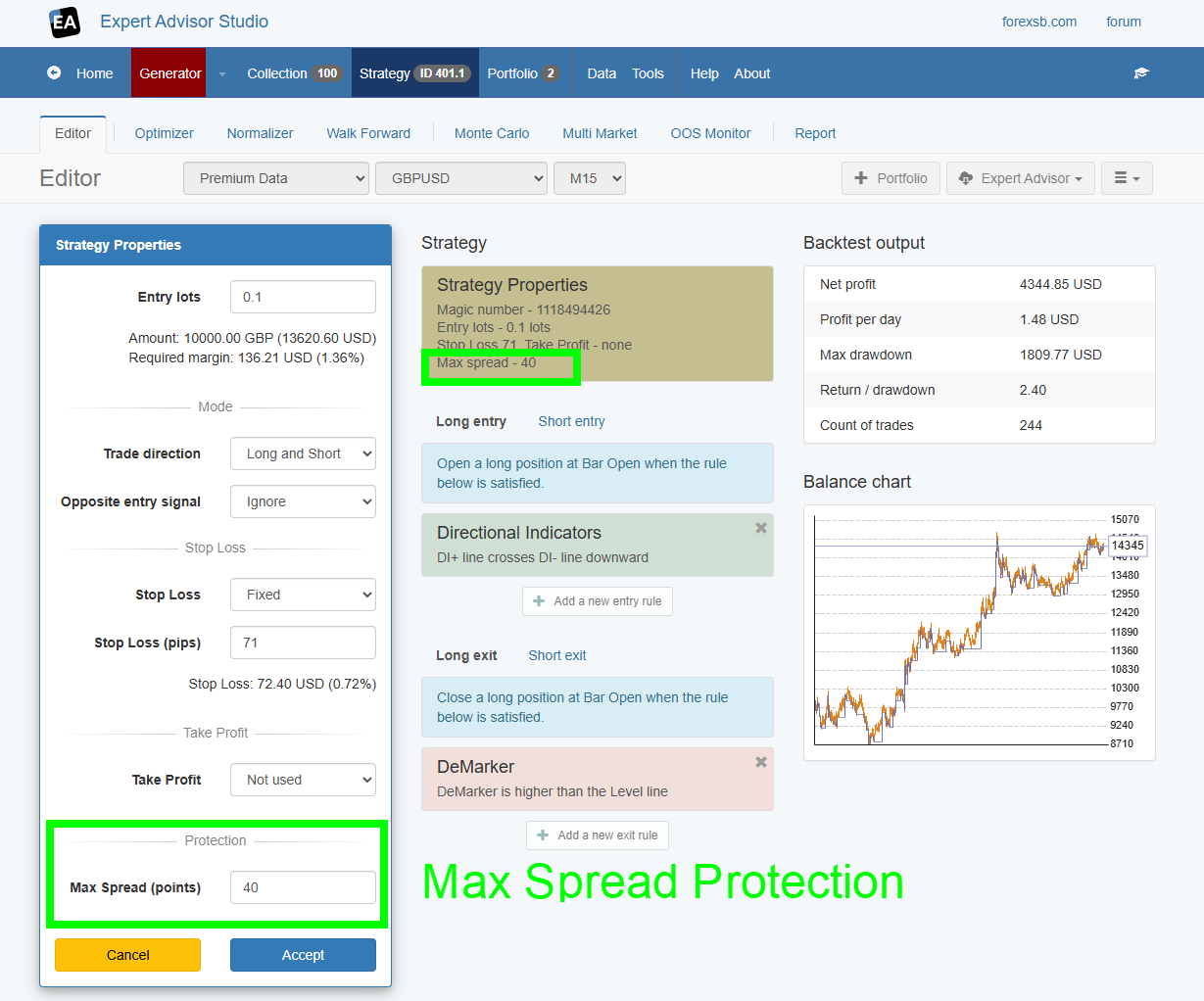
For that reason, I added Max spread protection in EA Studio. Please examine your strategy with Max. Spread Protection: 3-4 times higher than usual for your symbol. This works well for such cases.

I'll also improve the Monte Carlo spread simulation ot catch such cases.

3 (edited by poteree 2025-10-28 00:46:03)

Re: EA Studio vs Every Tick Based on Real Ticks: how to avoid mismatches?

Under Tools - Settings, Trading Session is from 00:00 to 24:00 by default. At 00:00 market is closed. If we do not adjust that time, we generate strategies in unrealistic market conditions.

I saw that Darwinex for example keeps spreads very very high from 00:05 (opening time on MOnday) until 01:00 (around 150 points) vs daily 30 points for GBPCHF. Opening time is 05:00-24:00. 00:00 must be removed in my opinion from Ea studio Settings!

In addition to the gap you're talking about, would you consider to set by default Trading Session time from 01:01 to for example 10 minutes before closing time?

Also, if there was a more realistic spread from opening time until 01.00 included, some strategies would not be generated.

It's important to avoid misleading strategies and false expectations on EA Studio under fake market conditions (in terms of Time or spread).

Re: EA Studio vs Every Tick Based on Real Ticks: how to avoid mismatches?

> set by default Trading Session time from 01:01 to for example 10 minutes before closing time?

This is very opinionated. There are many brokers with normal spreads around midnight.

> It's important to avoid misleading strategies and false expectations on EA Studio under fake market conditions

How to decide if market conditions are real or "fake".
EA Studio calculates strategies based on the exact market data and the given spreads.

We can have better Monte Carlo simulations or other analytical tests to detect dangerous situations, but I think the backtest should be as precise as possible.

Re: EA Studio vs Every Tick Based on Real Ticks: how to avoid mismatches?

Spread of brokers data loaded on EA Studio should be aligned with real spreads of the same broker on Mt5. If it's not, it's not realistic market condition in my opinion.
Example: AUDNZD with Darwinex has default 20 points fixed spread on EaStudio.

On Darwinex MT5, right after midnight (00:04) until 1:00, spreads jumps from 25 points to 143 and more:
https://i.ibb.co/TBGFf18D/AUDNZD-spread.png

If there are brokers with same spread right after midnight, well good to know but are they on EA-Studio? Darwinex should not have 20 pips spread always instead on EAstudio, if it's confirmed that it jumps its spreads between 00:04 and 01:00 included.

Re: EA Studio vs Every Tick Based on Real Ticks: how to avoid mismatches?

EA Studio uses real spreads from the historical data.

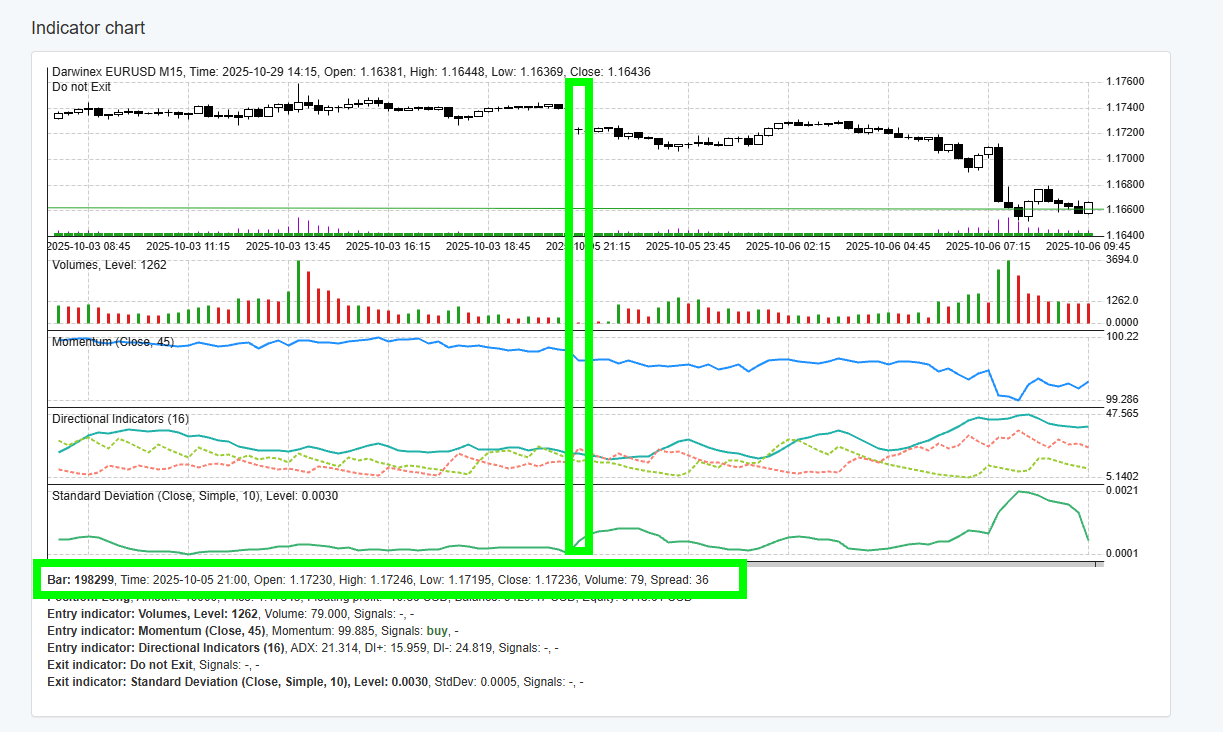
You can check that in the Indicator Chart.

https://image-holder.forexsb.com/store/eas-real-spread-indicator-chart-thumb.png

Re: EA Studio vs Every Tick Based on Real Ticks: how to avoid mismatches?

ooooooook.

I had viewn 20 points from Custom Settings, so not clear what it is 20 points at this point, if in fact I see from the chart that real spreads also on EaStudio jumps from 20 points to 140 points 
https://i.ibb.co/SwYQBQr6/AUDNZD-spread-in-custom-settings.png.

To recap: at the beginning you meant that, even with this so high real Spreads on EAstudio, some indicators (like Bollinger Bands) change those 140 points spreads into very low ones?

Hope to read soon good news of having this fixed ;-) Bollinger Bands is one of my preferred indicators.

You're saying that this is the only reason why there's mismatches among EaStudio backtest results and Mt5? Please it would be good to have a complete list of these indicators that have this issue, so that we can avoid to use them while they get fixed as you say you're working on that.

Re: EA Studio vs Every Tick Based on Real Ticks: how to avoid mismatches?

The issue is not with the indicator but with the way MetaTrader stores the spread.
MetaTrader (like other platforms) averages the spread during the bar and provides this averaged value in the historical data.

This is problematic on bar opening after a gap (usually on Sunday evening or on Monday morning). The spread can be high for a few seconds or minutes, but then lower later. It results in a low average spread for the bar. However, when we trade, we open a position at the Bar open with a high spread, which may ruin the position.

I have an idea to catch such cases by artificially increasing the spreads of bars after a gap.
I'll gather information on real spreads and gaps, and see what the RealSpread/AverageSpread ratio is for the different symbols and time frames.

The EA Studio backtest works perfectly with the data we feed it.

I'm also considering an advanced data feed with two spreads per bar—one at bar open and one averaged.

...

The spread you set in the Symbol Settings is valid for market data without a real spread. (Data you may import from MetaTrader 4.)

Re: EA Studio vs Every Tick Based on Real Ticks: how to avoid mismatches?

There's always something to learn. So, if I understand, the real tick of Metrader in this case is the real backtest. No ea studio, no the open price mode of MT5.

But, the backtest was not only on Sunday night or Monday morning, but every day of the week. So it seems that only partially the negative real tick backtest is due to the gap, given that you say "usually on Sunday evening or on Monday morning":

Re: EA Studio vs Every Tick Based on Real Ticks: how to avoid mismatches?

Try the Max Spread protection: https://forexsb.com/forum/topic/9992/ma … acktester/

https://image-holder.forexsb.com/store/ea-studio-editor-max-spread-protection-thumb.png

Set Max Spread between 30 and 50 points. It will eliminate the overestimated backtest results and may even make previously losing strategies profitable.

11 (edited by poteree 2025-11-03 13:32:11)

Re: EA Studio vs Every Tick Based on Real Ticks: how to avoid mismatches?

thanks, but by applying Max Spread = 50 (always with SL 50 pips and no TP), the EA studio result remain almost the same, as the Open Price mode test in MT5.

The real tick backtest improves, as you forecasted, BUT, the trades are very few and the profit is just +100$ in 2025 vs around +900$ in Open Price.

Now, the big question: is Eastudio backtest more accurate than MT5 Real Tick backtest?

If not, the spread EAs studio imports with the Data Export script from MT5 is the Real Ticks MT5 spread, or the Averaged Bar MT5 Spread you mentioned above?

https://i.ibb.co/LHwH9B7/GBPCHF-M30-EAs-vs-Open-P-vs-Real-Ticks-Max-Spread-50.png

12 (edited by aaronpriest 2026-05-15 06:43:43)

Re: EA Studio vs Every Tick Based on Real Ticks: how to avoid mismatches?

I'm seeing the same thing with Express Generator strategies when exporting from EA Studio and backtesting in MT5 (both 1min OHLC and every tick based on real ticks). The results between EAS and MT5 are radically different (using Darwinex data and backtesting on a Darwinex demo account). I've noticed all the strategies so far are using either Bollinger Bands or Envelopes for indicators, so I've disabled both for entry and exit. Any other indicators I should disable?

Re: EA Studio vs Every Tick Based on Real Ticks: how to avoid mismatches?

This happens with the "Bands" indicators, such as Bollinger Bands, Envelopes, and Donchian Channels.

A possible solution, in addition to Max Spread Protection, is to disable trading when gaps are possible during the Trading session like:
- Session open: 01:00
- Session close: 23:00
- Trade on Sunday - off

Re: EA Studio vs Every Tick Based on Real Ticks: how to avoid mismatches?

Popov wrote:

This happens with the "Bands" indicators, such as Bollinger Bands, Envelopes, and Donchian Channels.

A possible solution, in addition to Max Spread Protection, is to disable trading when gaps are possible during the Trading session like:
- Session open: 01:00
- Session close: 23:00
- Trade on Sunday - off


I'm already doing that in express generator though. I ended up just disabling those indicators for entry and exit.

Re: EA Studio vs Every Tick Based on Real Ticks: how to avoid mismatches?

Here is an example strategy that tests very well on EA Studio and Express Generator for the past year on Darwinex (in fact every broker in the drop down list), but does not give the same results when backtested in MT5 on Darwinex demo account. I'm excluding 22:00 to 02:00 for rollover to not get any hours that would have an average spread lower than reality during the beginning or end of a bar. I'm using "every tick based on real ticks" in MT5, but even 1 minute OHLC gives similar to real ticks for backtest results in MT5 compared to EA Studio website. This strategy has bollinger bands as an entry condition. Try downloading the strategy and comparing EA Studio backtest to MT5 backtest. How do we solve this, other than just disabling bollinger bands and similar banded indicators when generating strategies?

Post's attachments

AUDCAD_M15_1432272099.png 8.34 kb, file has never been downloaded. 

EA Studio AUDCAD M15 1432272099.mq5 55.59 kb, 1 downloads since 2026-05-18 

EA Studio.png 86.91 kb, file has never been downloaded. 

You don't have the permssions to download the attachments of this post.

16 (edited by aaronpriest Yesterday 04:06:33)

Re: EA Studio vs Every Tick Based on Real Ticks: how to avoid mismatches?

aaronpriest wrote:

Here is an example strategy that tests very well on EA Studio and Express Generator for the past year on Darwinex (in fact every broker in the drop down list), but does not give the same results when backtested in MT5 on Darwinex demo account. I'm excluding 22:00 to 02:00 for rollover to not get any hours that would have an average spread lower than reality during the beginning or end of a bar. I'm using "every tick based on real ticks" in MT5, but even 1 minute OHLC gives similar to real ticks for backtest results in MT5 compared to EA Studio website. This strategy has bollinger bands as an entry condition. Try downloading the strategy and comparing EA Studio backtest to MT5 backtest. How do we solve this, other than just disabling bollinger bands and similar banded indicators when generating strategies?

I'm getting somewhere with this. I uploaded MT5 tick data from my Darwinex-Demo account to EA Studio and it's significantly different than the Darwinex server data, enough that some strategies and indicators produce 12 losing trades instead of 184 trades with a PF>1.5 for example. Quite a difference.

Re: EA Studio vs Every Tick Based on Real Ticks: how to avoid mismatches?

> I uploaded MT5 tick data from my Darwinex-Demo account to EA Studio

Are the MT and the EA Studio backtest results similar now?

We use Darwinex data for EA Studio and Express Generator from: Darwinex-Live through Access Server LIVE MT5 New

Re: EA Studio vs Every Tick Based on Real Ticks: how to avoid mismatches?

Popov wrote:

> I uploaded MT5 tick data from my Darwinex-Demo account to EA Studio

Are the MT and the EA Studio backtest results similar now?

A lot closer for sure. I don't expect real ticks to match open bars, but EA Studio was a lot closer to MT5 1min OHLC with banded indicators. I'm generating new strategies overnight with express generator on exported history from MT5 and I'll do more comparing in EA Studio tomorrow, particularly with Bollinger Bands.

Re: EA Studio vs Every Tick Based on Real Ticks: how to avoid mismatches?

You can also use your MT5 data in the Express Generator to create and validate your strategies.


  • Export data from MT with the “Data Export.mq5”. (You can download the script from EA Studios, Data Import page.) Set the proper count of bars and commission values in the script's Input.

  • Place the files in a subdirectory of ExGen's data directory. For example: C:\express-generator\data\MyData

  • Use the directory's name as a server name when running the generator.

node .\bin\gen.js --server MyData --symbol EURUSD --period M15 --max-data-bars 100000

Re: EA Studio vs Every Tick Based on Real Ticks: how to avoid mismatches?

Popov wrote:

You can also use your MT5 data in the Express Generator to create and validate your strategies.


  • Export data from MT with the “Data Export.mq5”. (You can download the script from EA Studios, Data Import page.) Set the proper count of bars and commission values in the script's Input.

  • Place the files in a subdirectory of ExGen's data directory. For example: C:\express-generator\data\MyData

  • Use the directory's name as a server name when running the generator.

node .\bin\gen.js --server MyData --symbol EURUSD --period M15 --max-data-bars 100000

This is exactly what I've been doing, since I bought EG. In the past few days I've been using Darwinex data instead of my own because I thought it would be the same as the Darwinex demo account I'm testing on, so I thought I could skip that step. Turns out I might not be able to and get consistent results.