Re: Grid Trading with EA Studio Experts (Averaging Down)

3.    If price moves against the trade by the original SL distance, recovery mode is activated instead of closing the trade.
    4.    The original TP is removed and the position is managed as a basket.

I reverted that idea. Now, the Grid follows the original closing rules and only add the Grid trading with them.
It allows to us every gentle Gird with 1-2 additions and small dollar Take Profit.

Re: Grid Trading with EA Studio Experts (Averaging Down)

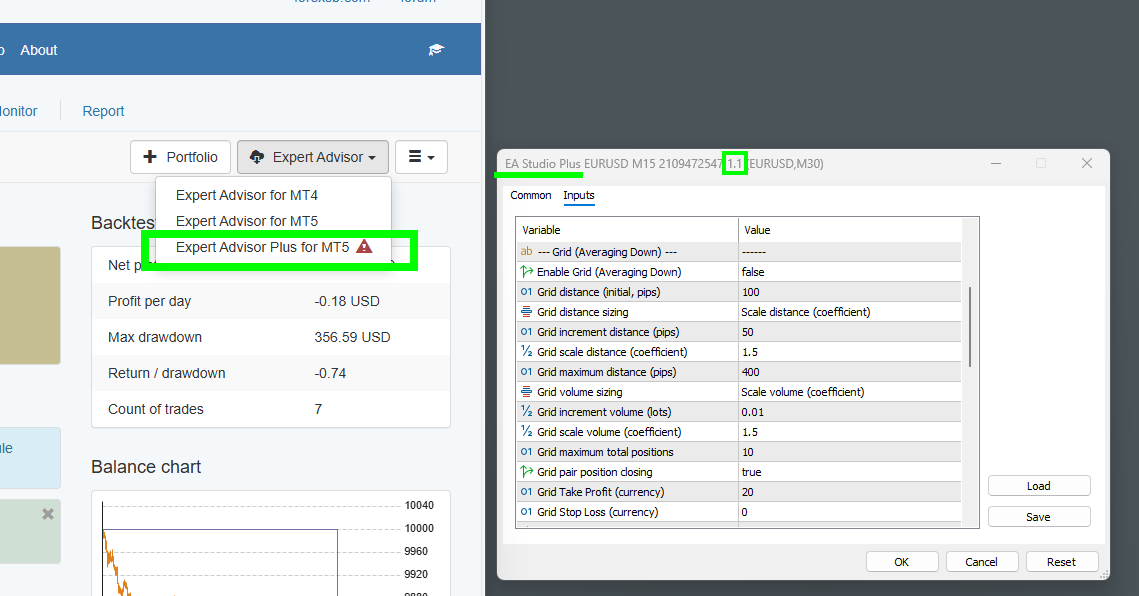
Uploaded Expert Advisor Polus v1.1

It fixes a bug with SL and TP when Grid is enabled (in currency and points).

https://image-holder.forexsb.com/store/eas-expert-advisor-plus-v1.1-thumb.png

You can use SL and TP in points (as in the original expert) and in currency from the Grid settings with Grid or not.
If the Grid is enabled, but you set "Gird maximum total positions" = 1, it uses the Grid's SL and TP in currency without adding to the position.

...

It is Expert Advisor Plus because I intend to add other features to it, which are only valuable for testing in the MetaTrader's tester.
Like:
- repeating entry signal in case of an error (for example, midnight trade interruption due to swaps calculations)
- averaging of profitable positions (Pyramiding)
- possibly Higher time frame indicators for entry filters.
- ...

Any ideas are welcomed!

Re: Grid Trading with EA Studio Experts (Averaging Down)

Does it work if I upload the EA in EA Studio and then I extract it in MT5 by flag on the grid option ?

Re: Grid Trading with EA Studio Experts (Averaging Down)

> Does it work if I upload the EA in EA Studio and then I extract it in MT5 by flag on the grid option?

Yes, it works.

You can import any strategy and export a Grid export (Expert Advisor Plus)

By default, the Grid is off, and the strategy should work as original.

Re: Grid Trading with EA Studio Experts (Averaging Down)

Uploaded Expert Advisor Polus v1.2

It fixes Grid Stop Loss in currency.

...

Dollar Stop Loss and Take Profit works very well in my tests. they are not set to the positions but monitored at every tick. If the strategy makes total floating profit greater than the currency TP or lower than the currency SL, the Expert closes all positions.

If Pair close is enabled, the expert close the last position and only 0.01 lots from the first one on Currency Take Profit.

Re: Grid Trading with EA Studio Experts (Averaging Down)

Great!

Will import my EAs “Ready for Live” which run on incubators, then will export them with the grid active and will benchmark the results with the sourcing EAs into the incubators.

Let’s see !
Thx

Popov wrote:

> Does it work if I upload the EA in EA Studio and then I extract it in MT5 by flag on the grid option?

Yes, it works.

You can import any strategy and export a Grid export (Expert Advisor Plus)

By default, the Grid is off, and the strategy should work as original.

Re: Grid Trading with EA Studio Experts (Averaging Down)

Uploaded Expert Advisor Polus v1.3

I reconsidered the Grid's SL and TP behavior again and reverted it to follow strictly the original strategy.

Now the Grid uses the original entry pips SL and TP for all additional entries. In a result, the new positions are in the limits of   the original strategy's protections.
(The previous version of the Grid Expert was using SL and TP calculated according to the average position price).

https://image-holder.forexsb.com/store/eas-expert-advisor-plus-equal-sl-tp-thumb.png

Trade Safe!

Re: Grid Trading with EA Studio Experts (Averaging Down)

Okay, when can we test it?

Re: Grid Trading with EA Studio Experts (Averaging Down)

Hi Popov,

Here is the my plan to evaluate the Grid version properly.

RfL (Ready for Live) are the EAs that already passed our full workflow filters and are currently production-grade.
PwL (Promotion Watchlist) are close-to-ready EAs still under validation before live promotion.

Test approach:
    1.    Import all current RfL and PwL into EA Studio (approx 50 EAs in total)
    2.    Export the Grid version
    3.    Run controlled backtests and compare PF, DD, win rate, and exposure behavior.
    4.    Run a 3–6 month parallel forward incubation (Original vs Grid).
    5.    Compare expectancy, drawdown stability, and exposure consistency.
    6.    Adopt Grid only if it improves distribution without increasing structural risk.

The objective is not just higher win rate, but better risk distribution with controlled downside.

All data will be progressively published here.
Just let me know when I can start to be effective across time and resources (MT4, demo accounts, VPs).

Thx

Re: Grid Trading with EA Studio Experts (Averaging Down)

Uploaded Expert Advisor Polus v1.4

This version includes updated algorithm for pair-closing of the Grid positions at currency take profit.
Now, the Grid is able to close the first open position (complete or partial) with one or more of the latest positions if they together make profit equal or higher than the "Grid Take Profit (currency)". This feature shows lower Drawdown on my tests.

> Okay, when can we test it?
It is public now. You can download the "Expert Advisor Plus for MT5" from the Strategy Editor.

> 1.    Import all current RfL and PwL into EA Studio (approx 50 EAs in total)
> 2.    Export the Grid version

The Expert Advisor Plus works as the ordinary Experts exported from EA Studio by default.
The Grid has to be turned on. The Expert must be tested, and the Grid properties must be adjusted carefully in the MetaTrader's Strategy Tester.

> Just let me know when I can start to be effective across time and resources (MT4, demo accounts, VPs).
I consider this Expert as feature complete now.
I'll write the documentation this weekend.
The Expert Advisor Plus is written in MQL5 and works in MetaTrader 5 only.
MetaTrader 4 is effectively removed from the MetaQuotes' website and the MQL4 documentation is removed also. I cannot maintain MT4 Experts anymore.

Please test the Grid feature carefully and share your experience.
Happy Gridding!

Re: Grid Trading with EA Studio Experts (Averaging Down)

Hello, Traders,

Here is the documentation of Expert Advisor Plus and the Grid functionality.

Have a great weekend!

Re: Grid Trading with EA Studio Experts (Averaging Down)

Hello, Traders,

I uploaded Expert Advisor Plus v1.5

It fixes a bug in the Grid's distance input parameters. It is written that the values are in pips, but actually they were in points. Now I fixed it by correctly convert the pips to points for the markets with 3 and 5 digits.

This fix immediately reduces the Grid's equity drawdown simply because it adds less entries and makes them further apart smile

Re: Grid Trading with EA Studio Experts (Averaging Down)

Hello Popov,

I have installed a couple of incubators to test the EA Plus versions derived from existing EA Standard strategies that have already been running in my incubation process for a while. These are already proven profitable EAs, which will continue to run in parallel.

So essentially it’s the same strategies, with and without grid, running on the same broker under parallel benchmarks.

I mentioned several incubators because, honestly, I’ve never seen such a wide range of possible settings for a grid system, and it made me curious :-)
Features like the grid step options and the multiple closing logic make your grid implementation quite unique.

I’ll share all the experiment settings and results here and will post the FxBlue live link soon.

Thanks,
Vincenzo

Re: Grid Trading with EA Studio Experts (Averaging Down)

HI Popov,

in the while i was setting my DOE, I found out something which not clear.

In EA Studio Expert Advisor Plus, if a strategy uses an indicator-based closing signal, how does this behave once the Grid has started?

Specifically:

If the second trade is opened (first grid level) and multiple grid positions are already at market, and then the strategy indicator generates a close signal, does the EA:

1. Close all open grid positions immediately, even if the basket is currently in loss, or
2. Ignore the indicator close signal while the grid is active, and manage the basket only through the Grid mechanisms (Pair Closing, Grid TP/SL in currency)?

In other words, once the grid starts, does the indicator-based exit remain active or is the grid logic exclusively in control of the closing process?

Thx
Vincenzo

Re: Grid Trading with EA Studio Experts (Averaging Down)

Hello Vincenzo,

> In EA Studio Expert Advisor Plus, if a strategy uses an indicator-based closing signal, how does this behave once the Grid has started?

The Strategy applies the closing logic rules in the same way with or without Grid enabled.

> If the second trade is opened (first grid level) and multiple grid positions are already at market, and then the strategy indicator generates a close signal, does the EA:

The indicators' close signal will close all open positions by this expert.

> In other words, once the grid starts, does the indicator-based exit remain active or is the grid logic exclusively in control of the closing process?

The closing indicators logic is active. The Grid may open and close positions on its own, but it is "within" the original strategy's behavior.

Re: Grid Trading with EA Studio Experts (Averaging Down)

Hello Popov,

thank you, this clarification is very helpful.

I would like to confirm one practical implication.

If the original strategy keeps its indicator-based closing logic active even after the Grid has started, then any close signal can close the whole basket, including open grid positions, even if the basket is still in floating loss.

My concern is that almost all strategies generated in EA Studio have at least one exit rule based on indicators.

So, in practical terms:

- Does this mean that Expert Advisor Plus is mainly suitable for strategies without dynamic indicator-based closing rules?

- Or is there a recommended way to use the Grid effectively when the original strategy includes indicator exits?

In other words, if the original exit logic remains fully active, it seems that the Grid recovery logic may often be interrupted before it can do its job. I would like to understand whether this is the intended design and how you recommend handling it in practice.

Best regards,
Vincenzo

Re: Grid Trading with EA Studio Experts (Averaging Down)

> If the original strategy keeps its indicator-based closing logic active even after the Grid has started, then any close signal can close the whole basket, including open grid positions, even if the basket is still in floating loss.

The strategy's trading logic does not change when the Grid is enabled.

Think of the Grid (Averaging Down) as a new opportunity to add lots in the same direction as the initial position at a more favourable price. Another viewpoint is that the Grid can be considered as a money-management system.

This Grid implementation, "Averaging Down," is not an independent trading system.
It opens a position only after the strategy makes its original entry.
The Grid stops acting when the strategy raises a close signal, which will effectively close all open positions (the original one and any additional averaging-down entries), or if the market reaches any of the strategy's protections, such as SL, Trailing SL, or TP.

>- Does this mean that Expert Advisor Plus is mainly suitable for strategies without dynamic indicator-based closing rules?
I cannot confirm that. It depends on the particular strategy.
It would be great if we had a backer with Grid in EA Studio, but this is not the case currently.

> In other words, if the original exit logic remains fully active, it seems that the Grid recovery logic may often be interrupted before it can do its job.

Yes, it is true. The Grid, however, does not aim to make a bad strategy profitable.

What are my observations:

- The Grid entries increase the traded volume and the Margin requirements. For that reason, I advise a minimal initial entry of 0.01 lots.

- The Grid works better (or at least reveals its potential) when the strategy has a wider Stop Loss range.

- There is a possibility to create a strategy specially designed to utilise the Grid capabilities. It particularly means the exit rule is "Do not Exit" or one that limits upward market movement.

- The "Grid Take Profit (currency)" option works well even with the strategy's original entry.

- A strategy with Grid embedded has a higher chance of showing a short-term profit and numerous consecutive winning trades.

- Trading multiple Grid strategies is much riskier than strategies with fixed entry lots.

- A single Grid strategy on a larger account may work well if we can afford a large drawdown.

- A fixed-lot strategy is much safer on a smaller account.

Re: Grid Trading with EA Studio Experts (Averaging Down)

Thanks Popov, as usual great willingness and transparency.

This is what I am going to do then:

Executive Summary

I am running a DOE to test whether an EA Studio Expert Advisor Plus Grid overlay can improve the behavior of already good strategies, rather than trying to rescue weak ones.

The starting point is a pool of profitable incubation EAs across symbols such as

AUDCAD, AUDUSD, NZDCAD, EURCAD, EURGBP, EURJPY, GBPJPY, GBPUSD, XAUUSD, and XAGUSD.

The idea is simple:

most of these strategies already work well, but a minority of trades fail to reach TP and move into adverse territory.

The question is whether a controlled Grid overlay can improve the management of these losing cases and potentially enhance not only classic KPIs, but also strategy longevity and robustness.

A key clarification from Popov is that the Grid is not an independent trading system. It works within the original strategy logic. This means that if the strategy has indicator-based exits, SL, trailing SL, or TP, those remain active and can close the whole basket even after Grid entries have started.

Because of this, the experiment focuses on testing Grid as an overlay recovery layer, not as a standalone Grid strategy.

The DOE structure is therefore:

* Original strategy as control
* Bucket 01 = Fibonacci Grid
* Bucket 02 = Custom Grid A
* Bucket 03 = Custom Grid B

Each selected EA is installed in 3 additional variants, while the original remains unchanged in incubation.

To track the test arms cleanly, each bucket gets a numeric suffix added to the original magic number:

* 01 = Fibonacci
* 02 = Custom A
* 03 = Custom B

Example:
`1740201819` → original
`174020181901` → Fibonacci
`174020181902` → Custom A
`174020181903` → Custom B

The broader objective is not to “gomove to a full grid system trading,” but to verify whether a carefully designed Grid variance on top of a strong base strategy can improve the handling of adverse trades without destroying the original edge.

Willing to share here to anyone interested the full dataset.

Thanks Popov, and trade safe to everyone.

Vincenzo

Re: Grid Trading with EA Studio Experts (Averaging Down)

Hi Vicenzo,

I forgot to mention that the Grid system works well in the MetaTrader's Strategy Tester.

My advice is to test the strategies first in MetaTrader with "Every tick based on real ticks".

I have three reasons for that:

- test the strategy behaviour on real historical spread (I mean "really" real instead of bar-data-rounded real). It catches spread rounding issues after a weekend gap.

- Testing the performance of the Grid and parameters adjustments.

- Catch a potential bug in the Expert's trading logic. (less probably, but always possible)

Happy trading!

Re: Grid Trading with EA Studio Experts (Averaging Down)

Hi Popov,

1 question: After a partial Pair Closing, if one or more positions remain open from the grid, can the original strategy open a new base entry before the whole basket is fully closed, or does it wait until all positions of that expert are flat?

Re: Grid Trading with EA Studio Experts (Averaging Down)

is it possible to have the sequential trade's numbers into the comment ?

Re: Grid Trading with EA Studio Experts (Averaging Down)

>  After a partial Pair Closing, if one or more positions remain open from the grid, can the original strategy open a new base entry before the whole basket is fully closed

No, it cannot. The strategy opens its "original" position only if there are no open trades for this symbol, period, and magic number.

> Is it possible to have the sequential trade's numbers in the comment?
It will become a mess when the Grid performs several pair closings.

Re: Grid Trading with EA Studio Experts (Averaging Down)

thx

Re: Grid Trading with EA Studio Experts (Averaging Down)

Hi Popov, hope you are doing well.

https://www.fxblue.com/users/i70_Eastudio_grid


It currently contains 14 EA Plus strategies. These are top performers from my original incubation process without Grid, and I am now running the Grid versions in parallel. The objective is to compare the two batches over the long run: original version vs. Grid version. All with Fibo grid settings.

Still to early but, 100% of EAs are in profit!

From my experience with grid systems over the last five years, one very important statistical dimension is not only overall performance, but also how often the strategy reaches each Grid level.

For example, it would be extremely useful to know:
    •    how many trades close at position 0, meaning the Grid never activates
    •    how many trades close after position 1, 2, 3, etc.
    •    how often the Grid reaches deeper levels such as position 5, 6, 7
    •    how long recovery typically takes from each level
    •    what the probability of closing in profit is once a given Grid level has been reached

This kind of analysis is very helpful not only for evaluating Grid efficiency, but also for calibrating maximum risk. In practice, it allows us to build a risk profile such as:

“On this EA, 90% of the cases that reach position 5 close in profit within 20 hours; once position 6 is reached, the probability drops sharply and most recoveries take much longer.”

To run this analysis properly, we would need the trade records to include both:
    1.    the Magic Number, and
    2.    the sequential Grid position in the trade comment, for example:

    •    pos.0 = no Grid activation
    •    pos.1 = first Grid add-on trade
    •    pos.2 = second Grid add-on trade
    •    etc.

My question is:

What is the best way to make this information available in the trade history?
Can EA Plus be modified so that each trade is recorded with the sequential Grid position in the comment field, or is there another practical way you would recommend?

Best regards,
Vincenzo

Post's attachments

IMG_3801.jpeg 285.33 kb, 5 downloads since 2026-03-31 

You don't have the permssions to download the attachments of this post.

Re: Grid Trading with EA Studio Experts (Averaging Down)

Vincenzo wrote:

Hi Popov, hope you are doing well.

https://www.fxblue.com/users/i70_Eastudio_grid


It currently contains 14 EA Plus strategies. These are top performers from my original incubation process without Grid, and I am now running the Grid versions in parallel. The objective is to compare the two batches over the long run: original version vs. Grid version. All with Fibo grid settings.

Still to early but, 100% of EAs are in profit!

From my experience with grid systems over the last five years, one very important statistical dimension is not only overall performance, but also how often the strategy reaches each Grid level.

For example, it would be extremely useful to know:
    •    how many trades close at position 0, meaning the Grid never activates
    •    how many trades close after position 1, 2, 3, etc.
    •    how often the Grid reaches deeper levels such as position 5, 6, 7
    •    how long recovery typically takes from each level
    •    what the probability of closing in profit is once a given Grid level has been reached

This kind of analysis is very helpful not only for evaluating Grid efficiency, but also for calibrating maximum risk. In practice, it allows us to build a risk profile such as:

“On this EA, 90% of the cases that reach position 5 close in profit within 20 hours; once position 6 is reached, the probability drops sharply and most recoveries take much longer.”

To run this analysis properly, we would need the trade records to include both:
    1.    the Magic Number, and
    2.    the sequential Grid position in the trade comment, for example:

    •    pos.0 = no Grid activation
    •    pos.1 = first Grid add-on trade
    •    pos.2 = second Grid add-on trade
    •    etc.

My question is:

What is the best way to make this information available in the trade history?
Can EA Plus be modified so that each trade is recorded with the sequential Grid position in the comment field, or is there another practical way you would recommend?

Best regards,
Vincenzo

Apologies I just realized I posted my previous reply under the wrong topic.

I had been reviewing your incubation and FxBlue analysis thread and placed the comment there by mistake, while it actually relates to this post.

Reposting it here for clarity.

Interesting direction, especially the focus on grid behavior and level tracking that’s definitely a relevant angle. One thing I’m trying to understand better is how you evaluate these results at this stage. Most of the strategies shown seem to have a relatively low number of trades so far, which makes it a bit difficult to assess consistency or robustness. I assume this is still in an early phase? From my experience, and also from discussions with other algo builders, performance is usually only considered meaningful after a certain amount of data has been collected often around 40 to 60 trades or more per strategy. Below that, it’s generally still more about observation than confirmation. Also, since you mentioned these come from original non-grid strategies, it would be useful to see how those baseline versions perform over the same period. That comparison would give more context to what the grid is actually changing. The grid-level analysis you describe is probably the most important part here. Without visibility on how often deeper levels are reached, it’s hard to fully understand the risk profile behind the current results.