Topic: Grid Trading with EA Studio Experts (Averaging Down)

Introduction

Hello Traders,

I was invited to a team-building event organised by Petko Aleksandrov from https://algotradingspace.com/. We discussed a variety of topics related to algorithmic trading.

Petko and his team trade a lot of strategies, including third-party robots, strategies created by EA Studio, and automatically generated strategies from the Top 10 Robots App.

From the stats he already has, it appeared that the fixed-lot strategies created with EA Studio are suited best for Prop-firms challenges and also for small accounts ($200 - $1000). It was also clear that the best results come from strategies which are manually examined, monitored and updated by experienced traders.

The automatically generated and validated strategies from the Top 10 App does not show a steady performance in general. It appeared that they are useful only after additional validation and examination in EA Studio. It was good that we charted ideas for improvement of the workflow, but this is an additional topic.

It was noted that he has a moderate success form third-party scalping robots.

However, the most interesting for me was that Petko has more success with robots with the so-called grid compensation of the losing trades with a predefined risk.

He trades multiple accounts with one "Grid" robot per account. Despite the risk of account blow-off, he is in total profit.

I examined the way Petko and his team work and here are my notes:

- multiple accounts with one robot instead of a large account with multiple robots. (diversification)
- limited number of additional entries to a losing position with a small scaling coefficient of the entry volume. (controlled Martingale)
- manually testing the experts in MetaTrader to find the most suitable currency pair for each robot and the exact parameters.
- periodic profit withdrawal

It all looks exceptionally well from the outside. However, I had my observations:

- Petko does not pay for the third-party robots. He partners with the robot developers and sells their products. As a rule, the so-called "vendor" robots are expensive: $500 - $1000+. They also have a limited number of activations. I'm not sure what the profit would be if we include the price of the robots themselves.

- He mostly trades on brokers with whom he has an affiliate partnership or ones that sponsor his videos. This is a disadvantage.

...

I was thinking a lot about how to add more value for you and how to make it possible to have more successful trading.

I'll examine my ideas in the next post.
Re: Grid Trading with EA Studio Experts (Averaging Down)

Expert Advisor optional features

I designed the EA Studio backtester to generate and test strategies with a fixed-lot entry at bar-open. I spent months and years trying to make the world's fastest and most precise backtesting engine.

Now, I'm almost satisfied with that. However, it is obvious that the lack of money-management features and dynamic parameters is a drawback. For that reason, I started the work on a new product with a lot of new functionality. It sounds great, but the development is slow and will take another two years to finish.

Having a burst of inspiration, I decided that I could add additional features to the EA Studio's Expert Advisors, even if they can be tested in MetaTrader only.

I intend to implement an "Averaging down" functionality for the exported expert advisors.

This feature will be optional and will be included in the robots only if it is enabled. The Averaging options will be controlled from the Expert's Input. All options will be off by default, so they will not affect the original behavior of the strategy when disabled.

When enabled, the Averaging functionality will alternate the Expert Advisor's work in MetaTrader. It will be able to test and adjust the parameters in the MetaTrader's Strategy Tester.

Re: Grid Trading with EA Studio Experts (Averaging Down)

Averaging Down

Averaging Down is a process of trading in the same direction at more favorable price on a losing position.

Example:
- Buy EURUSD at 0.01 lots at 1.00200
- If the markets goes up, we close on a profit
- if the market goes down, we add 0.01 lots to the position at 1.00100. Now we have 0.02 lots open long with average price of 1.00150.
- if the market continues downwards, we add new lots at every 100 points.
- we close on a profit if the market swigs up and goes above the average position price.
- we close at a predefined Stop Loss if the market continues downwards.

The averaging a loosing position increase the potential loss because of increasing the position size.

Re: Grid Trading with EA Studio Experts (Averaging Down)

Variants of Grid (Averaging Down)

- Trade levels:
   * add to a losing position at a predefined step - Grid
   * add to a losing position at a previous top/bottom (ZigZag, Fractal, Round price, ...)

- Trade volume:
  * add a fixed lot size
  * scale the entry volume up with a fixed or dynamic coefficient.

- Exit on profit
  * using a fixed Take Profit, which is dynamically calculated as per the current average position price

- Exit on loss
  * Exit on a predefined loss level as a percentage of the account at the first entry.

- Averaging conditions
  * always average a losing position
  * apply averaging only if particular indicators show a ranging market: (ADX less than 25, RSI between 30 and 70, narrow Bollinger Bands, ...)

Re: Grid Trading with EA Studio Experts (Averaging Down)

Implementation in EA Studio's Expert Advisors

I'll share here my ideas for implementation of Averaging Down strategy in the robots exported from EA Studio.

As we know, the EA Studio creates and tests strategies with a fixed entry size. It is not possible to backtest grid systems.

The options I'm going to add to the Experts will work only in MetaTrader. It makes it extremely important to test and adjust the new features in the MetaTrader's Strategy Tester.

A strategy with enabled Averaging with act as follows:

- the closing signals from indicators will be canceled if the strategy is in a current loss.
- the strategy will add lots (will open new positions) in the same direction at a predefined step (or other levels)
- the added volume can be fixed or scaled
- a Take Profit will be applied according to the averaged position price
- a fixed or dynamic Stop Loss will limit the total loss of the aggregate position

...

I'm starting to implement these features and will post regular updates.

Please share your opinion and experience.

As always, trade safe!

Re: Grid Trading with EA Studio Experts (Averaging Down)

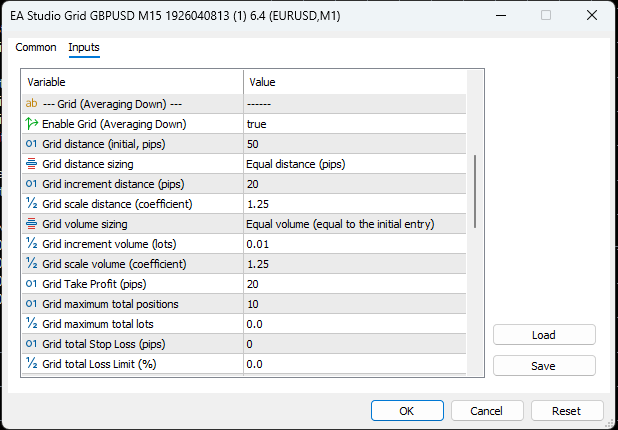
Grid Input Options

Hello, Traders,
I started designing the options for the Grid system. Here is the proposal:

https://image-holder.forexsb.com/store/eas-grid-averaging-down-options-thumb.png

Enable Grid (Averaging Down) - true or false - it enables or disables the grid system. It is off by default.

Grid Distance (initial, pips) - 50 - the distance from the initial entry to the first grid entry in pips.

Grid distance sizing - this option determines how the spacing between grid entries changes:
- Equal distance (pips) - all grid entries are equally spaced from the initial entry
    Example: Initial at 1.2000, grid entries at 1.1950, 1.1900, 1.1850 (50 pips apart each).

- Increment distance (pips) - each grid entry adds a fixed increment to the previous spacing
    Example: With initial 50 pips and increment 20, entries are at: 50 pips from initial (1.1950), then 70 pips below (1.1880), then 90 pips below (1.1790).

- Scale distance (coefficient) - each spacing is multiplied by the coefficient
    Example: With initial 50 pips and scale 1.25, entries are at: 50 pips from initial (1.1950), then 62 pips below, then 78 pips below.


Next connected distance sizing options are:

Grid increment distance (pips) - 20  - the increment value added to the spacing for each subsequent grid entry. Only used when "Grid distance sizing" is "Increment distance (pips)".

Grid scale distance (coefficient) - 1.25 - the multiplier applied to the spacing for each subsequent grid entry. Only used when "Grid distance sizing" is "Scale distance (coefficient)".

Then we have very similar options for the Grid volume sizing:

Grid volume sizing - this option determines how the lot size changes for grid entries:
- Equal volume (equal to the initial entry) - all grid entries use the same lot size as the initial entry
    Example: If initial is 0.05 lots, all grid entries are 0.05 lots

- Increment volume (lots) - each grid entry adds a fixed increment to the lot size
    Example: If initial is 0.05 lots and increment is 0.01, entries are: 0.06, 0.07, 0.08 lots

- Scale volume (coefficient) - each lot size is multiplied by the coefficient (like Martingale)
    Example: If initial is 0.05 lots and scale is 1.25, entries are: 0.06, 0.08, 0.10 lots

These options work with the following two:

Grid increment volume (lots) - 0.01 - the increment value added to the lot size for each subsequent grid entry. Only used when "Grid volume sizing" is "Increment volume (lots)".

Grid scale volume (coefficient) - 1.25 - the multiplier applied to the lot size for each subsequent grid entry. Only used when "Grid volume sizing" is "Scale volume (coefficient)".

The Grid will exit at Take Profit

Grid Take Profit (pips) - 20 - The Take Profit of all open positions is calculated at every addition. It is measured from the aggregate positions price.

The following two options are the grid limitations:

Grid maximum total positions - 10 - the count of the initial entry and the subsequent entries

Maximum grid lots - 0 - the maximum number of open lots including all entries. Zero means off.

Then we have two options to limit the total loss:

Grid total Stop Loss - it is measured from the initial entry. Zero means off.

Grid total Loss Limit (%) - the maximum loss as a percentage of the account balance at the time the initial entry was opened. For example, if balance was $10,000 when the initial entry opened and this is set to 5%, all positions close when the total floating loss reaches $500. Zero means this limit is disabled.

Re: Grid Trading with EA Studio Experts (Averaging Down)

I'll carry on with my usual nay-saying smile and I'll start quoting Paul Tudor Jones: only losers average losers! It is especially true for discrete/manual trading. For algo... Basically the same applies, but if the testing approach offers reliable results, then at least somewhat founded understanding can be formed whether it can yield improved results.

I hear you on the extended development time and probably most can relate and undoubtedly we all are sorry to hear that, which brings me to the question if it is justified to prioritize loser-averaging development over other features, which are more obvious to bring improvement. I don't know your dev plan, maybe it will bear fruit one way or another and drag other features along. And very likely some guys will chime in and say I'm foolish to question the effectiveness of averaging because they have a genius take on it wink

https://priceactionninja.com/wp-content/uploads/2023/06/FZ04reYWAAQnSjo-1.jpg

8 (edited by Popov 2026-02-06 16:49:17)

Re: Grid Trading with EA Studio Experts (Averaging Down)

> I started designing the options for the Grid system. Here is the proposal:

Awesome, I've been waiting for that for a long time!

I do not see any Take Profit strategy?
Optimization directly on MT5 will be possible?

Re: Grid Trading with EA Studio Experts (Averaging Down)

> I do not see any Take Profit strategy?

I added it.
It will be a Grid Take Profit (pips). The Take Profit will be updated at every addition. It will be calculated relatively to the aggregate position price.

> Optimization directly on MT5 will be possible?

That's the idea. Backtesting and optimization in the MetaTrader's Strategy Tester.

Re: Grid Trading with EA Studio Experts (Averaging Down)

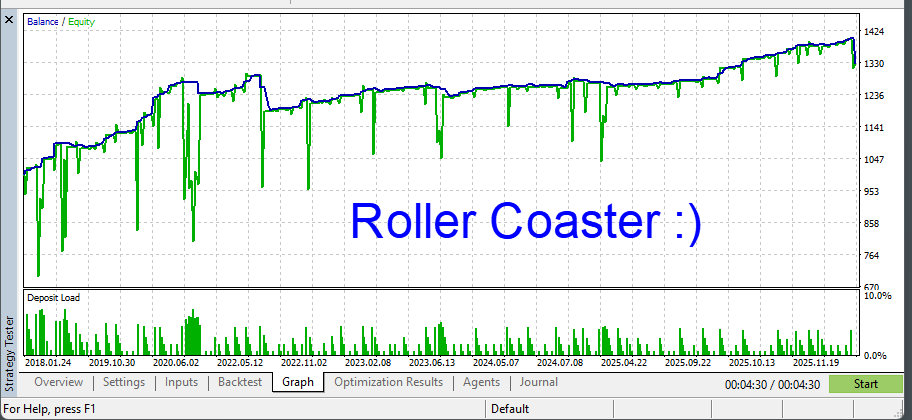
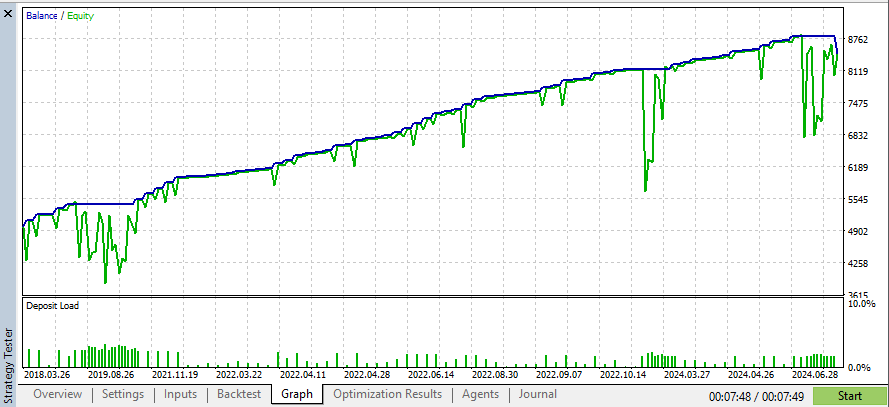
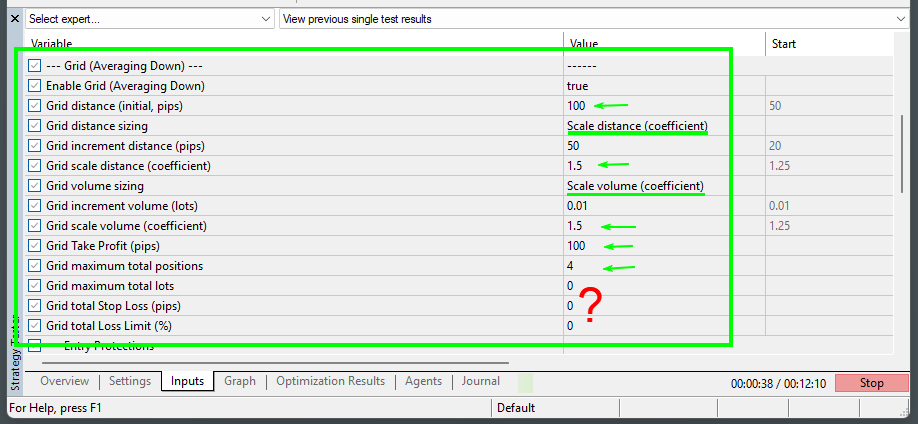
First Test of the Grid functionality - Roller-Coaster style

With Grid

Who needs protections:

https://image-holder.forexsb.com/store/eas-grid-test-5-inputs-thumb.png


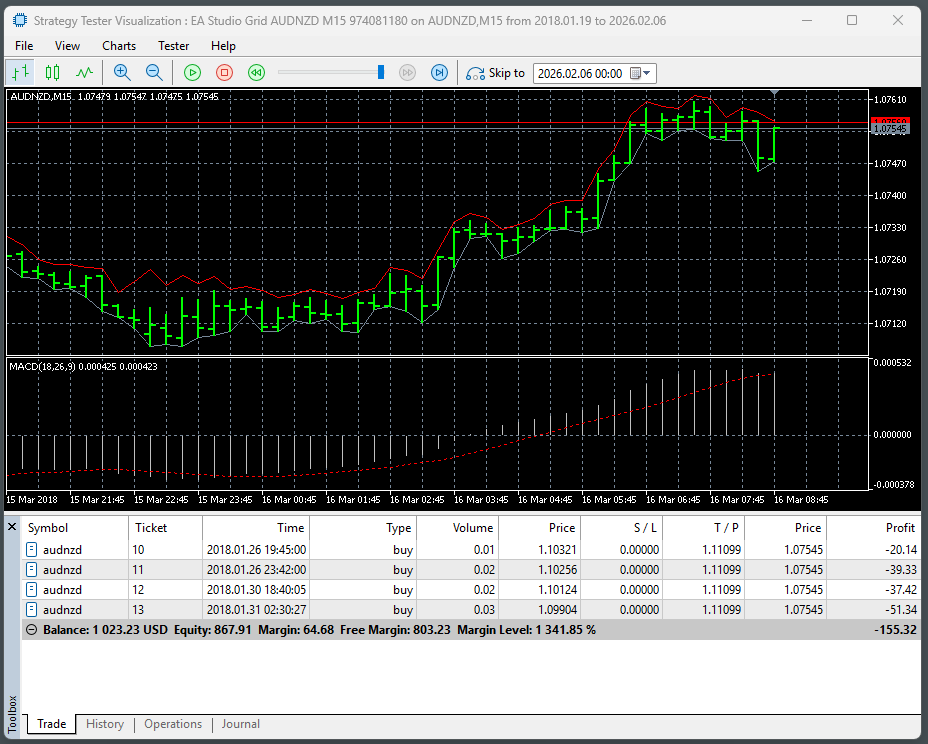
Positions with distance and volume scaling:

https://image-holder.forexsb.com/store/eas-grid-test-5-positions-thumb.png


Nightmare Balance-equity curve:

https://image-holder.forexsb.com/store/eas-grid-test-5-chart-thumb.png


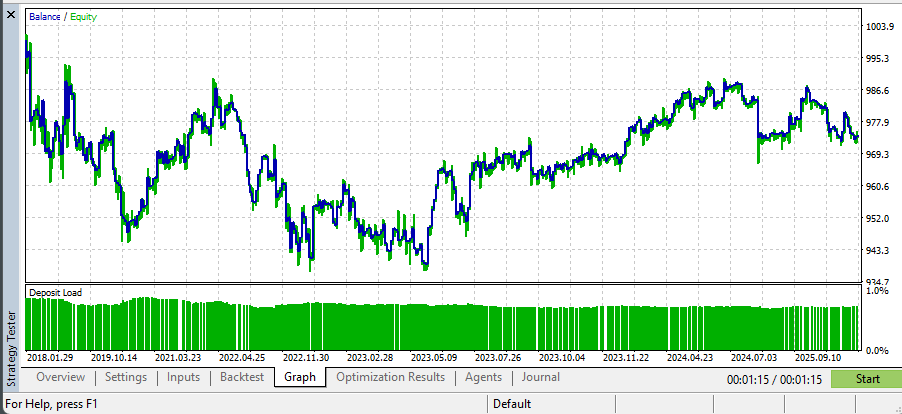
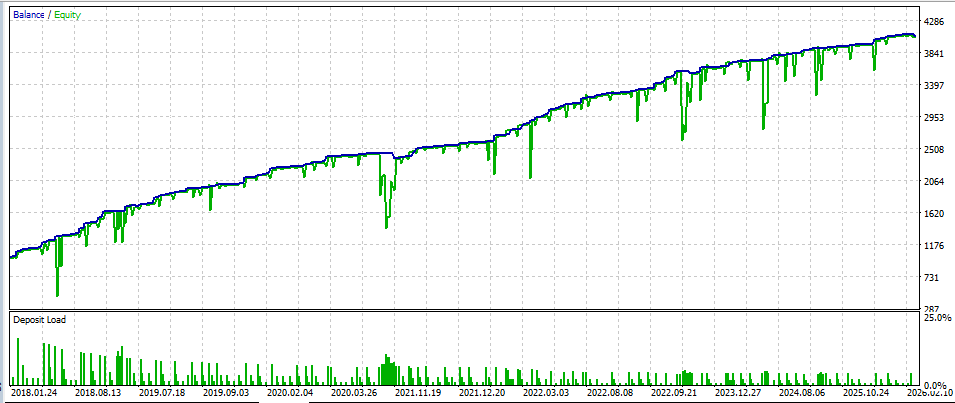
The same strategy with Grid off.

https://image-holder.forexsb.com/store/eas-grid-test-5-chart-no-grid-thumb.png


We have a saying in Bulgarian (however it sounds more colorful)

What kind of strategies there were back in the day!

They completely messed up this country!

Re: Grid Trading with EA Studio Experts (Averaging Down)

> only losers average losers

Well, quoted Footon! I like this photo on a poster.

Re: Grid Trading with EA Studio Experts (Averaging Down)

Hi Popov,

Nice to hear that this option (grid) is now also on your desk.

I’ve been selecting and trading third-party grid systems for several years (over 30 different commercial
products), and in my experience only a few manage to deliver consistent results over time. We’ve also spent significant time refining the settings and working on cross-adaptation across different configurations.

If you’re interested, we’d be happy to share our findings and setups.

Best regards,
Vincenzo

Re: Grid Trading with EA Studio Experts (Averaging Down)

> If you’re interested, we’d be happy to share our findings and setups.

That's excellent Vinchenzo.

I'm progressing pretty well with the development and I think, I'll release it for testing within several days.
Then we will have a lot to discuss about the usage and the parameters.

We can schedule an online meeting with all users interested in this feature a week after the release to share experience and to plan improvements.

Re: Grid Trading with EA Studio Experts (Averaging Down)

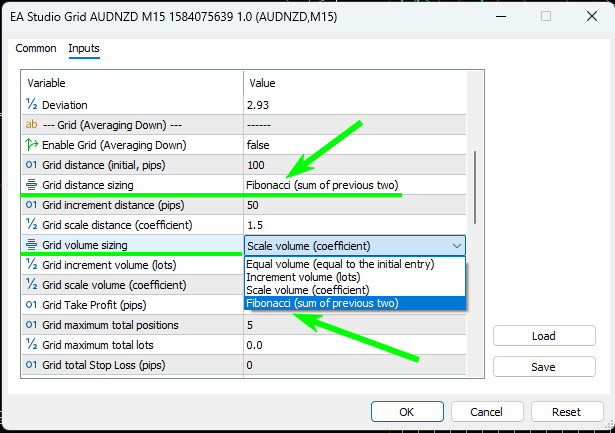
Fibonacci numbers are everywhere.

I found them in the Grid options also.

https://image-holder.forexsb.com/store/eas-grid-options-fibonacci-thumb.png

https://image-holder.forexsb.com/store/eas-grid-positions-fibonacci-thumb.png

Re: Grid Trading with EA Studio Experts (Averaging Down)

On the other side Popov, I started 2 years ago with EA Studio to get rid off the grid systems.
My statistics say that the sentence “Despite the risk of account blow-off, he is in total profit” is missing the “time” dimension. Soon or later you blow-off the account or, with the hard stops (which will be factor > 10 than a usual stop loss for single strategy) will be impossible to recover, or you get per weeks or months in DD because the asset “decided” to trade within a new trading range higher/lower by +5/10%.

However, let’s see what comes up and how this is going to improve what we already do today.

Let me comment also the statement below:

…From the stats he already has, it appeared that the fixed-lot strategies created with EA Studio are suited best for Prop-firms challenges and also for small accounts ($200 - $1000)…
-> Is this seen as a limit? Why only small accounts?

…It was also clear that the best results come from strategies which are manually examined, monitored and updated by experienced traders….
-> This will always be true, doesn’t matter what the experience will always be required

…It appeared that they are useful only after additional validation and examination in EA Studio. It was good that we charted ideas for improvement of the workflow, but this is an additional topic….
-> This is very interesting, as all of us is currently working on the best possible workflow. I hope that we can get more from you here as well.

have a great day!
Vincenzo

Re: Grid Trading with EA Studio Experts (Averaging Down)

> Soon or later, you blow-off the account or, with the hard stops...
Yes, exactly, but it is controlled. This was my main motivation to start doing Grid expert.
What I noticed, Petko trades separate account for each Expert Advisor. Some of his Grid accounts blow, but the rest covers the loss.

> Is this seen as a limit? Why only small accounts?
It is because the risk is limited. Prop firms and the small accounts do not love risk.
It does not mean the EA Studio Expert Advisors cannot trade on larger accounts, of course.

...

I do not recommend Grid trading for everyone. I'm doing this Grid expert for research. I'm exploring the opportunity and provide tools for the user which want to try it.

Re: Grid Trading with EA Studio Experts (Averaging Down)

Demo Grid Trader Expert

Hello, Traders,

I'm almost ready with the Grid functionality. I'll release a Demo in EA Studio tomorrow.

However, if you like to test it now and to give feedback, please try the attached expert.

USDJPY M15 - real ticks

https://image-holder.forexsb.com/store/demo-grid-trader-1.01-usdjpy-thumb.png


You have to enable the Grid trading from the input, if you like the Grid smile
Enable Grid (Averiging Down) true

.

Re: Grid Trading with EA Studio Experts (Averaging Down)

Hi Popov,
Based on long experience with grid systems, the objective is to reduce exposure by systematically pairing the largest order with earlier orders, using full closures first, and partial closures only when necessary, while keeping the grid mathematically consistent.
Base setup:
•    Fixed grid step (e.g. 50 pips), of course it is better to have a variable space like the ones you included in the EA “fib ratios”.
•    Initial lot size: 0.01
•    Lot multiplier: 2
•    Orders are opened against price at each grid level
________________________________________
Example State
After a 150-pip adverse move, the EA has:
1.    Order #1 → 0.01 lot
2.    Order #2 → 0.02 lot
3.    Order #3 → 0.04 lot
All orders are in drawdown.
________________________________________
Exit & Reduction Logic (Sequential)
Step 1 — Full pair closure
When price retraces and Order #3 (0.04) and Order #1 (0.01) are both in profit, this can be fixed or variable dollar value:
•    Close Order #3 (0.04) and Order #1 (0.01) completely.
•    Remaining open order:
o    Order #2 → 0.02 lot
This step is always executed first whenever possible.
________________________________________
Step 2 — Partial pairing (forced continuation)
If price retraces again and no smaller full-lot order exists for pairing:
•    When a new order#3 again and Order #2 (0.02) are both in profit:
o    Close the largest new order (0.04) completely with
o    Partially close Order #2 by 0.01, reducing it from 0.02 → 0.01.
After this step:
•    Remaining exposure:
o    Order #2 → 0.01 lot
________________________________________
Re-entry Logic (Important)
After any partial close, the grid must restart from the remaining lot size, not from the historical maximum.
•    If Order #2 is reduced to 0.01:
o    This becomes the new base lot.
•    If price moves again against the position:
o    The next grid order size must be:
    0.01 × lot multiplier = 0.02
    NOT 0.04
From this point forward:
•    Lot progression continues normally:
o    0.01 → 0.02 → 0.04 → 0.08 …

Re: Grid Trading with EA Studio Experts (Averaging Down)

Quantbot, this is very interesting.

Thank you!

I'll start implementing it tomorrow.

Re: Grid Trading with EA Studio Experts (Averaging Down)

I implemented the pair-closing strategy. It works well.

However, I reconsidered my approach to the Grid system expert.

My initial plan was to execute the original strategy closing logic (including SL) only if the positions is at a profit. However, it completely changes the strategy behavior.
Now, I'm rewriting the Grid logic to be blended in the original strategy. Think of it like "possibility" (Losers Average Losers) to make a recovery entry at a more favorable price.

Re: Grid Trading with EA Studio Experts (Averaging Down)

Here is an example strategy:

(This is just the first try of the new features of the Expert. No optimization of any kind.)

EURCHF M15, real ticks.

https://image-holder.forexsb.com/store/grid-aurchf-m15-001-balance-thumb.png


https://image-holder.forexsb.com/store/grid-aurchf-m15-001-backtest-thumb.png


.

Post's attachments

Grid EURCHF M15 1064551822.mq5 74.01 kb, 7 downloads since 2026-02-11 

You don't have the permssions to download the attachments of this post.

Re: Grid Trading with EA Studio Experts (Averaging Down)

The new options are:

- Grid pair position closing: true or false - When on, it closes the last open position with the full or partial first position as described by Quantbot (https://forexsb.com/forum/post/83088/#p83088)

- Grid Take Profit (currency) - Take Profit in dollars (or whatever is the account currency)

- Grid Stop Loss (currency) - Stop Loss in dollars (or whatever is the account currency). It is used by the pair closing described above.

- Major change - the Grid option acts together with the original strategy's exit rules.

...

ToDo:
- check if the Grid Expert works as in EA Studio when the Grid is off
- the same as above when the Grid is on, but the Grid max open positions = 1
- add some warnings if the options contradict (Pair closing on and Take Profit currency = 0)
- check if the position and account protections work with the Grid.

If everything is OK, I'll release the Grid functionality for public testing for all EA Studio users.

Re: Grid Trading with EA Studio Experts (Averaging Down)

Popov wrote:

Here is an example strategy:

(This is just the first try of the new features of the Expert. No optimization of any kind.)

EURCHF M15, real ticks.

https://image-holder.forexsb.com/store/grid-aurchf-m15-001-balance-thumb.png


https://image-holder.forexsb.com/store/grid-aurchf-m15-001-backtest-thumb.png


.

Can you share your setting please ? I am trying to replicate the backtest

Re: Grid Trading with EA Studio Experts (Averaging Down)

Hi Popov, this is what I would test:

    1.    The strategy combines a statistical edge with a structured recovery grid.
    2.    The EA trades normally and closes at TP during standard conditions.
    3.    If price moves against the trade by the original SL distance, recovery mode is activated instead of closing the trade.
    4.    The original TP is removed and the position is managed as a basket.
    5.    A grid sequence opens positions against price using a lot multiplier (e.g., 2).
    6.    The objective is not classic martingale recovery, but active exposure reduction.
    7.    The largest lot is always paired with the smallest lot and both are closed when in profit.
    8.    If needed, partial closes are used to reduce exposure back to the minimum base lot.
    9.    After any reduction, the lot progression resets from the new base size, avoiding historical escalation.
    10.    When exposure is minimized and the basket reaches breakeven or small profit, all trades close and the system returns to normal edge trading.

This approach aims to reduce the percentage of losing trades by actively managing and redistributing risk instead of closing positions at the original stop loss.

However, in a strong and persistent trend with little or no retracement, and without a hard stop mechanism, the risk of significant drawdown or even account blow-up is real.

On the other hand, it is important to remember that every large stop-out has a nonlinear recovery cost. For example, a 20% loss requires a 25% gain to return to breakeven (not 20%). The deeper the drawdown, the disproportionately larger the recovery required.

If you get 2 stop-outs in a row of 20% each, the account would decline by 36% overall, and you would then need approximately a 56.25% gain to return to breakeven. At 5% per months (without any other stop out) you would need approximately 9/10 months.

Just to keep all in mind!

Re: Grid Trading with EA Studio Experts (Averaging Down)

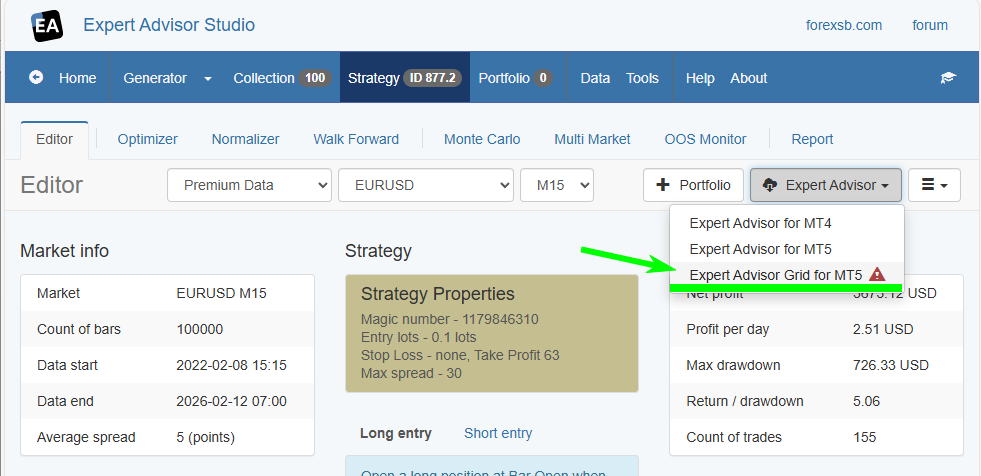
Expert Advisor Grid for MT5 is ready for public testing

https://image-holder.forexsb.com/store/eas-export-expert-advisor-grid-beta-thumb.png

I'll write documentation for the new features today and will post update in the EA Studio's News topic.

Test, explore, or hack with the new Expert!

Happy Trading!