<?xml version="1.0" encoding="utf-8"?>
<feed xmlns="http://www.w3.org/2005/Atom">
	<title type="html"><![CDATA[Forex Software — Import From EA Studio]]></title>
	<link rel="self" href="https://forexsb.com/forum/feed/atom/topic/9361/" />
	<updated>2023-02-03T12:17:48Z</updated>
	<generator>PunBB</generator>
	<id>https://forexsb.com/forum/topic/9361/import-from-ea-studio/</id>
		<entry>
			<title type="html"><![CDATA[Re: Import From EA Studio]]></title>
			<link rel="alternate" href="https://forexsb.com/forum/post/73432/#p73432" />
			<content type="html"><![CDATA[<p>Yes that worked!&nbsp; Now I see when I change the start and/or end date I have to click on each of the strategy tabs to get the Strategy Portfolio to update.&nbsp; Is this the correct way to do this?</p>]]></content>
			<author>
				<name><![CDATA[Alann]]></name>
				<uri>https://forexsb.com/forum/user/14347/</uri>
			</author>
			<updated>2023-02-03T12:17:48Z</updated>
			<id>https://forexsb.com/forum/post/73432/#p73432</id>
		</entry>
		<entry>
			<title type="html"><![CDATA[Re: Import From EA Studio]]></title>
			<link rel="alternate" href="https://forexsb.com/forum/post/73430/#p73430" />
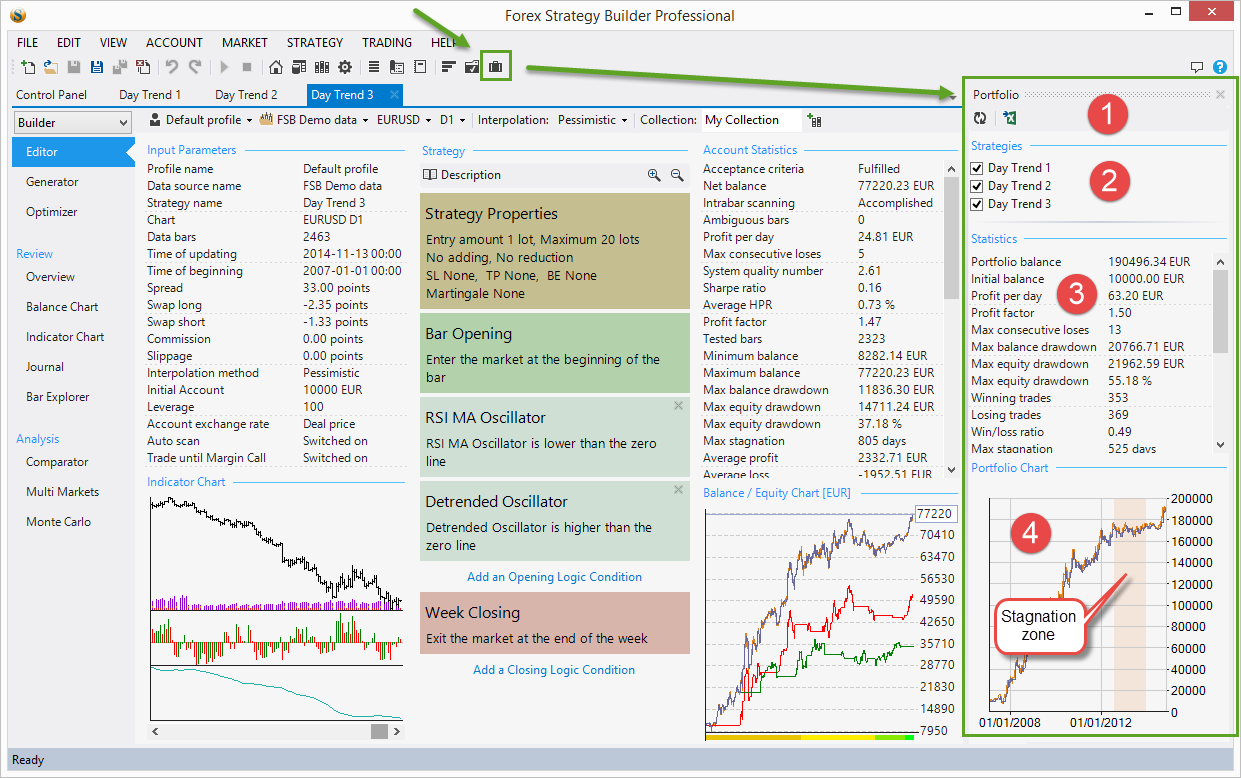
			<content type="html"><![CDATA[<p>You need to have the desired strategies opened in tabs within FSB Pro.</p>]]></content>
			<author>
				<name><![CDATA[Popov]]></name>
				<uri>https://forexsb.com/forum/user/2/</uri>
			</author>
			<updated>2023-02-03T11:18:39Z</updated>
			<id>https://forexsb.com/forum/post/73430/#p73430</id>
		</entry>
		<entry>
			<title type="html"><![CDATA[Re: Import From EA Studio]]></title>
			<link rel="alternate" href="https://forexsb.com/forum/post/73427/#p73427" />
			<content type="html"><![CDATA[<p>I clicked on the Strategy Portfolio icon as you have shown, however, the overall strategy of all 10 strategies is not displayed.&nbsp; I recalculated but that did not make any difference.</p>]]></content>
			<author>
				<name><![CDATA[Alann]]></name>
				<uri>https://forexsb.com/forum/user/14347/</uri>
			</author>
			<updated>2023-02-03T09:11:13Z</updated>
			<id>https://forexsb.com/forum/post/73427/#p73427</id>
		</entry>
		<entry>
			<title type="html"><![CDATA[Re: Import From EA Studio]]></title>
			<link rel="alternate" href="https://forexsb.com/forum/post/73421/#p73421" />
			<content type="html"><![CDATA[<p>&gt; Is there a way to combine all strategies together so I can see the combined balance line and its statistics?</p><p>You can see an aggregated stats of the currently loaded strategies.</p><p>See <a href="https://forexsb.com/wiki/fsbpro_guide/strategy_portfolio">Strategy Portfolio</a></p><br /><p><span class="postimg"><img src="https://forexsb.com/wiki/_media/fsbpro_guide/strategy_portfolio.png" alt="https://forexsb.com/wiki/_media/fsbpro_guide/strategy_portfolio.png" /></span></p>]]></content>
			<author>
				<name><![CDATA[Popov]]></name>
				<uri>https://forexsb.com/forum/user/2/</uri>
			</author>
			<updated>2023-02-03T05:35:24Z</updated>
			<id>https://forexsb.com/forum/post/73421/#p73421</id>
		</entry>
		<entry>
			<title type="html"><![CDATA[Re: Import From EA Studio]]></title>
			<link rel="alternate" href="https://forexsb.com/forum/post/73420/#p73420" />
			<content type="html"><![CDATA[<p>I had imported a mt4 source code file instead of a json file.&nbsp; After importing the json file I can now see all strategies.&nbsp; Is there a way to combine all strategies together so I can see the combined balance line and its statistics?</p>]]></content>
			<author>
				<name><![CDATA[Alann]]></name>
				<uri>https://forexsb.com/forum/user/14347/</uri>
			</author>
			<updated>2023-02-03T03:50:23Z</updated>
			<id>https://forexsb.com/forum/post/73420/#p73420</id>
		</entry>
		<entry>
			<title type="html"><![CDATA[Re: Import From EA Studio]]></title>
			<link rel="alternate" href="https://forexsb.com/forum/post/73419/#p73419" />
			<content type="html"><![CDATA[<p>Yes, you can.</p><p>Drag and drop your EA Studio collection over FSB Pro (preferably on the Collection page).<br />All strategies will be imported. <br />Check if you don&#039;t have Filters enabled.<br />You will see a message in the log in case of an error.</p>]]></content>
			<author>
				<name><![CDATA[Popov]]></name>
				<uri>https://forexsb.com/forum/user/2/</uri>
			</author>
			<updated>2023-02-02T19:57:09Z</updated>
			<id>https://forexsb.com/forum/post/73419/#p73419</id>
		</entry>
		<entry>
			<title type="html"><![CDATA[Import From EA Studio]]></title>
			<link rel="alternate" href="https://forexsb.com/forum/post/73417/#p73417" />
			<content type="html"><![CDATA[<p>Can I import an EA from EA Studio containing 10 strategies?&nbsp; I tried it but it looks like just one of the ten strategies show up in the portfolio tab of FSB Pro.&nbsp; Is it possible to look at each stradegy in the portfolio and not just the overall balance line of the 10 strategies?&nbsp; Also how do I save the portfolio of strategies in FSB Pro as an MT4 and MT5 source code and json file?</p>]]></content>
			<author>
				<name><![CDATA[Alann]]></name>
				<uri>https://forexsb.com/forum/user/14347/</uri>
			</author>
			<updated>2023-02-02T18:52:13Z</updated>
			<id>https://forexsb.com/forum/post/73417/#p73417</id>
		</entry>
</feed>