<?xml version="1.0" encoding="utf-8"?>
<feed xmlns="http://www.w3.org/2005/Atom">
	<title type="html"><![CDATA[Forex Software — Symbol Settings]]></title>
	<link rel="self" href="https://forexsb.com/forum/feed/atom/topic/8173/" />
	<updated>2020-01-13T12:21:57Z</updated>
	<generator>PunBB</generator>
	<id>https://forexsb.com/forum/topic/8173/symbol-settings/</id>
		<entry>
			<title type="html"><![CDATA[Re: Symbol Settings]]></title>
			<link rel="alternate" href="https://forexsb.com/forum/post/58746/#p58746" />
			<content type="html"><![CDATA[<p>Got it, thanks Popov</p>]]></content>
			<author>
				<name><![CDATA[jox51]]></name>
				<uri>https://forexsb.com/forum/user/11801/</uri>
			</author>
			<updated>2020-01-13T12:21:57Z</updated>
			<id>https://forexsb.com/forum/post/58746/#p58746</id>
		</entry>
		<entry>
			<title type="html"><![CDATA[Re: Symbol Settings]]></title>
			<link rel="alternate" href="https://forexsb.com/forum/post/58745/#p58745" />
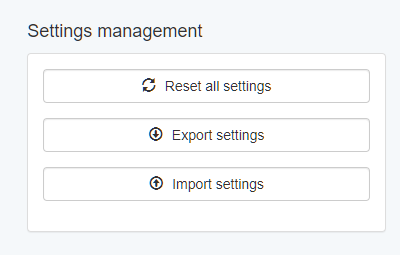
			<content type="html"><![CDATA[<p>EA Studio save its settings on closing in the Browser&#039;s Local Storage. This is a common repository for all tabs and browser instances.</p><p>When you know that, it is easier to imagine that when you close next EA Studio instance, it overrides the settings from the previous one.</p><p>You can esily keep multiple settings by exporting them as files from Tools -&gt; Settings.</p><p><span class="postimg"><img src="https://image-holder.forexsb.com/store/ea-studio-settings-management.png" alt="https://image-holder.forexsb.com/store/ea-studio-settings-management.png" /></span></p>]]></content>
			<author>
				<name><![CDATA[Popov]]></name>
				<uri>https://forexsb.com/forum/user/2/</uri>
			</author>
			<updated>2020-01-13T11:48:58Z</updated>
			<id>https://forexsb.com/forum/post/58745/#p58745</id>
		</entry>
		<entry>
			<title type="html"><![CDATA[Re: Symbol Settings]]></title>
			<link rel="alternate" href="https://forexsb.com/forum/post/58744/#p58744" />
			<content type="html"><![CDATA[<p>I noticed that if I enter custom symbol settings that it only saves for that instance. It won&#039;t save it permanently.</p>]]></content>
			<author>
				<name><![CDATA[jox51]]></name>
				<uri>https://forexsb.com/forum/user/11801/</uri>
			</author>
			<updated>2020-01-13T11:30:12Z</updated>
			<id>https://forexsb.com/forum/post/58744/#p58744</id>
		</entry>
		<entry>
			<title type="html"><![CDATA[Re: Symbol Settings]]></title>
			<link rel="alternate" href="https://forexsb.com/forum/post/58708/#p58708" />
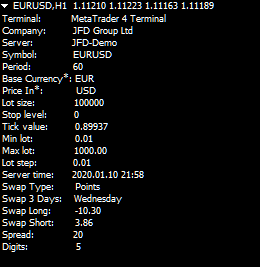
			<content type="html"><![CDATA[<p>You can see the current MetaTrader symbol settings with the attached script.</p><br /><p><span class="postimg"><img src="https://image-holder.forexsb.com/store/metatrader-4-symbol-settings.png" alt="https://image-holder.forexsb.com/store/metatrader-4-symbol-settings.png" /></span></p><p>The &quot;Base currency&quot; and &quot;Price in&quot; values work properly only for forex symbols.</p>]]></content>
			<author>
				<name><![CDATA[Popov]]></name>
				<uri>https://forexsb.com/forum/user/2/</uri>
			</author>
			<updated>2020-01-11T10:22:31Z</updated>
			<id>https://forexsb.com/forum/post/58708/#p58708</id>
		</entry>
		<entry>
			<title type="html"><![CDATA[Symbol Settings]]></title>
			<link rel="alternate" href="https://forexsb.com/forum/post/58707/#p58707" />
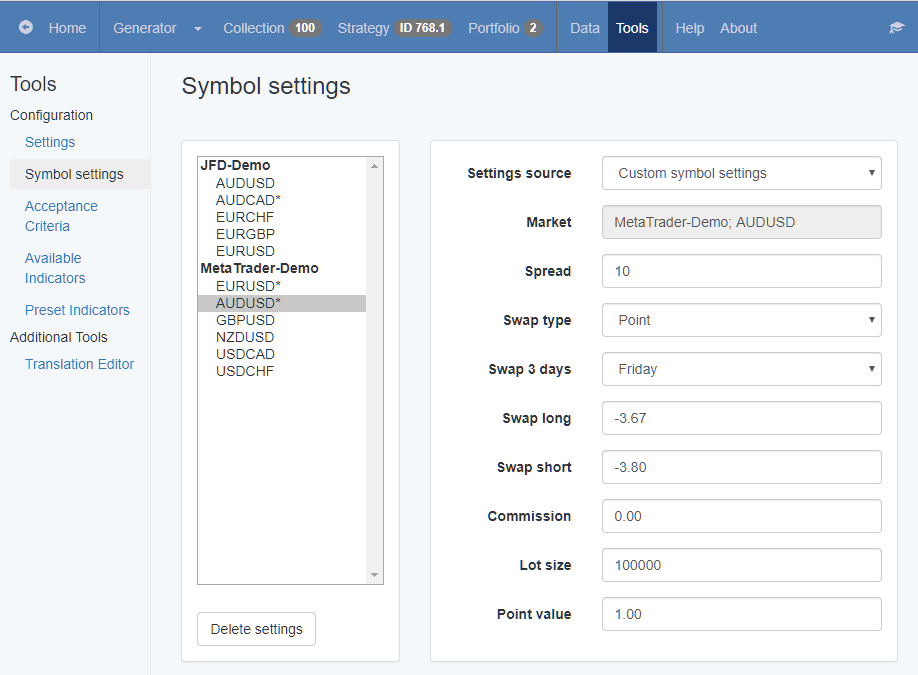
			<content type="html"><![CDATA[<p>Hello Traders,</p><p>Now we can use custom symbol settings in EA Studio. A new Symbol Settings page is added under Tools.</p><p><a href="https://image-holder.forexsb.com/store/ea-studio-symbol-settings.png"><span class="postimg"><img src="https://image-holder.forexsb.com/store/ea-studio-symbol-settings-thumb.png" alt="https://image-holder.forexsb.com/store/ea-studio-symbol-settings-thumb.png" /></span></a></p><p>Originally the symbol settings come with the data file, which contains the data set and all market parameters from your MetaTrader account. However, it is useful sometimes to change the parameters or to experiment with different values.</p><p>The Symbol Settings page works in a non-destructive way. It allows shading the original settings and using new values in EA Studio without changing the actual data files. It is absolutely safe to experiment with them because you can easily recover to original values.</p><p>EA Studio populates the symbol list automatically when you load data in the Editor, the Generator, or when you import new data files. The symbols are arranged in groups according to the data server.</p><p>Please see the full help article here: <a href="https://forexsb.com/wiki/eas-guide/symbols">Symbol Settings</a></p><p>Please report any issues.</p><p>Trade Safe!</p>]]></content>
			<author>
				<name><![CDATA[Popov]]></name>
				<uri>https://forexsb.com/forum/user/2/</uri>
			</author>
			<updated>2020-01-11T09:32:09Z</updated>
			<id>https://forexsb.com/forum/post/58707/#p58707</id>
		</entry>
</feed>