<?xml version="1.0" encoding="utf-8"?>
<feed xmlns="http://www.w3.org/2005/Atom">
	<title type="html"><![CDATA[Forex Software — About the time zone of EightCap's data in EA studio]]></title>
	<link rel="self" href="https://forexsb.com/forum/feed/atom/topic/9930/" />
	<updated>2025-05-05T16:58:56Z</updated>
	<generator>PunBB</generator>
	<id>https://forexsb.com/forum/topic/9930/about-the-time-zone-of-eightcaps-data-in-ea-studio/</id>
		<entry>
			<title type="html"><![CDATA[Re: About the time zone of EightCap's data in EA studio]]></title>
			<link rel="alternate" href="https://forexsb.com/forum/post/82662/#p82662" />
			<content type="html"><![CDATA[<p>A just discovered and fixed a bug in the Data Feed scripts that caused the data time to be shifted with several hours forward.<br />The affected data are coming from MetaQuotes, Darwinex, and BlackBull. </p><p>Now, the data work fine.</p><p>Please report any issue!</p>]]></content>
			<author>
				<name><![CDATA[Popov]]></name>
				<uri>https://forexsb.com/forum/user/2/</uri>
			</author>
			<updated>2025-05-05T16:58:56Z</updated>
			<id>https://forexsb.com/forum/post/82662/#p82662</id>
		</entry>
		<entry>
			<title type="html"><![CDATA[Re: About the time zone of EightCap's data in EA studio]]></title>
			<link rel="alternate" href="https://forexsb.com/forum/post/82610/#p82610" />
			<content type="html"><![CDATA[<p>I checked now, it is perfect, I set GMT+3 in EA Studio and it is the same as Eightcap (GMT+3). I hope everyone who needs it will come here to read this topic.</p><p>Also Shapeare, can you check it?</p><p>Mr Popov, if you need to play with these settings in the future, please mark it here, it is very important for us to know it!</p><p>Thanks</p>]]></content>
			<author>
				<name><![CDATA[mentosan]]></name>
				<uri>https://forexsb.com/forum/user/2989/</uri>
			</author>
			<updated>2025-04-08T08:27:54Z</updated>
			<id>https://forexsb.com/forum/post/82610/#p82610</id>
		</entry>
		<entry>
			<title type="html"><![CDATA[Re: About the time zone of EightCap's data in EA studio]]></title>
			<link rel="alternate" href="https://forexsb.com/forum/post/82609/#p82609" />
			<content type="html"><![CDATA[<p>I set the Data feed server to use DST.<br />Now the Eightcap data corresponds to GMT + 03.</p><p>Please check report if you see discrepancies wit your broker.</p>]]></content>
			<author>
				<name><![CDATA[Popov]]></name>
				<uri>https://forexsb.com/forum/user/2/</uri>
			</author>
			<updated>2025-04-08T08:04:59Z</updated>
			<id>https://forexsb.com/forum/post/82609/#p82609</id>
		</entry>
		<entry>
			<title type="html"><![CDATA[Re: About the time zone of EightCap's data in EA studio]]></title>
			<link rel="alternate" href="https://forexsb.com/forum/post/82608/#p82608" />
			<content type="html"><![CDATA[<p>is it not possible to make it independent of any country&#039;s GMT time? i.e. i just check the real broker time somewhere and change it accordingly in the EAS?</p><p> for example i just asked chatgbt &quot;what is the current GMT time of eightcap&#039;s MT5?&quot; and i got the answer &quot;As of now, the time on eightcap&#039;s MetaTrader 5 (MT5) platform is 9:47 AM (GMT+3)&quot;.</p><p>I think this information should be enough to know what to enter in the EAS &quot;GMT+3&quot;.</p>]]></content>
			<author>
				<name><![CDATA[mentosan]]></name>
				<uri>https://forexsb.com/forum/user/2989/</uri>
			</author>
			<updated>2025-04-08T06:50:26Z</updated>
			<id>https://forexsb.com/forum/post/82608/#p82608</id>
		</entry>
		<entry>
			<title type="html"><![CDATA[Re: About the time zone of EightCap's data in EA studio]]></title>
			<link rel="alternate" href="https://forexsb.com/forum/post/82607/#p82607" />
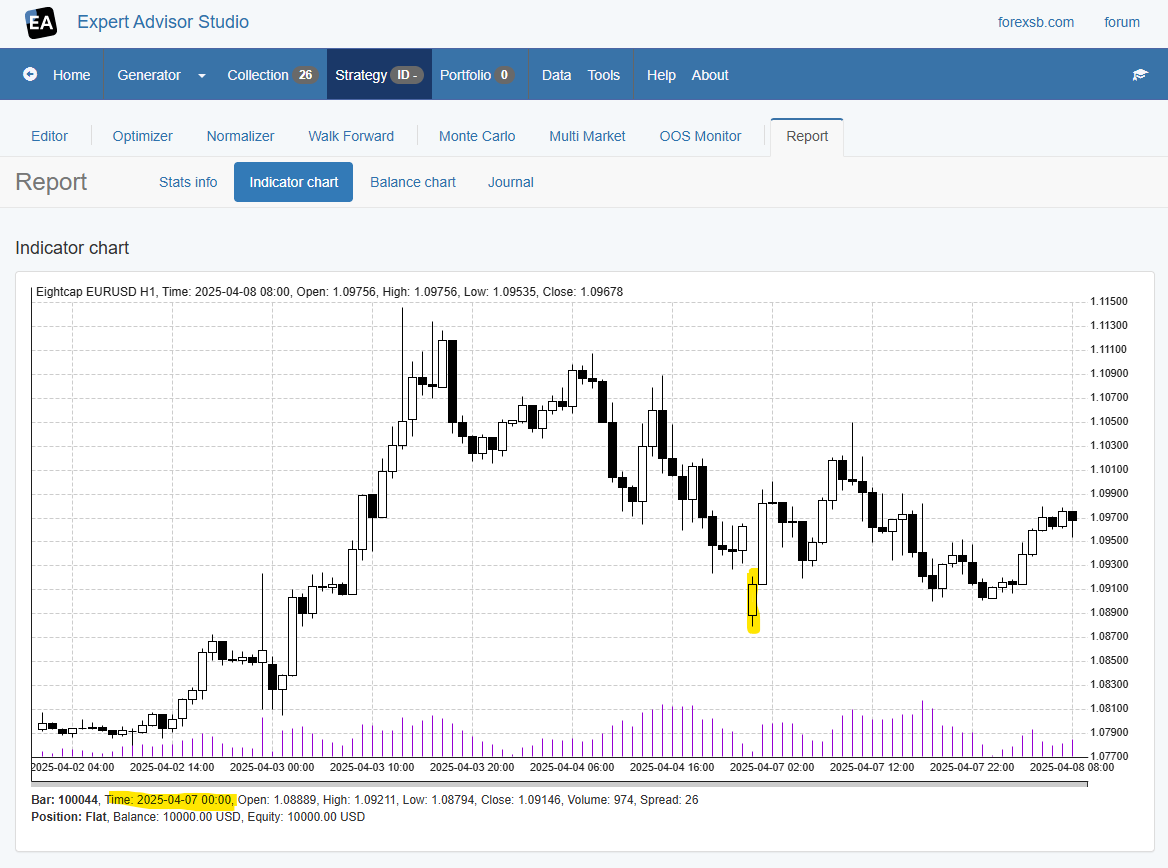
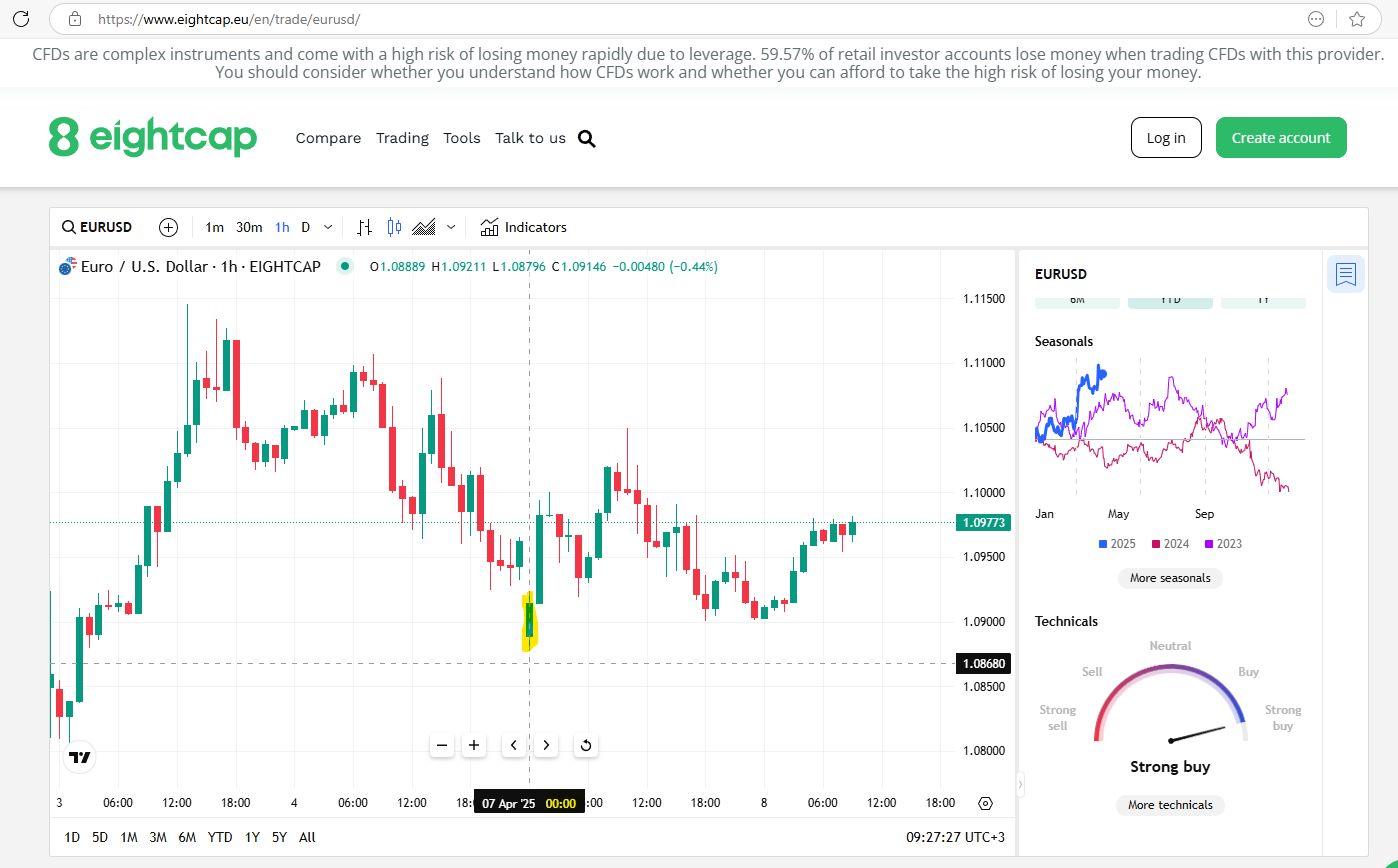
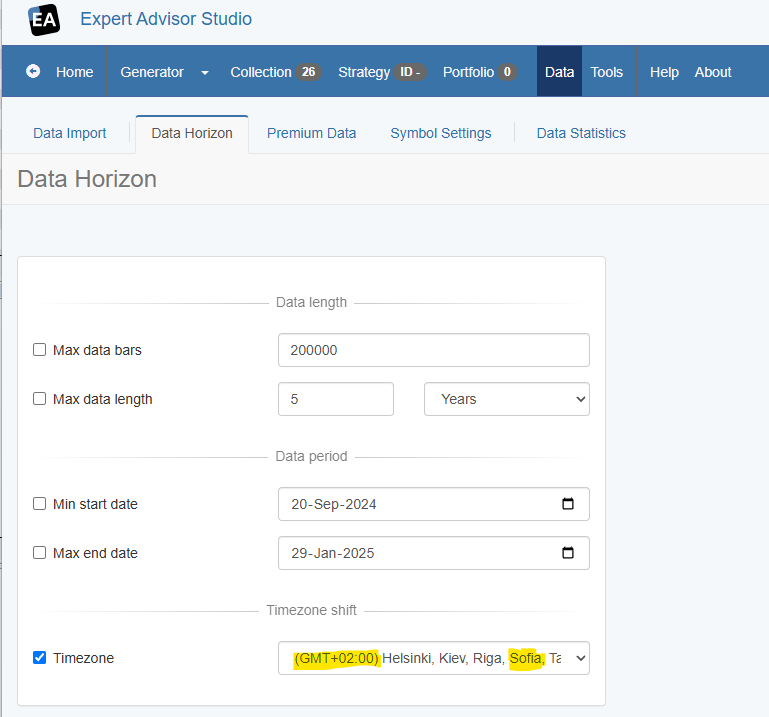
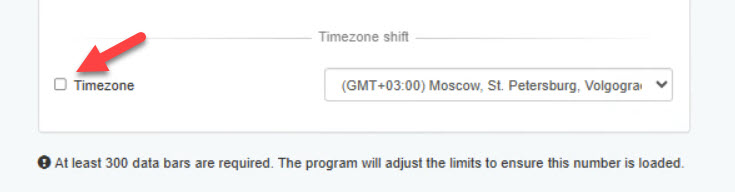
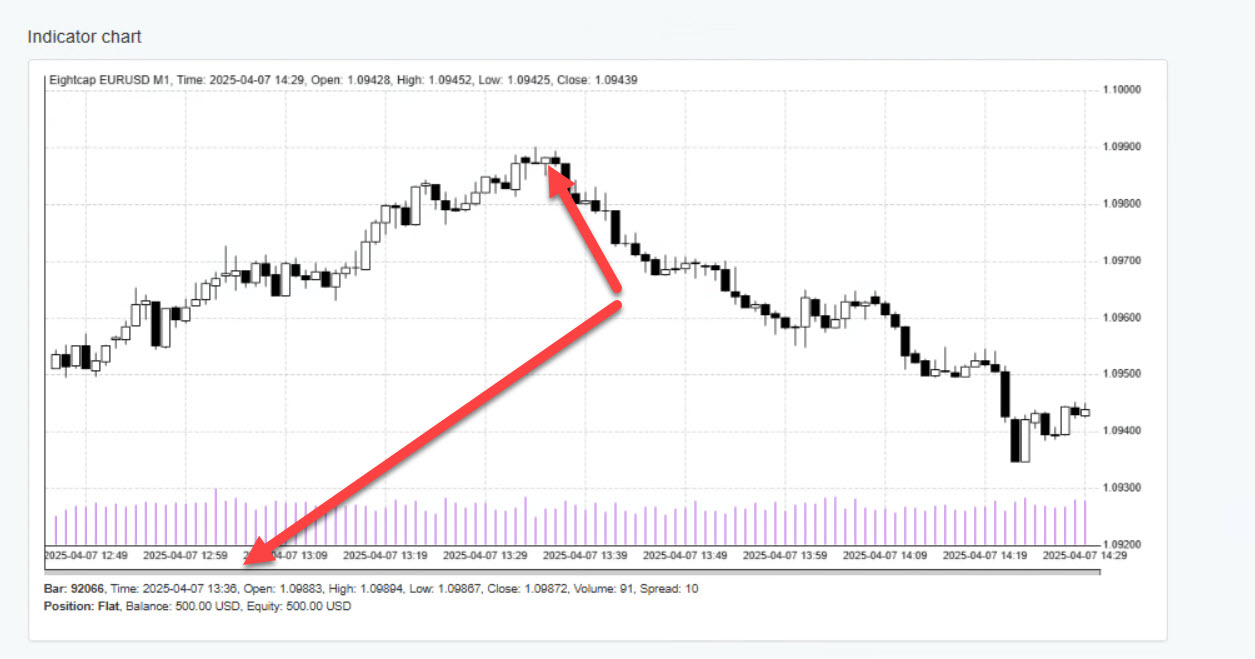
			<content type="html"><![CDATA[<p>I just uploaded an update version of EA Studio with fixed Timezone checkbox.</p><p>Here are my observations of the current behavior:</p><p>EA Studio bar at 00:00 corresponds to the same bar of Eightcap.<br />My current Timezone settings is GMT+02:00 Sofia - the <strong>real</strong> timezone without DST.</p><p>The problem is that the <strong>current</strong> timezone of Bulgaria (Sofia) is GMT+ 03:00 due to DST.</p><p>It works but I&#039;m not sure if this is the best solution.</p><p><a href="https://image-holder.forexsb.com/store/eas-chart-time-00%202025-04-08%20092347.png"><span class="postimg"><img src="https://image-holder.forexsb.com/store/eas-chart-time-00%202025-04-08%20092347-thumb.png" alt="https://image-holder.forexsb.com/store/eas-chart-time-00%202025-04-08%20092347-thumb.png" /></span></a></p><p><a href="https://image-holder.forexsb.com/store/eightcap-chart-time-00%202025-04-08%20092347.png"><span class="postimg"><img src="https://image-holder.forexsb.com/store/eightcap-chart-time-00%202025-04-08%20092347-thumb.png" alt="https://image-holder.forexsb.com/store/eightcap-chart-time-00%202025-04-08%20092347-thumb.png" /></span></a></p><p><a href="https://image-holder.forexsb.com/store/eas-timezone%202025-04-08%20092347.png"><span class="postimg"><img src="https://image-holder.forexsb.com/store/eas-timezone%202025-04-08%20092347-thumb.png" alt="https://image-holder.forexsb.com/store/eas-timezone%202025-04-08%20092347-thumb.png" /></span></a></p><p>All comments are welcomed!</p><p>...</p><p>(I just noticed how inconvenient is to make screenshots of the Indicator chart of EA Studio without the currently selected bar to be highlighted in some way. I&#039;ll add cross lines to the chart today.)</p>]]></content>
			<author>
				<name><![CDATA[Popov]]></name>
				<uri>https://forexsb.com/forum/user/2/</uri>
			</author>
			<updated>2025-04-08T06:35:04Z</updated>
			<id>https://forexsb.com/forum/post/82607/#p82607</id>
		</entry>
		<entry>
			<title type="html"><![CDATA[Re: About the time zone of EightCap's data in EA studio]]></title>
			<link rel="alternate" href="https://forexsb.com/forum/post/82606/#p82606" />
			<content type="html"><![CDATA[<p>It&#039;s good that this comes from you and not randomly. I think it&#039;s more logical to keep EAS (GMT+3) the same as Eightcap (GMT+3).</p><p>Here&#039;s how I do it:<br />I check when needed in Myfxbook, pick a random system from Eightcap, and go to Trading Activity &gt; Settings.</p><p><a href="https://postimages.org/"><span class="postimg"><img src="https://i.postimg.cc/rmnX0GkT/2025-04-08-08-01-45.jpg" alt="https://i.postimg.cc/rmnX0GkT/2025-04-08-08-01-45.jpg" /></span></a><a href="https://postimages.org/de/">fotos ins internet stellen</a></p><p>I always use the Broker Time (GMT+3) in EAS as in myfxbook.</p>]]></content>
			<author>
				<name><![CDATA[mentosan]]></name>
				<uri>https://forexsb.com/forum/user/2989/</uri>
			</author>
			<updated>2025-04-08T06:07:15Z</updated>
			<id>https://forexsb.com/forum/post/82606/#p82606</id>
		</entry>
		<entry>
			<title type="html"><![CDATA[Re: About the time zone of EightCap's data in EA studio]]></title>
			<link rel="alternate" href="https://forexsb.com/forum/post/82605/#p82605" />
			<content type="html"><![CDATA[<p>It looks like Eightcap (and the other brokers) also applies the Daylight Saving Time time shift.</p><p>I switched it off on the Data feed server yesterday, but I probably have to return it back.<br />The problem is that DST is different for the different countries.</p><p>I&#039;ll do additional research on that topic today.</p><p>Please share your ideas.</p>]]></content>
			<author>
				<name><![CDATA[Popov]]></name>
				<uri>https://forexsb.com/forum/user/2/</uri>
			</author>
			<updated>2025-04-08T05:38:46Z</updated>
			<id>https://forexsb.com/forum/post/82605/#p82605</id>
		</entry>
		<entry>
			<title type="html"><![CDATA[Re: About the time zone of EightCap's data in EA studio]]></title>
			<link rel="alternate" href="https://forexsb.com/forum/post/82604/#p82604" />
			<content type="html"><![CDATA[<p>After Shapeare&#039;s comment, I started looking into this issue more carefully. Since yesterday, I&#039;ve been checking it regularly, and to my surprise, I noticed this morning that there is indeed a problem. </p><p>The timezone is currently off by one hour—Eightcap (GMT+3) =EAS(GMT+2) instead of Eightcap(GMT+3)= EAS(GMT+3) from yesterday.</p><p> I&#039;m quite sure EAS will switch back to GMT+3 later. Anyway, I’ll keep monitoring it and report back.</p><p>It would be great if other colleagues could check it as well.</p>]]></content>
			<author>
				<name><![CDATA[mentosan]]></name>
				<uri>https://forexsb.com/forum/user/2989/</uri>
			</author>
			<updated>2025-04-08T05:27:31Z</updated>
			<id>https://forexsb.com/forum/post/82604/#p82604</id>
		</entry>
		<entry>
			<title type="html"><![CDATA[Re: About the time zone of EightCap's data in EA studio]]></title>
			<link rel="alternate" href="https://forexsb.com/forum/post/82597/#p82597" />
			<content type="html"><![CDATA[<p>&gt; However, I would like to report the timezone hack, which is not working. It is active even when not selected.</p><p>I&#039;ll check that.</p><p>Thank you for the report!</p>]]></content>
			<author>
				<name><![CDATA[Popov]]></name>
				<uri>https://forexsb.com/forum/user/2/</uri>
			</author>
			<updated>2025-04-07T12:22:07Z</updated>
			<id>https://forexsb.com/forum/post/82597/#p82597</id>
		</entry>
		<entry>
			<title type="html"><![CDATA[Re: About the time zone of EightCap's data in EA studio]]></title>
			<link rel="alternate" href="https://forexsb.com/forum/post/82596/#p82596" />
			<content type="html"><![CDATA[<p>I also use Eightcap as a broker and I live in Germany. I do not have your problem.</p><p>MT5 from Eightcap shows GMT+3.<br /><a href="https://postimg.cc/G9Kjp13Z"><span class="postimg"><img src="https://i.postimg.cc/5NdKnxhN/mt52.jpg" alt="https://i.postimg.cc/5NdKnxhN/mt52.jpg" /></span></a></p><p>I set EAS to GMT+3.</p><p><a href="https://postimages.org/"><span class="postimg"><img src="https://i.postimg.cc/c4nTnV6y/gmt-set.jpg" alt="https://i.postimg.cc/c4nTnV6y/gmt-set.jpg" /></span></a></p><p>Result: same hour in both.<br /><a href="https://postimages.org/"><span class="postimg"><img src="https://i.postimg.cc/FsyW6Mvb/eas2.jpg" alt="https://i.postimg.cc/FsyW6Mvb/eas2.jpg" /></span></a></p><p>However, I would like to report the timezone hack which does not work. It is active even when not selected.</p>]]></content>
			<author>
				<name><![CDATA[mentosan]]></name>
				<uri>https://forexsb.com/forum/user/2989/</uri>
			</author>
			<updated>2025-04-07T10:57:17Z</updated>
			<id>https://forexsb.com/forum/post/82596/#p82596</id>
		</entry>
		<entry>
			<title type="html"><![CDATA[Re: About the time zone of EightCap's data in EA studio]]></title>
			<link rel="alternate" href="https://forexsb.com/forum/post/82595/#p82595" />
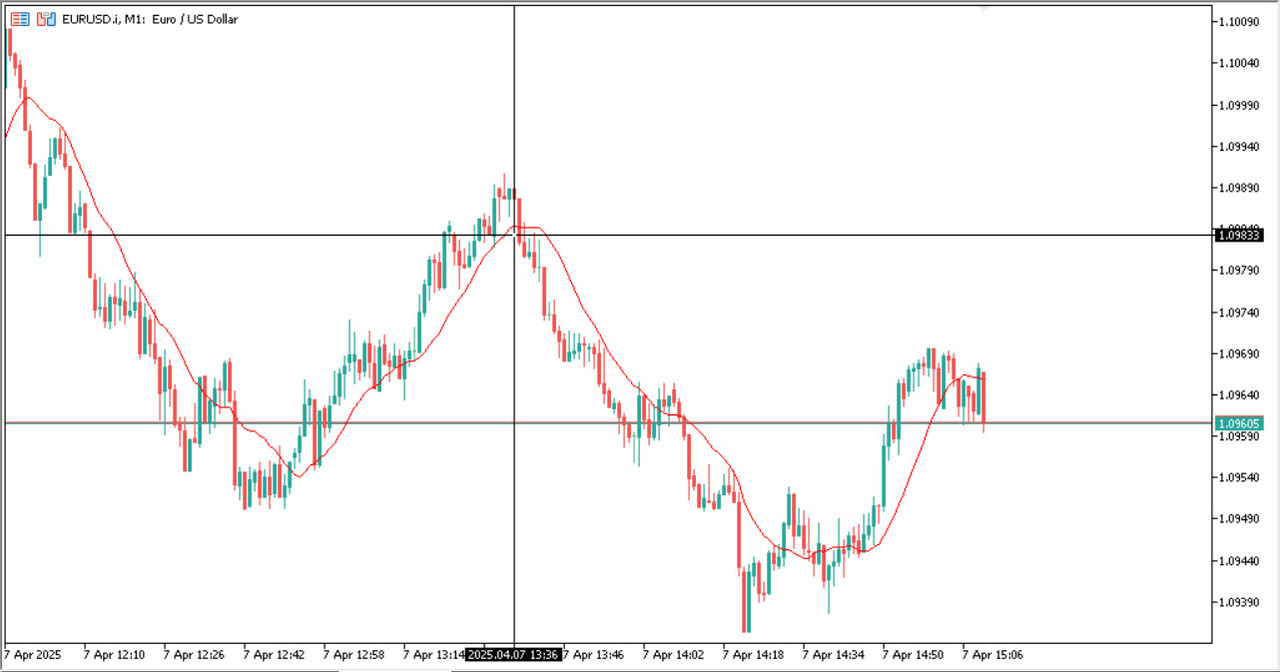
			<content type="html"><![CDATA[<p>&gt; Why is EA studio&#039;s time zone GMT + 1?</p><p>Thank you for the report! I check the server and found out it has applied applied 1 hour Daylight saving time (DST).</p><p>...</p><p>How MetaTrader sets the charts time zone&nbsp; is a mystery to me. I&#039;m not sure whether or when MT adjusts the time zone to the local time zone.</p><p>I&#039;m currently using a server set to UTC for exporting data. The interesting part is that all the brokers I&#039;m using show my local time. It looks like MetaTrader gets the local time by IP geolocation, or all the brokers I&#039;m using are in Bulgaria!</p><p>I apply time zone correction as ServerTime - LocalTime.<br />Theoretically, the data in EA Studio, Ex Gen and the other application should be in UTC time zone.</p><p>When I&#039;m interested in adjusting the application data time zone, I compare the charts in the app with the chart of the MetaTrader terminal and set the necessary correction from the Data -&gt; Data Horizon page.</p>]]></content>
			<author>
				<name><![CDATA[Popov]]></name>
				<uri>https://forexsb.com/forum/user/2/</uri>
			</author>
			<updated>2025-04-07T10:11:50Z</updated>
			<id>https://forexsb.com/forum/post/82595/#p82595</id>
		</entry>
		<entry>
			<title type="html"><![CDATA[About the time zone of EightCap's data in EA studio]]></title>
			<link rel="alternate" href="https://forexsb.com/forum/post/82594/#p82594" />
			<content type="html"><![CDATA[<p>I have attached an image showing the comparison between the data in Eightcap&#039;s MT5 and EA studio. I found that when Eightcap&#039;s MT5 time is 05:29, EA studio&#039;s time is 03:29. However, the GMT time at that point is 02:29. Why is EA studio&#039;s time zone GMT + 1?</p><p>About my EA studio settings:<br />EA studio&#039;s Data - Data Statistics - Loaded files shows Eightcap AUDJPY M1, so the Eightcap AUDJPY M1 data has been loaded.<br />In EA studio&#039;s Data - Data Horizon, Timezone is set to GMT.</p><p>According to eightcap&#039;s official website, their server is at UTC+3 https://www.eightcap.eu/en/trade/audjpy/</p>]]></content>
			<author>
				<name><![CDATA[shapeare]]></name>
				<uri>https://forexsb.com/forum/user/16613/</uri>
			</author>
			<updated>2025-04-07T03:58:35Z</updated>
			<id>https://forexsb.com/forum/post/82594/#p82594</id>
		</entry>
</feed>