<?xml version="1.0" encoding="utf-8"?>
<feed xmlns="http://www.w3.org/2005/Atom">
	<title type="html"><![CDATA[Forex Software — Connect EG to my Historical Data]]></title>
	<link rel="self" href="https://forexsb.com/forum/feed/atom/topic/9661/" />
	<updated>2024-03-21T05:23:20Z</updated>
	<generator>PunBB</generator>
	<id>https://forexsb.com/forum/topic/9661/connect-eg-to-my-historical-data/</id>
		<entry>
			<title type="html"><![CDATA[Re: Connect EG to my Historical Data]]></title>
			<link rel="alternate" href="https://forexsb.com/forum/post/79155/#p79155" />
			<content type="html"><![CDATA[<p>&gt; To use data from your broker, do the following:</p><p>Yes, of course. This is the way to use custom data.</p><p>The files will also contain spreads if you export data from MetaTrader 5.</p><p>Make a folder &quot;Trading&quot; under the &quot;data&quot; folder and use the generator as follows:</p><div class="codebox"><pre><code>// MacOS, Linux
node ./bin/gen.js --server Trading --symbol EURUSD --period M30 ...

// Windows
node .\bin\gen.js --server Trading --symbol EURUSD --period M30 ...</code></pre></div><p>You don&#039;t need &quot;fetch&quot; when you use your data files.</p><p>If your data file is in another place, you can directly access it through its entire path.</p><div class="codebox"><pre><code>node ./bin/gen.js  --data-file /my-data-dir/data/Trading/EURUSD_M30.json ...</code></pre></div>]]></content>
			<author>
				<name><![CDATA[Popov]]></name>
				<uri>https://forexsb.com/forum/user/2/</uri>
			</author>
			<updated>2024-03-21T05:23:20Z</updated>
			<id>https://forexsb.com/forum/post/79155/#p79155</id>
		</entry>
		<entry>
			<title type="html"><![CDATA[Re: Connect EG to my Historical Data]]></title>
			<link rel="alternate" href="https://forexsb.com/forum/post/79153/#p79153" />
			<content type="html"><![CDATA[<p>Hi Popov,</p><p>In&nbsp; a previous post above you stated the following:</p><p>To use data from your broker, do the following:<br />- Create a new directory under the Express Generator&#039;s &quot;data&quot; directory for your files.<br />- Download the data files with the script you use to export data for EA Studio and put the files in the created folder.</p><p>Call the Generator with the corresponding &quot;server&quot; parameter. Use the created directory name.</p><p>Let&#039;s say the new directory is &quot;MyBroker&quot;.<br />Call Express Generator with:</p><p>node .\bin\gen.js --server MyBroker --symbol EURUSD --period M30 </p><br /><p>Is this no longer available to do?</p><p>Alan,</p>]]></content>
			<author>
				<name><![CDATA[Alann]]></name>
				<uri>https://forexsb.com/forum/user/14347/</uri>
			</author>
			<updated>2024-03-20T23:43:40Z</updated>
			<id>https://forexsb.com/forum/post/79153/#p79153</id>
		</entry>
		<entry>
			<title type="html"><![CDATA[Re: Connect EG to my Historical Data]]></title>
			<link rel="alternate" href="https://forexsb.com/forum/post/79150/#p79150" />
			<content type="html"><![CDATA[<p>You can load only the data we collect on our data feed servers.</p><p>The currently available servers are: <br /> - <strong>Premium</strong>: Data from DukasCopy with real spread. Their crypto and gold data have unusual digit counts.<br /> - <strong>FTMO </strong>- we will probably remove it because they no longer support algotrading.<br /> - <strong>BlackBull </strong>- MT5 live account. Real spread. The data are shorter than those of the other servers. However, they have good BTCUSD, ETHUSD and Gold data.<br /> - <strong>MetaQuotes </strong>- this is the default data feed for MetaTrader when you download it from the Metaquotes. Real spread.</p><p>We will explore the Trading.com data from their MetaTrader 5 and decide if they are good enough.</p>]]></content>
			<author>
				<name><![CDATA[Popov]]></name>
				<uri>https://forexsb.com/forum/user/2/</uri>
			</author>
			<updated>2024-03-20T20:27:20Z</updated>
			<id>https://forexsb.com/forum/post/79150/#p79150</id>
		</entry>
		<entry>
			<title type="html"><![CDATA[Re: Connect EG to my Historical Data]]></title>
			<link rel="alternate" href="https://forexsb.com/forum/post/79148/#p79148" />
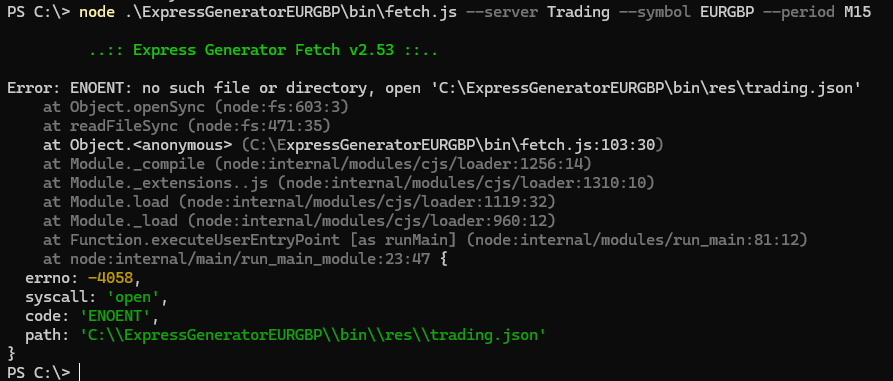
			<content type="html"><![CDATA[<p>I am trying to run EG with historical data I downloaded from Trading.com using the Data Export app.&nbsp; I created a data folder called Trading under the &quot;data&quot; directory.&nbsp; I then used power shell to fetch the data.&nbsp; I get the following error:</p><p><span class="postimg"><img src="https://i.postimg.cc/Bv72xJMs/fetch.png" alt="https://i.postimg.cc/Bv72xJMs/fetch.png" /></span></p><p>When I change the data directory to Premium it works!</p><p><span class="postimg"><img src="https://i.postimg.cc/XY5RRhSf/fetch-premium.png" alt="https://i.postimg.cc/XY5RRhSf/fetch-premium.png" /></span></p><p>Alann,</p>]]></content>
			<author>
				<name><![CDATA[Alann]]></name>
				<uri>https://forexsb.com/forum/user/14347/</uri>
			</author>
			<updated>2024-03-20T17:34:38Z</updated>
			<id>https://forexsb.com/forum/post/79148/#p79148</id>
		</entry>
		<entry>
			<title type="html"><![CDATA[Re: Connect EG to my Historical Data]]></title>
			<link rel="alternate" href="https://forexsb.com/forum/post/78695/#p78695" />
			<content type="html"><![CDATA[<p>Popov,</p><p>Thank you!</p><p>Alann,</p>]]></content>
			<author>
				<name><![CDATA[Alann]]></name>
				<uri>https://forexsb.com/forum/user/14347/</uri>
			</author>
			<updated>2024-02-14T12:55:07Z</updated>
			<id>https://forexsb.com/forum/post/78695/#p78695</id>
		</entry>
		<entry>
			<title type="html"><![CDATA[Re: Connect EG to my Historical Data]]></title>
			<link rel="alternate" href="https://forexsb.com/forum/post/78684/#p78684" />
			<content type="html"><![CDATA[<p>Express Generator can download data only from the data feeds we provide eon our servers.</p><div class="quotebox"><blockquote><p>; Server: Premium, FTMO, BlackBull, MetaQuotes<br />server = Premium</p></blockquote></div><p>To use data from your broker, do the following:<br /> - Create a new directory under the Express Generator&#039;s &quot;data&quot; directory for your files.<br /> - Download the data files with the script you use to export data for EA Studio and put the files in the created folder.</p><p>Call the Generator with the corresponding &quot;server&quot; parameter. Use the created directory name.</p><p>Let&#039;s say the new directory is &quot;MyBroker&quot;.<br />Call Express Generator with:<br /></p><div class="codebox"><pre><code>node .\bin\gen.js --server MyBroker --symbol EURUSD --period M30 </code></pre></div>]]></content>
			<author>
				<name><![CDATA[Popov]]></name>
				<uri>https://forexsb.com/forum/user/2/</uri>
			</author>
			<updated>2024-02-14T09:50:38Z</updated>
			<id>https://forexsb.com/forum/post/78684/#p78684</id>
		</entry>
		<entry>
			<title type="html"><![CDATA[Connect EG to my Historical Data]]></title>
			<link rel="alternate" href="https://forexsb.com/forum/post/78675/#p78675" />
			<content type="html"><![CDATA[<p>How can I change the ExpressGenerator server so it will update with my downloaded historical data from my broker?</p><p>Alann,</p>]]></content>
			<author>
				<name><![CDATA[Alann]]></name>
				<uri>https://forexsb.com/forum/user/14347/</uri>
			</author>
			<updated>2024-02-13T20:39:07Z</updated>
			<id>https://forexsb.com/forum/post/78675/#p78675</id>
		</entry>
</feed>
