<?xml version="1.0" encoding="utf-8"?>
<feed xmlns="http://www.w3.org/2005/Atom">
	<title type="html"><![CDATA[Forex Software — Indicator Options in EA Studio]]></title>
	<link rel="self" href="https://forexsb.com/forum/feed/atom/topic/9380/" />
	<updated>2023-03-10T09:03:27Z</updated>
	<generator>PunBB</generator>
	<id>https://forexsb.com/forum/topic/9380/indicator-options-in-ea-studio/</id>
		<entry>
			<title type="html"><![CDATA[Re: Indicator Options in EA Studio]]></title>
			<link rel="alternate" href="https://forexsb.com/forum/post/73913/#p73913" />
			<content type="html"><![CDATA[<p>Very interesting and great it was all solved and matches now :-) Thanks for the improvements.</p>]]></content>
			<author>
				<name><![CDATA[geektrader]]></name>
				<uri>https://forexsb.com/forum/user/1841/</uri>
			</author>
			<updated>2023-03-10T09:03:27Z</updated>
			<id>https://forexsb.com/forum/post/73913/#p73913</id>
		</entry>
		<entry>
			<title type="html"><![CDATA[Re: Indicator Options in EA Studio]]></title>
			<link rel="alternate" href="https://forexsb.com/forum/post/73905/#p73905" />
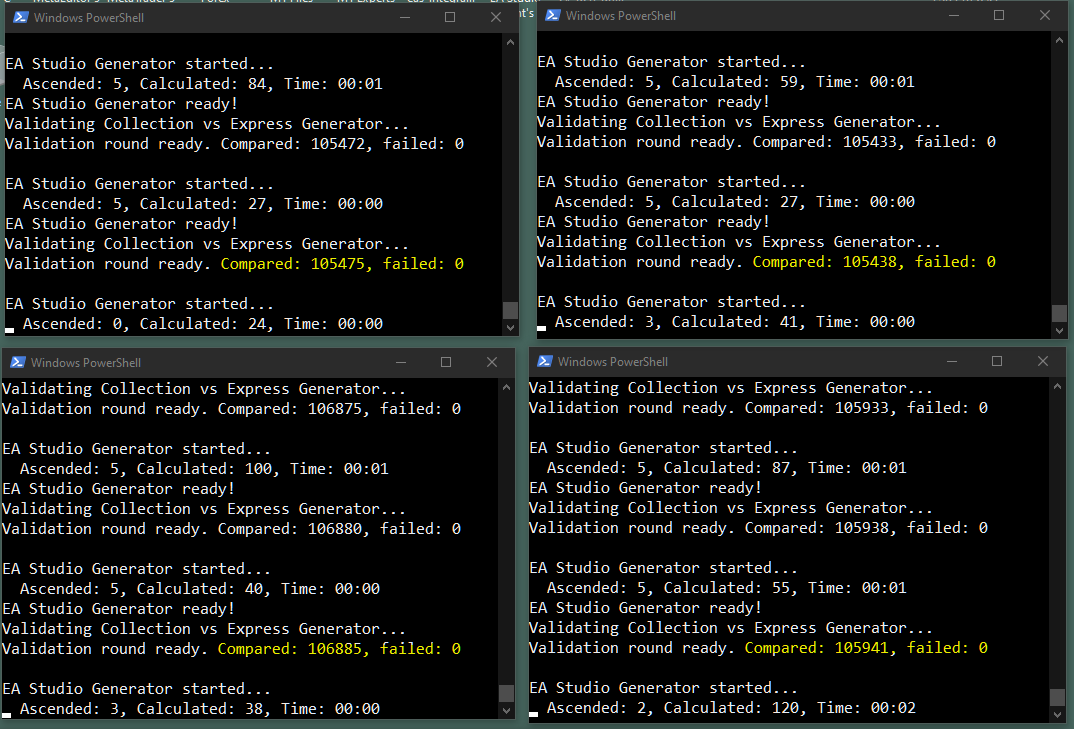
			<content type="html"><![CDATA[<p>After several issues have been fixed, EA Studio and Express Generator calculate equally.<br />All issues found were regarding the first bar of the calculations. It appeared more tricky than it should be <img src="https://forexsb.com/forum/img/smilies/smile.png" width="15" height="15" alt="smile" /></p><br /><p><a href="https://image-holder.forexsb.com/store/eas-vs-xgen-compare-good.png"><span class="postimg"><img src="https://image-holder.forexsb.com/store/eas-vs-xgen-compare-good-thumb.png" alt="https://image-holder.forexsb.com/store/eas-vs-xgen-compare-good-thumb.png" /></span></a></p>]]></content>
			<author>
				<name><![CDATA[Popov]]></name>
				<uri>https://forexsb.com/forum/user/2/</uri>
			</author>
			<updated>2023-03-10T05:02:20Z</updated>
			<id>https://forexsb.com/forum/post/73905/#p73905</id>
		</entry>
		<entry>
			<title type="html"><![CDATA[Re: Indicator Options in EA Studio]]></title>
			<link rel="alternate" href="https://forexsb.com/forum/post/73902/#p73902" />
			<content type="html"><![CDATA[<div class="quotebox"><cite>ViniQ wrote:</cite><blockquote><p>@Popov if possible allow us to optimize the smoothing method too on indicators that are moving average based ( Moving Average, Moving Averages Crossover ...) Cheers</p></blockquote></div><p>+1</p>]]></content>
			<author>
				<name><![CDATA[geektrader]]></name>
				<uri>https://forexsb.com/forum/user/1841/</uri>
			</author>
			<updated>2023-03-10T03:13:56Z</updated>
			<id>https://forexsb.com/forum/post/73902/#p73902</id>
		</entry>
		<entry>
			<title type="html"><![CDATA[Re: Indicator Options in EA Studio]]></title>
			<link rel="alternate" href="https://forexsb.com/forum/post/73899/#p73899" />
			<content type="html"><![CDATA[<p>Thanks for the update and another 5% speed improvement, that&#039;s pure gold as usually:-)</p><p>Also the automatic verification between EA Studio and Express Generator is a great idea. I&#039;ll test and report back how it goes.</p>]]></content>
			<author>
				<name><![CDATA[geektrader]]></name>
				<uri>https://forexsb.com/forum/user/1841/</uri>
			</author>
			<updated>2023-03-09T19:13:16Z</updated>
			<id>https://forexsb.com/forum/post/73899/#p73899</id>
		</entry>
		<entry>
			<title type="html"><![CDATA[Re: Indicator Options in EA Studio]]></title>
			<link rel="alternate" href="https://forexsb.com/forum/post/73896/#p73896" />
			<content type="html"><![CDATA[<p>Uploaded <strong>Expert Advisor Studio v23.3.9</strong></p><p>This release comes with some minor issues fixed:<br /> - fixed starting bar of 3 indicators<br /> - fixed Net profit calculation when the strategy opens and closes a position at the first possible bar.<br /> - indicators have fix max period to 1000 bars. It was 200 before. Or, it is equal to the &quot;Max indicator period&quot; option from the Settings, if it is higher.</p><p>EA Studio is now about 5% on 100k bars. The speed improvement comes from a different way of initializing and setting the arrays&nbsp; that hold the computed values of indicators.</p><p>I think all current issues are fixed. However, be careful and report any misbehavior!</p><p>Trade Safe!</p>]]></content>
			<author>
				<name><![CDATA[Popov]]></name>
				<uri>https://forexsb.com/forum/user/2/</uri>
			</author>
			<updated>2023-03-09T17:07:11Z</updated>
			<id>https://forexsb.com/forum/post/73896/#p73896</id>
		</entry>
		<entry>
			<title type="html"><![CDATA[Re: Indicator Options in EA Studio]]></title>
			<link rel="alternate" href="https://forexsb.com/forum/post/73892/#p73892" />
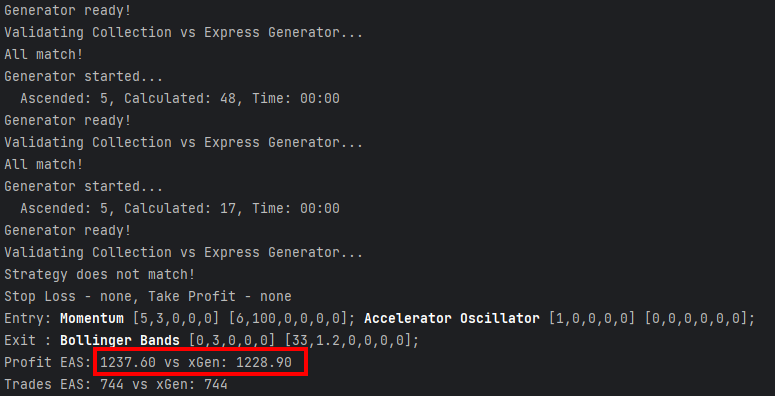
			<content type="html"><![CDATA[<p>I made a lot of refactoring and optimizations of the latest releases of EA Studio.</p><p>Just to be sure everything is fine, I made an automated test of the latest (unpublished) EA Studio vs the current Express Generator.</p><p>The tester generates 5 strategies in a local build of EA Studio and then tests them in Express Generator with the same settings.</p><p>It was rather boring to watch it, but finally, it found a discrepancy <img src="https://forexsb.com/forum/img/smilies/smile.png" width="15" height="15" alt="smile" /> <img src="https://forexsb.com/forum/img/smilies/wink.png" width="15" height="15" alt="wink" /><br />One strategy showed the same count of trades but a slightly different profit.</p><p>I&#039;ll dig deeper to find out why it happens and will solve it.</p><p><span class="postimg"><img src="https://image-holder.forexsb.com/store/eas-vs-xgen-deviation-profit.png" alt="https://image-holder.forexsb.com/store/eas-vs-xgen-deviation-profit.png" /></span></p><p>Trade Safe!</p>]]></content>
			<author>
				<name><![CDATA[Popov]]></name>
				<uri>https://forexsb.com/forum/user/2/</uri>
			</author>
			<updated>2023-03-09T13:58:13Z</updated>
			<id>https://forexsb.com/forum/post/73892/#p73892</id>
		</entry>
		<entry>
			<title type="html"><![CDATA[Re: Indicator Options in EA Studio]]></title>
			<link rel="alternate" href="https://forexsb.com/forum/post/73876/#p73876" />
			<content type="html"><![CDATA[<p>@Popov if possible allow us to optimize the smoothing method too on indicators that are moving average based ( Moving Average, Moving Averages Crossover ...) Cheers</p>]]></content>
			<author>
				<name><![CDATA[ViniQ]]></name>
				<uri>https://forexsb.com/forum/user/9651/</uri>
			</author>
			<updated>2023-03-08T19:28:27Z</updated>
			<id>https://forexsb.com/forum/post/73876/#p73876</id>
		</entry>
		<entry>
			<title type="html"><![CDATA[Re: Indicator Options in EA Studio]]></title>
			<link rel="alternate" href="https://forexsb.com/forum/post/73875/#p73875" />
			<content type="html"><![CDATA[<p>Great news that this limit was finally lifted and the new functionality is on top! Thanks for this.</p>]]></content>
			<author>
				<name><![CDATA[geektrader]]></name>
				<uri>https://forexsb.com/forum/user/1841/</uri>
			</author>
			<updated>2023-03-08T19:21:10Z</updated>
			<id>https://forexsb.com/forum/post/73875/#p73875</id>
		</entry>
		<entry>
			<title type="html"><![CDATA[Re: Indicator Options in EA Studio]]></title>
			<link rel="alternate" href="https://forexsb.com/forum/post/73874/#p73874" />
			<content type="html"><![CDATA[<p>I have been waiting it for a long time <img src="https://forexsb.com/forum/img/smilies/big_smile.png" width="15" height="15" alt="big_smile" /></p><p>Congrats to the community for always improve the software with construtive feedback<br />and to Popov/dev team to have such a great Work ethic! Cheers from Brazil</p>]]></content>
			<author>
				<name><![CDATA[ViniQ]]></name>
				<uri>https://forexsb.com/forum/user/9651/</uri>
			</author>
			<updated>2023-03-08T18:42:35Z</updated>
			<id>https://forexsb.com/forum/post/73874/#p73874</id>
		</entry>
		<entry>
			<title type="html"><![CDATA[Re: Indicator Options in EA Studio]]></title>
			<link rel="alternate" href="https://forexsb.com/forum/post/73852/#p73852" />
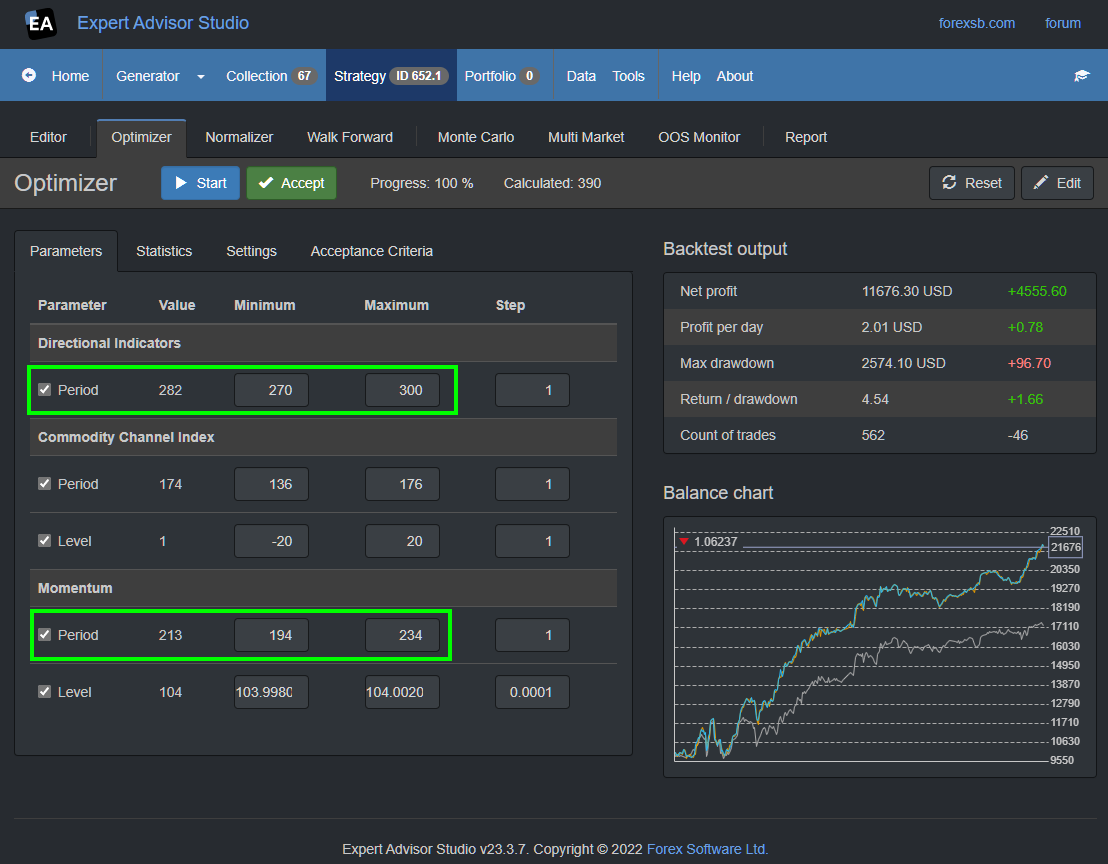
			<content type="html"><![CDATA[<p>Uploaded <strong>Expert Advisor Studio v23.3.7</strong></p><p>This release interprets the &quot;Max indicator period&quot; option better when we have values higher than 200:<br /> - Added ability to set Period higher than 200 in the Editor<br /> - Better validation of the numeric values fields in the Indicator Properties panel<br /> - proper Maximum values fields in the Optimizer <br /> - Optimizer and Normalizer calculate indicator values higher than 200.</p><p>These features were rather tricky to implement, and some misbehaviour is possible.</p><p>You can test the new features by settings the &quot;Max indicator period&quot; higher than 200. Let&#039;s say 300.<br />Run the Generator.<br />Find a strategy with an indicator with a Period higher than 200.<br />Play with it in the Editor, Optimizer and Normalizer.</p><br /><p><a href="https://image-holder.forexsb.com/store/eas-optimizer-period-higher-than-200.png"><span class="postimg"><img src="https://image-holder.forexsb.com/store/eas-optimizer-period-higher-than-200-thumb.png" alt="https://image-holder.forexsb.com/store/eas-optimizer-period-higher-than-200-thumb.png" /></span></a></p><br /><p>Please report any issues you discover!</p>]]></content>
			<author>
				<name><![CDATA[Popov]]></name>
				<uri>https://forexsb.com/forum/user/2/</uri>
			</author>
			<updated>2023-03-07T10:29:49Z</updated>
			<id>https://forexsb.com/forum/post/73852/#p73852</id>
		</entry>
		<entry>
			<title type="html"><![CDATA[Re: Indicator Options in EA Studio]]></title>
			<link rel="alternate" href="https://forexsb.com/forum/post/73836/#p73836" />
			<content type="html"><![CDATA[<p>Uploaded <strong>Expert Advisor Studio v23.3.6</strong></p><p>It comes with indicators&#039; code cleanup and optimization.</p><p>I ran many tests to be sure the generated by EA Studio collections match the Express Generator.</p><p>Trade Safe!</p>]]></content>
			<author>
				<name><![CDATA[Popov]]></name>
				<uri>https://forexsb.com/forum/user/2/</uri>
			</author>
			<updated>2023-03-06T12:34:56Z</updated>
			<id>https://forexsb.com/forum/post/73836/#p73836</id>
		</entry>
		<entry>
			<title type="html"><![CDATA[Re: Indicator Options in EA Studio]]></title>
			<link rel="alternate" href="https://forexsb.com/forum/post/73822/#p73822" />
			<content type="html"><![CDATA[<p>I uploaded <strong>Expert Advisor Studio v23.3.5</strong></p><p>It comes with indicators&#039; code cleanup and optimization.<br />I fixed a &quot;Standard Deviation&quot; indicator bug introduced in the previous release.</p>]]></content>
			<author>
				<name><![CDATA[Popov]]></name>
				<uri>https://forexsb.com/forum/user/2/</uri>
			</author>
			<updated>2023-03-05T21:30:37Z</updated>
			<id>https://forexsb.com/forum/post/73822/#p73822</id>
		</entry>
		<entry>
			<title type="html"><![CDATA[Re: Indicator Options in EA Studio]]></title>
			<link rel="alternate" href="https://forexsb.com/forum/post/73820/#p73820" />
			<content type="html"><![CDATA[<p>One of the best features you&#039;ve added for indicators without a fixed range (unlike RSI or WPR). They indeed vary extremely wide between different market types, so that this feature is absolutely crucial. I am glad you have added such smart stuff to EA Studio since a long time already. Thanks.</p>]]></content>
			<author>
				<name><![CDATA[geektrader]]></name>
				<uri>https://forexsb.com/forum/user/1841/</uri>
			</author>
			<updated>2023-03-05T08:22:50Z</updated>
			<id>https://forexsb.com/forum/post/73820/#p73820</id>
		</entry>
		<entry>
			<title type="html"><![CDATA[Re: Indicator Options in EA Studio]]></title>
			<link rel="alternate" href="https://forexsb.com/forum/post/73816/#p73816" />
			<content type="html"><![CDATA[<p>A new version was uploaded with the same number.</p><p>It fixes an issue with settings the decimal points of the generated Level parameter.</p><p>The bug was introduced with the previous release, where I added range calculation for the Level parameter for the following indicators: Bull Power, Bears Power, Momentum, and Commodity Channel Index.</p><p>How the Level range work:<br /> 1. the Generator calculates the Level value within the default ranges (Min, Max, and Point) for the first calculation of an indicator<br /> 2. It finds the Min and Max values of the indicator line.<br /> 3. The Generator use the found Min and Max values for ranges of the Level parameter for the subsequent calculation.</p><p>This feature is very useful for the Level parameter because it varies greatly for the different markets.&nbsp; <br />This feature is used in 10 of the EA Studio indicators.</p>]]></content>
			<author>
				<name><![CDATA[Popov]]></name>
				<uri>https://forexsb.com/forum/user/2/</uri>
			</author>
			<updated>2023-03-04T17:02:04Z</updated>
			<id>https://forexsb.com/forum/post/73816/#p73816</id>
		</entry>
		<entry>
			<title type="html"><![CDATA[Re: Indicator Options in EA Studio]]></title>
			<link rel="alternate" href="https://forexsb.com/forum/post/73813/#p73813" />
			<content type="html"><![CDATA[<p>Oh wow, these are great news! Will test ASAP, currently rebuilding my 38TB NAS from parity after a crash, hence currently a little break from my usual activity. But I will report back. Thanks so much for these new features -:)</p>]]></content>
			<author>
				<name><![CDATA[geektrader]]></name>
				<uri>https://forexsb.com/forum/user/1841/</uri>
			</author>
			<updated>2023-03-04T15:06:37Z</updated>
			<id>https://forexsb.com/forum/post/73813/#p73813</id>
		</entry>
</feed>