<?xml version="1.0" encoding="utf-8"?>
<feed xmlns="http://www.w3.org/2005/Atom">
	<title type="html"><![CDATA[Forex Software — Workflow Runner]]></title>
	<link rel="self" href="https://forexsb.com/forum/feed/atom/topic/9279/" />
	<updated>2023-09-19T10:55:51Z</updated>
	<generator>PunBB</generator>
	<id>https://forexsb.com/forum/topic/9279/workflow-runner/</id>
		<entry>
			<title type="html"><![CDATA[Re: Workflow Runner]]></title>
			<link rel="alternate" href="https://forexsb.com/forum/post/76614/#p76614" />
			<content type="html"><![CDATA[<p>Yes, it looks correct.</p><p>In the next release of Express Generator, it will be easier to make it.<br />Please watch for Express Generator v2.47.</p>]]></content>
			<author>
				<name><![CDATA[Popov]]></name>
				<uri>https://forexsb.com/forum/user/2/</uri>
			</author>
			<updated>2023-09-19T10:55:51Z</updated>
			<id>https://forexsb.com/forum/post/76614/#p76614</id>
		</entry>
		<entry>
			<title type="html"><![CDATA[Re: Workflow Runner]]></title>
			<link rel="alternate" href="https://forexsb.com/forum/post/76596/#p76596" />
			<content type="html"><![CDATA[<p>Hi Popov,<br />Thanks for the valuable tutorial. Can I also specify data start date rather than use max-data-bars?</p><p>For example,<br />REM Generate In Sample 90%<br />...<br /> --use_data_start true ^<br /> --data_start &quot;2021-01-01 UTC&quot; ^<br /> --use_data_end false ^<br /> --data_start_percent 0 ^<br /> --data_end_percent 90 ^ <br /> --collection_capacity 10 ^</p><p>then in REM Validated OOS 10%<br />.. --use_data_start true ^<br /> --data_start &quot;2021-01-01 UTC&quot; ^ <br /> --use_data_end false ^ <br /> --data_start_percent 90 ^<br /> --data_end_percent 100 ^</p><p>Will this work? Thanks<br />Regards,<br />AFR</p>]]></content>
			<author>
				<name><![CDATA[AdvanceFxRobot]]></name>
				<uri>https://forexsb.com/forum/user/14723/</uri>
			</author>
			<updated>2023-09-18T16:00:27Z</updated>
			<id>https://forexsb.com/forum/post/76596/#p76596</id>
		</entry>
		<entry>
			<title type="html"><![CDATA[Workflow Runner]]></title>
			<link rel="alternate" href="https://forexsb.com/forum/post/71941/#p71941" />
			<content type="html"><![CDATA[<p>We can make a command that runs another command with different parameters.</p><p>Please see the OOS example here: <a href="https://forexsb.com/forum/topic/9278/generate-in-sample-and-validate-oos/">https://forexsb.com/forum/topic/9278/ge … idate-oos/</a></p><p>I&#039;ll use the same workflow but will make a command that runs it on 8 different markets.</p><p>To make it work, I modify the OOS example to accept parameters.</p><p>Here I set a variable <strong>symbol</strong> to take the first param and a variable <strong>period</strong> to accept the second param.</p><div class="codebox"><pre><code>set symbol=%1
set period=%2</code></pre></div><p>Then I use the symbol and period params instead of hardcoding the symbol and period.<br />We use a variable by surrounding it with <strong>%</strong>.</p><div class="codebox"><pre><code>node .\bin\fetch.js ^
  --fx-rates      false    ^
  --symbol        %symbol% ^
  --period        %period% ^
  --max-data-bars 20000
...
node .\bin\gen.js ^
  --symbol        %symbol% ^
  --period        %period% ^
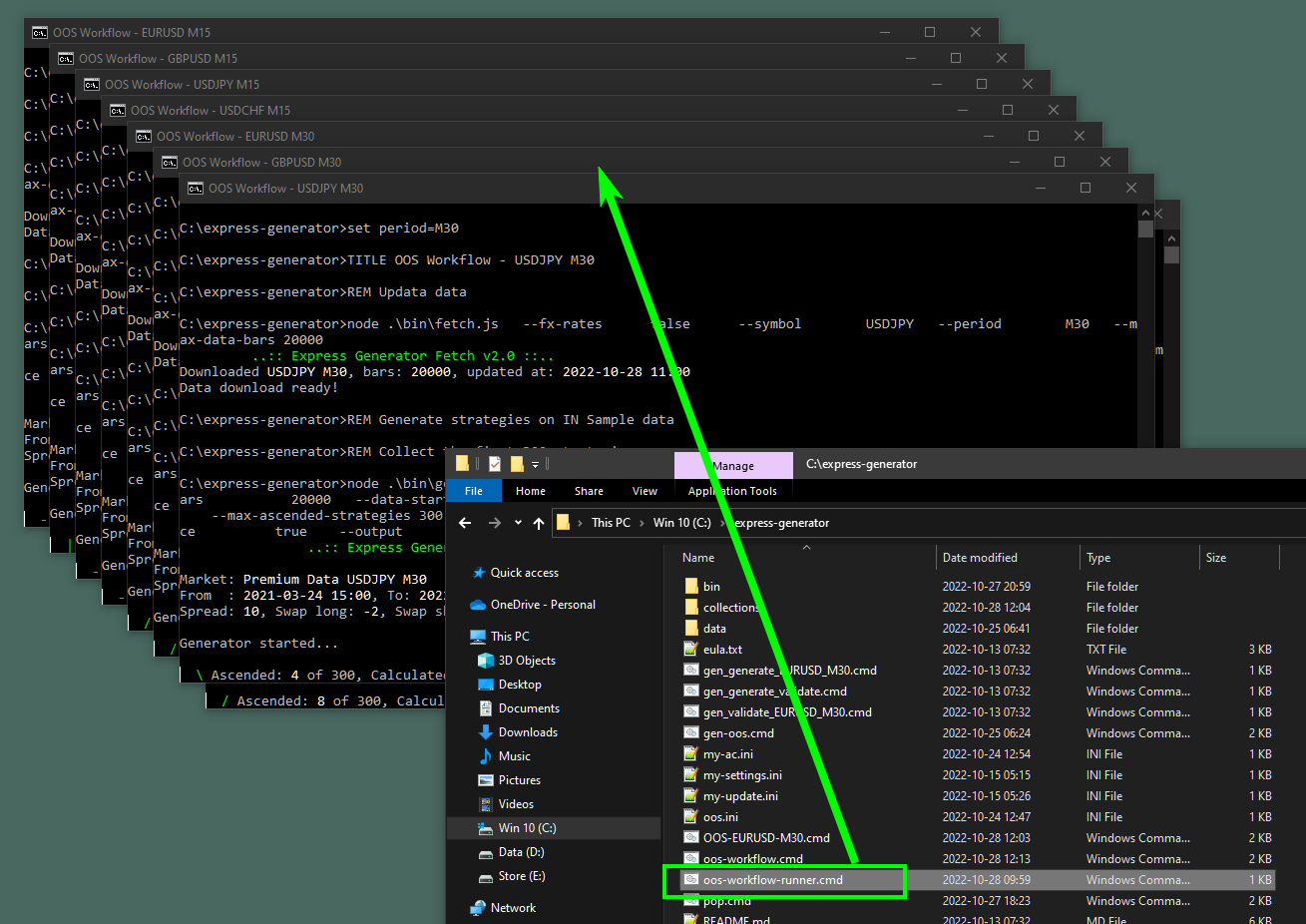
  --max-data-bars 20000 ^</code></pre></div><br /><p>By having the symbol and the period as parameters, I can run this command from another.</p><p><strong>oos-workflow-runner.cmd</strong></p><div class="codebox"><pre><code>START oos-workflow EURUSD M15
START oos-workflow GBPUSD M15
START oos-workflow USDJPY M15
START oos-workflow USDCHF M15

START oos-workflow EURUSD M30
START oos-workflow GBPUSD M30
START oos-workflow USDJPY M30
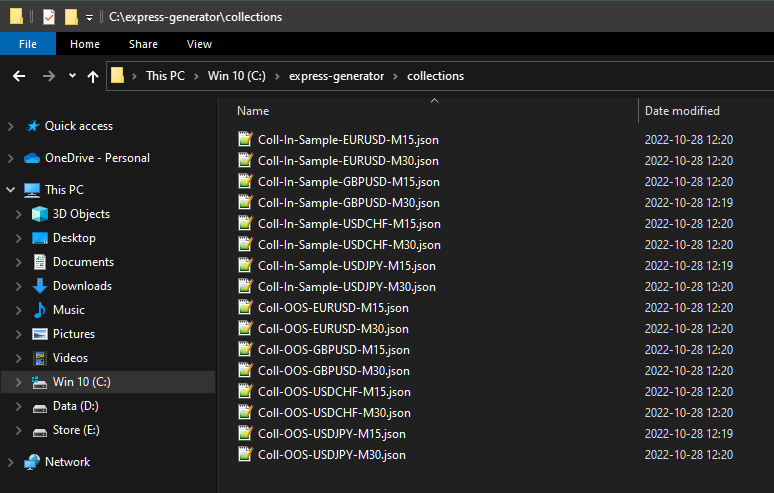
START oos-workflow USDCHF M30</code></pre></div><p>Now I can start the <strong>oos-workflow-runner.cmd</strong> command and it will run 8 different oos-workflow commands in 8 separate CMD instances.</p><p><a href="https://image-holder.forexsb.com/store/workflow-runner.png"><span class="postimg"><img src="https://image-holder.forexsb.com/store/workflow-runner-thumb.png" alt="https://image-holder.forexsb.com/store/workflow-runner-thumb.png" /></span></a></p><p>Now I have 8 sets of generated In Sample collections and validated top 10 collections with 1 click.</p><p><a href="https://image-holder.forexsb.com/store/workflow-runner-collections.png"><span class="postimg"><img src="https://image-holder.forexsb.com/store/workflow-runner-collections-thumb.png" alt="https://image-holder.forexsb.com/store/workflow-runner-collections-thumb.png" /></span></a></p><p>This is the true magic of the Express Generator <img src="https://forexsb.com/forum/img/smilies/smile.png" width="15" height="15" alt="smile" /></p>]]></content>
			<author>
				<name><![CDATA[Popov]]></name>
				<uri>https://forexsb.com/forum/user/2/</uri>
			</author>
			<updated>2022-10-28T12:21:25Z</updated>
			<id>https://forexsb.com/forum/post/71941/#p71941</id>
		</entry>
</feed>