<?xml version="1.0" encoding="utf-8"?>
<feed xmlns="http://www.w3.org/2005/Atom">
	<title type="html"><![CDATA[Forex Software — Update Historical Data]]></title>
	<link rel="self" href="https://forexsb.com/forum/feed/atom/topic/9277/" />
	<updated>2025-10-06T21:32:56Z</updated>
	<generator>PunBB</generator>
	<id>https://forexsb.com/forum/topic/9277/update-historical-data/</id>
		<entry>
			<title type="html"><![CDATA[Re: Update Historical Data]]></title>
			<link rel="alternate" href="https://forexsb.com/forum/post/82869/#p82869" />
			<content type="html"><![CDATA[<p>There is particular historical (and not very logical) reason for that.</p><p>The first Forex Strategy Builder I created around 2007 was able to import historical data from MetaTrader 4 in CSV format.<br />The easiest way to do it was to press <strong>Ctrl</strong>+ <strong>S</strong> on chart.</p><p>The export files are EURUSD1.CSV, EURUSD5.CSV, ..., EURUSD1440.CSV</p><p>FSB Pro uses similar functionality since 2012 (first production release in 2014).<br />It made it very easy to set a data path directly to the MT&#039;s &quot;files&quot; folder and simply to save CSV filers from the charts.</p><p>Later, I introduced data files in JSON format for EA Studio (and now for FSB Pro also). The JSON files have the benefit of containing symbol information like spreads, swaps, commissions, count of digits ....</p><p>When I start the work on Express Generator, I connected it to the Premium Data feed server.<br />I was pissed of it one day spending hours to find a bug of loading the data because I was thinking that EURUSD1.json is D1 period, but it was actually M1 (simply because USD ends with D). Then I made the Premium Data feed files like EURUSD_M1.json..</p><p>This worked well until I decided to make it possible to import data in JSON format from our broker. Of course, the easiest way was to use the Data Export scripts from EA Studio (because every EAS trader have them already) and also to set the data path to the brokers &quot;files&quot; folder. Obviously, the exported format of EA Studio was EURUSD1.json <img src="https://forexsb.com/forum/img/smilies/smile.png" width="15" height="15" alt="smile" /></p><p>That&#039;s why we will suffer forever.<br />(Recently tested one of the first releases of FSB from about 2005 and it still works. So that EA Studio and Express Generator will work in that way for many more years ahead)</p>]]></content>
			<author>
				<name><![CDATA[Popov]]></name>
				<uri>https://forexsb.com/forum/user/2/</uri>
			</author>
			<updated>2025-10-06T21:32:56Z</updated>
			<id>https://forexsb.com/forum/post/82869/#p82869</id>
		</entry>
		<entry>
			<title type="html"><![CDATA[Re: Update Historical Data]]></title>
			<link rel="alternate" href="https://forexsb.com/forum/post/82821/#p82821" />
			<content type="html"><![CDATA[<p>Hi Popov,</p><p>Why do the naming structures of the JSON files in the data folder differ from each other? for example:<br />\express-generator\data\Premium\EURUSD_M30.json<br />\express-generator\data\Darwinex\EURUSD30.json<br />\express-generator\data\Eightcap\EURUSD30.json</p>]]></content>
			<author>
				<name><![CDATA[quantbot]]></name>
				<uri>https://forexsb.com/forum/user/14524/</uri>
			</author>
			<updated>2025-09-21T12:46:04Z</updated>
			<id>https://forexsb.com/forum/post/82821/#p82821</id>
		</entry>
		<entry>
			<title type="html"><![CDATA[Re: Update Historical Data]]></title>
			<link rel="alternate" href="https://forexsb.com/forum/post/74144/#p74144" />
			<content type="html"><![CDATA[<p>Hi Popov,<br />Hope you are fine.<br />I have a question: <br />I am trading on ICMarkets. <br />ICMarkets servers are set on UTC+2. <br />When using the time_zone fetch setting in express generator should I set it to 2 or 0?</p>]]></content>
			<author>
				<name><![CDATA[RaminPo]]></name>
				<uri>https://forexsb.com/forum/user/14450/</uri>
			</author>
			<updated>2023-03-22T13:11:29Z</updated>
			<id>https://forexsb.com/forum/post/74144/#p74144</id>
		</entry>
		<entry>
			<title type="html"><![CDATA[Update Historical Data]]></title>
			<link rel="alternate" href="https://forexsb.com/forum/post/71934/#p71934" />
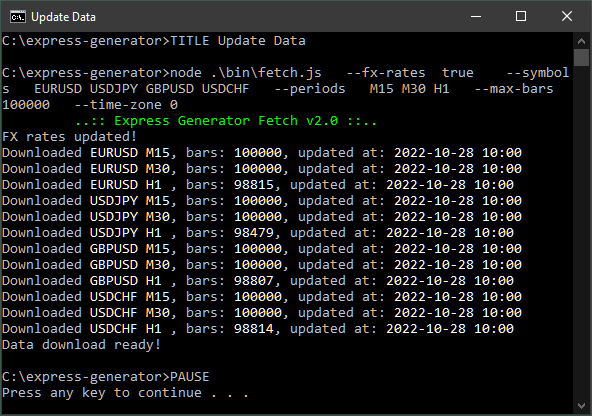
			<content type="html"><![CDATA[<p>Express Generator can fetch historical data from our Premium Data server.</p><br /><div class="codebox"><pre><code>TITLE Update Data

node .\bin\fetch.js ^
  --fx-rates  true  ^
  --symbols       EURUSD USDJPY GBPUSD USDCHF ^
  --periods       M15 M30 H1 ^
  --max-data-bars 100000 ^
  --time-zone 0

PAUSE</code></pre></div><br /><p>How it works:<br /> <strong>--fx-rates&nbsp; true</strong> - sets the fetch command to update the FX exchange rates. They are needed to convert the profit into the account currency.<br /> <strong>--symbols&nbsp; &nbsp;EURUSD USDJPY GBPUSD USDCHF</strong> - these are the symbols we will download<br /> <strong>--periods&nbsp; &nbsp;M15 M30 H1</strong> - periods to download for each of the above symbols<br /> <strong>--max-data-bars 100000</strong> - the maximum number of bars to download<br /> <strong>--time-zone 0</strong> - &quot;fetch&quot; can change the data timezone. We specify the timezone shift in hours. Here 0 means UTC.</p><p><span class="postimg"><img src="https://image-holder.forexsb.com/store/express-generator-fetch-premium-data.png" alt="https://image-holder.forexsb.com/store/express-generator-fetch-premium-data.png" /></span></p>]]></content>
			<author>
				<name><![CDATA[Popov]]></name>
				<uri>https://forexsb.com/forum/user/2/</uri>
			</author>
			<updated>2022-10-28T11:03:46Z</updated>
			<id>https://forexsb.com/forum/post/71934/#p71934</id>
		</entry>
</feed>