<?xml version="1.0" encoding="utf-8"?>
<feed xmlns="http://www.w3.org/2005/Atom">
	<title type="html"><![CDATA[Forex Software — Special Modifications for EAS]]></title>
	<link rel="self" href="https://forexsb.com/forum/feed/atom/topic/8955/" />
	<updated>2021-11-10T03:05:44Z</updated>
	<generator>PunBB</generator>
	<id>https://forexsb.com/forum/topic/8955/special-modifications-for-eas/</id>
		<entry>
			<title type="html"><![CDATA[Re: Special Modifications for EAS]]></title>
			<link rel="alternate" href="https://forexsb.com/forum/post/66840/#p66840" />
			<content type="html"><![CDATA[<p>@Popov: you are underestimating the quality of EA Studio ;-) I´ve successfully had &gt; 15000 strategies in one collection without ANY crashes. Good work!</p><p>@Roughey: Good to post my parameters here too, it will hopefully help others. Some credit would have been nice though ;-)</p>]]></content>
			<author>
				<name><![CDATA[geektrader]]></name>
				<uri>https://forexsb.com/forum/user/1841/</uri>
			</author>
			<updated>2021-11-10T03:05:44Z</updated>
			<id>https://forexsb.com/forum/post/66840/#p66840</id>
		</entry>
		<entry>
			<title type="html"><![CDATA[Re: Special Modifications for EAS]]></title>
			<link rel="alternate" href="https://forexsb.com/forum/post/66832/#p66832" />
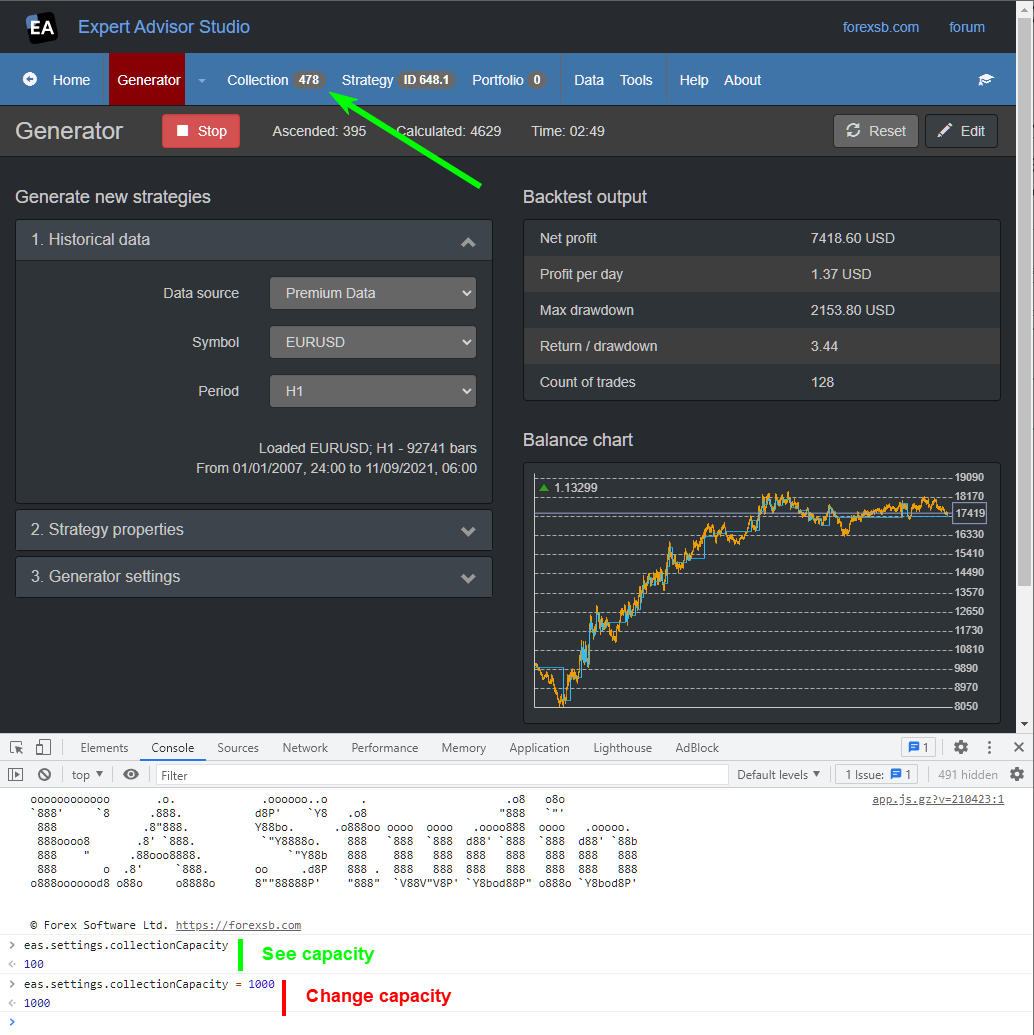
			<content type="html"><![CDATA[<p>A hack for increasing the Collection capacity.</p><p>Please know that a greater capacity may make the application slower and unstable.</p><p> * Open the browser&#039;s console: hit <strong>F12</strong> and switch to the &quot;Console&quot; tab.</p><p>The Collection capacity is in the following variable: <em>eas.settings.collectionCapacity</em><br /> - To see the capacity, write the variable and hit enter.<br /> - To change it, assign a value to it: eas.settings.collectionCapacity = 1000</p><p><a href="https://image-holder.forexsb.com/store/eas-change-collection-capacity.png"><span class="postimg"><img src="https://image-holder.forexsb.com/store/eas-change-collection-capacity-thumb.png" alt="https://image-holder.forexsb.com/store/eas-change-collection-capacity-thumb.png" /></span></a></p>]]></content>
			<author>
				<name><![CDATA[Popov]]></name>
				<uri>https://forexsb.com/forum/user/2/</uri>
			</author>
			<updated>2021-11-09T08:38:00Z</updated>
			<id>https://forexsb.com/forum/post/66832/#p66832</id>
		</entry>
		<entry>
			<title type="html"><![CDATA[Special Modifications for EAS]]></title>
			<link rel="alternate" href="https://forexsb.com/forum/post/66830/#p66830" />
			<content type="html"><![CDATA[<p>Hey,</p><p>i want to make a list with special modifications for EAs. We can collect here what do to if we want more bars or more in collection. Problem is i cannot find in forum anymore. And when we have one thread and Popov make it as sticky than every new one can look into.</p><p>Problems with Chrome and stability of the Browser:</p><p>Launching chrome.exe with these command line parameters should help:</p><div class="codebox"><pre><code>--args --disable-features=RendererCodeIntegrity --disable-background-timer-throttling --disable-renderer-backgrounding --disable-backgrounding-occluded-windows --js-flags=&quot;--max_old_space_size=32768&quot;</code></pre></div><p>It´s also always a good idea to use optimized Chrome builds from RobRich, they are much faster than the Google Chrome releases. I´d recommend to pick the AVX version:</p><p>https://github.com/RobRich999/Chromium_Clang</p>]]></content>
			<author>
				<name><![CDATA[Roughey]]></name>
				<uri>https://forexsb.com/forum/user/10939/</uri>
			</author>
			<updated>2021-11-09T07:34:47Z</updated>
			<id>https://forexsb.com/forum/post/66830/#p66830</id>
		</entry>
</feed>