<?xml version="1.0" encoding="utf-8"?>
<feed xmlns="http://www.w3.org/2005/Atom">
	<title type="html"><![CDATA[Forex Software — Import forex data in Expert Advisor Studio]]></title>
	<link rel="self" href="https://forexsb.com/forum/feed/atom/topic/8185/" />
	<updated>2022-05-30T20:06:43Z</updated>
	<generator>PunBB</generator>
	<id>https://forexsb.com/forum/topic/8185/import-forex-data-in-expert-advisor-studio/</id>
		<entry>
			<title type="html"><![CDATA[Re: Import forex data in Expert Advisor Studio]]></title>
			<link rel="alternate" href="https://forexsb.com/forum/post/69158/#p69158" />
			<content type="html"><![CDATA[<p>Ok thank you for confirming my answer!<br />That will be perfect for me.</p><p>But your answer is not totally true ... It must be done just 1 time.<br />Without this it is not possible to customize the data to the broker needs.<br />But this is just less work for doing it 1 time.</p><p>Thank you and have a good evening.</p>]]></content>
			<author>
				<name><![CDATA[Dragon]]></name>
				<uri>https://forexsb.com/forum/user/13731/</uri>
			</author>
			<updated>2022-05-30T20:06:43Z</updated>
			<id>https://forexsb.com/forum/post/69158/#p69158</id>
		</entry>
		<entry>
			<title type="html"><![CDATA[Re: Import forex data in Expert Advisor Studio]]></title>
			<link rel="alternate" href="https://forexsb.com/forum/post/69154/#p69154" />
			<content type="html"><![CDATA[<p>You don&#039;t need to import data from the &quot;Download Historical Data&quot; app anymore because we feed them automatically in EA Studio. They are named &quot;Premium Data&quot;.</p>]]></content>
			<author>
				<name><![CDATA[Popov]]></name>
				<uri>https://forexsb.com/forum/user/2/</uri>
			</author>
			<updated>2022-05-30T17:32:12Z</updated>
			<id>https://forexsb.com/forum/post/69154/#p69154</id>
		</entry>
		<entry>
			<title type="html"><![CDATA[Re: Import forex data in Expert Advisor Studio]]></title>
			<link rel="alternate" href="https://forexsb.com/forum/post/69124/#p69124" />
			<content type="html"><![CDATA[<p>Did i understand it right?<br />That i have to do this in -EA Studio- just one time?</p><p>After i have done it and have customized the symbol settings to my brokers information,<br />i have to download and upload never again the *.json Files, right?</p><p>I have done the download and upload from *.json every time i used EA-Studio until now ...<br />But i realized that in EA-Studio the Generator will automatically updates newer Bars.</p><p>So can i just start the Generator every time without downloading + uploading Premium Data again, after one time customize my settings?</p>]]></content>
			<author>
				<name><![CDATA[Dragon]]></name>
				<uri>https://forexsb.com/forum/user/13731/</uri>
			</author>
			<updated>2022-05-29T09:13:33Z</updated>
			<id>https://forexsb.com/forum/post/69124/#p69124</id>
		</entry>
		<entry>
			<title type="html"><![CDATA[Import forex data in Expert Advisor Studio]]></title>
			<link rel="alternate" href="https://forexsb.com/forum/post/58834/#p58834" />
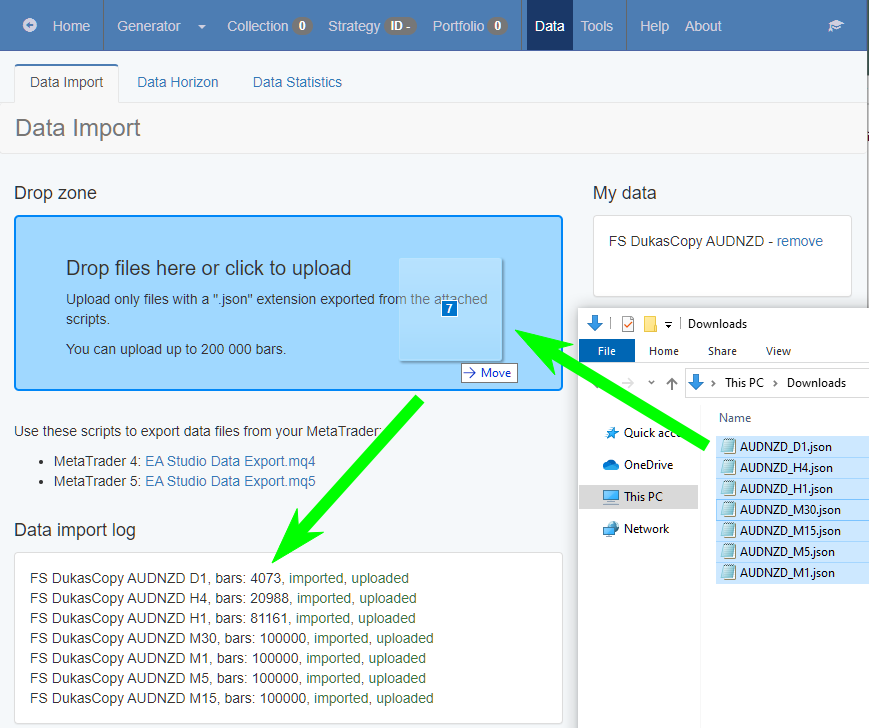
			<content type="html"><![CDATA[<p>You have to accomplish two steps - to import the data files in EA Studio and to customise the symbol&#039;s settings.</p><p>Import data files in EA Studio:</p><p> - Load the necessary data in the &quot;Expert Advisor Studio (JSON) format&quot;. Let&#039;s say AUDNZD.</p><p> - The files are with a .json extension. For example AUDNZD_H4.json</p><p> - Open EA Studio and navigate to the <strong>Data</strong> -&gt; <strong>Data Import</strong> page</p><p> - Select the download files and drag / drop them over the &quot;Drop files here...&#039; zone. EA Studio will import the files. If you are logged in with your account, EA Studio will also upload the files to the server for later use.</p><p> - Now you can visit the Editor and load the new symbol.</p><p>Customize the Symbols Settings. It is necessary to do it because the data comes with generic parameters for Swap, Spread, and others:</p><p> - Navigate to the Tools -&gt; Symbol Settings page.</p><p>- The new data are under the <strong>FS DukasCopy</strong> server. (&quot;FS&quot; stands for Forex Software Ltd.) Select the corresponding symbol.</p><p> - Switch on the &quot;Custom symbol settings&quot; option to be able to customize the settings. Now they become enabled.</p><p> - Change the values to be suitable for your trading account.</p><p><a href="https://image-holder.forexsb.com/store/expert-advisor-studio-historcial-forex-data-import.png"><span class="postimg"><img src="https://image-holder.forexsb.com/store/expert-advisor-studio-historcial-forex-data-import-thumb.png" alt="https://image-holder.forexsb.com/store/expert-advisor-studio-historcial-forex-data-import-thumb.png" /></span></a></p>]]></content>
			<author>
				<name><![CDATA[Popov]]></name>
				<uri>https://forexsb.com/forum/user/2/</uri>
			</author>
			<updated>2020-01-16T19:33:02Z</updated>
			<id>https://forexsb.com/forum/post/58834/#p58834</id>
		</entry>
</feed>