<?xml version="1.0" encoding="utf-8"?>
<feed xmlns="http://www.w3.org/2005/Atom">
	<title type="html"><![CDATA[Forex Software — Import history forex data in MetaTrader 4]]></title>
	<link rel="self" href="https://forexsb.com/forum/feed/atom/topic/8184/" />
	<updated>2020-01-16T19:30:08Z</updated>
	<generator>PunBB</generator>
	<id>https://forexsb.com/forum/topic/8184/import-history-forex-data-in-metatrader-4/</id>
		<entry>
			<title type="html"><![CDATA[Import history forex data in MetaTrader 4]]></title>
			<link rel="alternate" href="https://forexsb.com/forum/post/58833/#p58833" />
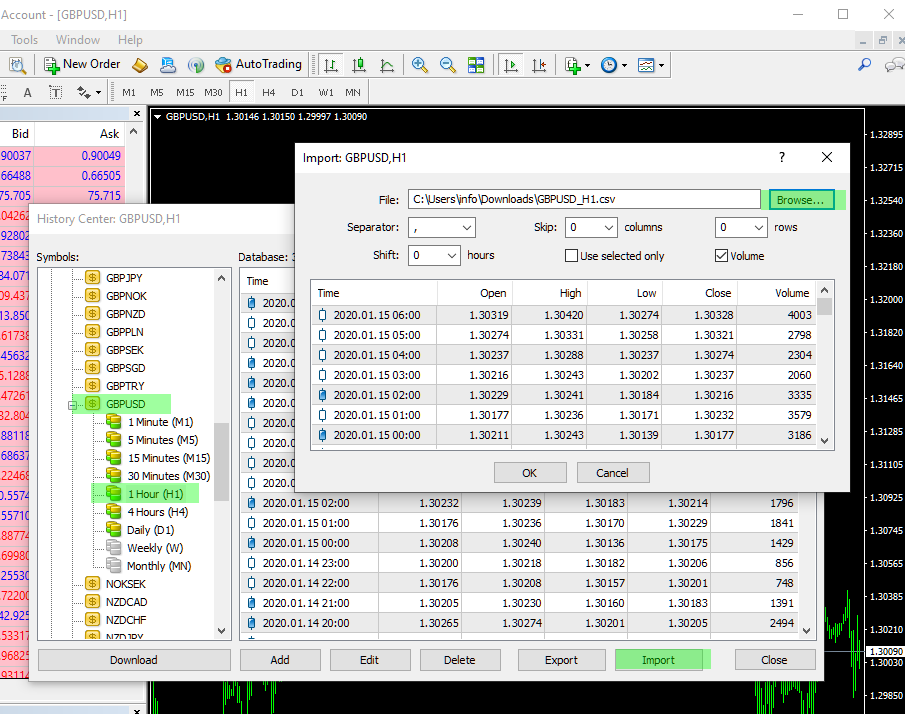
			<content type="html"><![CDATA[<p>MetaTrader 4 imports data in CSV format as follows:</p><p> - Load the necessary data in MetaTrader (CSV) format. Let&#039;s say GBPUSD. We recommend downloading the full data series - 200000 bars.</p><p> - Download all files in your Download folder. If you have previous downloads, you can sort the files by &quot;Date modified&quot;.</p><p> - Go to MetaTrader 4 and open the History Center from the Tools menu or by using F2.</p><p> - Navigate to the particular symbol in the &quot;Symbols:&quot; list - GBPUSD.</p><p> - Double click on the period to load the data in the table. We demonstrate that with H1, but you have to do it for all the periods one by one.</p><p> - Click the Import button to open the &quot;Import GBPUSD, H1&quot; panel.</p><p> - Use the Browse button to select the correct file. GBPUSD_H1.csv in that case. MT will preload and display the new data. If everything is normal, click OK.</p><p> - Repeat the previous steps for each period: M1, M5, M15, H1, D1.</p><p>Having good data in MetaTrader guarantees better quality of the backtest.</p><p><a href="https://image-holder.forexsb.com/store/import-forex-data-metatrader-gbpusd-h1.png"><span class="postimg"><img src="https://image-holder.forexsb.com/store/import-forex-data-metatrader-gbpusd-h1-thumb.png" alt="https://image-holder.forexsb.com/store/import-forex-data-metatrader-gbpusd-h1-thumb.png" /></span></a></p>]]></content>
			<author>
				<name><![CDATA[Popov]]></name>
				<uri>https://forexsb.com/forum/user/2/</uri>
			</author>
			<updated>2020-01-16T19:30:08Z</updated>
			<id>https://forexsb.com/forum/post/58833/#p58833</id>
		</entry>
</feed>