<?xml version="1.0" encoding="utf-8"?>
<feed xmlns="http://www.w3.org/2005/Atom">
	<title type="html"><![CDATA[Forex Software — Anyone have a faster way to output strategys to MQL4]]></title>
	<link rel="self" href="https://forexsb.com/forum/feed/atom/topic/7990/" />
	<updated>2020-06-11T06:51:44Z</updated>
	<generator>PunBB</generator>
	<id>https://forexsb.com/forum/topic/7990/anyone-have-a-faster-way-to-output-strategys-to-mql4/</id>
		<entry>
			<title type="html"><![CDATA[Re: Anyone have a faster way to output strategys to MQL4]]></title>
			<link rel="alternate" href="https://forexsb.com/forum/post/61111/#p61111" />
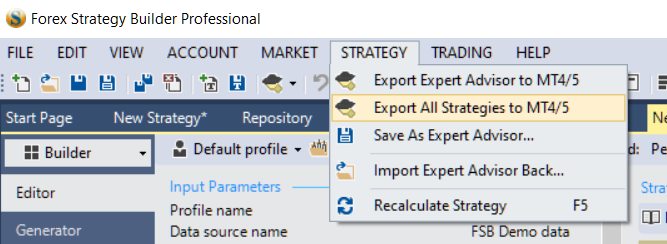
			<content type="html"><![CDATA[<p>You can export all open strategies as Expert Advisors to the available MetaTrader destinations.</p><p><span class="postimg"><img src="https://image-holder.forexsb.com/store/fsb-pro-export-all-strategies-to-meta-trader.png" alt="https://image-holder.forexsb.com/store/fsb-pro-export-all-strategies-to-meta-trader.png" /></span></p><p>If you want, you can set a destination folder for your experts that is not on MetaTrader. Do that in Control Panel -&gt; Expert Advisors. More info here: <a href="https://forexsb.com/wiki/fsbpro_guide/expert_advisor">Expert Advisor Settings</a></p>]]></content>
			<author>
				<name><![CDATA[Popov]]></name>
				<uri>https://forexsb.com/forum/user/2/</uri>
			</author>
			<updated>2020-06-11T06:51:44Z</updated>
			<id>https://forexsb.com/forum/post/61111/#p61111</id>
		</entry>
		<entry>
			<title type="html"><![CDATA[Re: Anyone have a faster way to output strategys to MQL4]]></title>
			<link rel="alternate" href="https://forexsb.com/forum/post/61109/#p61109" />
			<content type="html"><![CDATA[<p>What about Group selecting all the strategies from collections to the tabs instead of clicking them one by one. And is there a way to have a Export function within collections to group export all strategies? It can export either .xml or .mq4 something to make this more streamlined. And can the open tabs be extended to 100 instead of 50?</p>]]></content>
			<author>
				<name><![CDATA[Fwcolbert]]></name>
				<uri>https://forexsb.com/forum/user/11547/</uri>
			</author>
			<updated>2020-06-11T05:55:14Z</updated>
			<id>https://forexsb.com/forum/post/61109/#p61109</id>
		</entry>
		<entry>
			<title type="html"><![CDATA[Re: Anyone have a faster way to output strategys to MQL4]]></title>
			<link rel="alternate" href="https://forexsb.com/forum/post/57300/#p57300" />
			<content type="html"><![CDATA[<p>You can select and open multiple strategies at once with FSB Pro.</p><p>Then you can export all as individual experts. You can use either the &quot;Expert&quot; button in the middle of the toolbar or the &quot;STRATEGY&quot; -&gt; &quot;Export All Strategies to MT4/%&quot; menu.</p>]]></content>
			<author>
				<name><![CDATA[Popov]]></name>
				<uri>https://forexsb.com/forum/user/2/</uri>
			</author>
			<updated>2019-09-28T10:42:59Z</updated>
			<id>https://forexsb.com/forum/post/57300/#p57300</id>
		</entry>
		<entry>
			<title type="html"><![CDATA[Anyone have a faster way to output strategys to MQL4]]></title>
			<link rel="alternate" href="https://forexsb.com/forum/post/57299/#p57299" />
			<content type="html"><![CDATA[<p>Hi guys,</p><p>So I am fairly new to FSB I have been using EA Studio for about 12 months now daily and know it like the back of my hand. I have bought the MT4 Portfolio maker which you must export all strategies to MQL4 format before importing into the portfolio maker.</p><p>My question is, is there a quick way to export a large number of strategies to this format from FSB or must we export one by one, reason i ask is do people really export lets say 100 strategies one by one out of the repository then make a portfolio it seems very very time consuming to me? Maybe I am spoilt from using EA Studio.</p>]]></content>
			<author>
				<name><![CDATA[Michael1]]></name>
				<uri>https://forexsb.com/forum/user/10884/</uri>
			</author>
			<updated>2019-09-28T10:21:24Z</updated>
			<id>https://forexsb.com/forum/post/57299/#p57299</id>
		</entry>
</feed>
