<?xml version="1.0" encoding="utf-8"?>
<feed xmlns="http://www.w3.org/2005/Atom">
	<title type="html"><![CDATA[Forex Software — Data Statistics]]></title>
	<link rel="self" href="https://forexsb.com/forum/feed/atom/topic/7675/" />
	<updated>2019-01-10T06:35:18Z</updated>
	<generator>PunBB</generator>
	<id>https://forexsb.com/forum/topic/7675/data-statistics/</id>
		<entry>
			<title type="html"><![CDATA[Re: Data Statistics]]></title>
			<link rel="alternate" href="https://forexsb.com/forum/post/53727/#p53727" />
			<content type="html"><![CDATA[<p>If you have&nbsp; ideas or code for examining and filtering data, we can add it here. This was the exact idea of moving the Data statistics in a separate page.</p><p>I think to add stats for bar range, volume, volatility... stats by hour and day of week.</p>]]></content>
			<author>
				<name><![CDATA[Popov]]></name>
				<uri>https://forexsb.com/forum/user/2/</uri>
			</author>
			<updated>2019-01-10T06:35:18Z</updated>
			<id>https://forexsb.com/forum/post/53727/#p53727</id>
		</entry>
		<entry>
			<title type="html"><![CDATA[Re: Data Statistics]]></title>
			<link rel="alternate" href="https://forexsb.com/forum/post/53725/#p53725" />
			<content type="html"><![CDATA[<p>Good idea for checking the backtest data logicalness, gaps, spikes and other errors. I have my own EA for that already in MT4 and my data is fine, but even easier if it´s now in EA Studio too :-) Thanks.</p>]]></content>
			<author>
				<name><![CDATA[geektrader]]></name>
				<uri>https://forexsb.com/forum/user/1841/</uri>
			</author>
			<updated>2019-01-10T06:21:17Z</updated>
			<id>https://forexsb.com/forum/post/53725/#p53725</id>
		</entry>
		<entry>
			<title type="html"><![CDATA[Data Statistics]]></title>
			<link rel="alternate" href="https://forexsb.com/forum/post/53720/#p53720" />
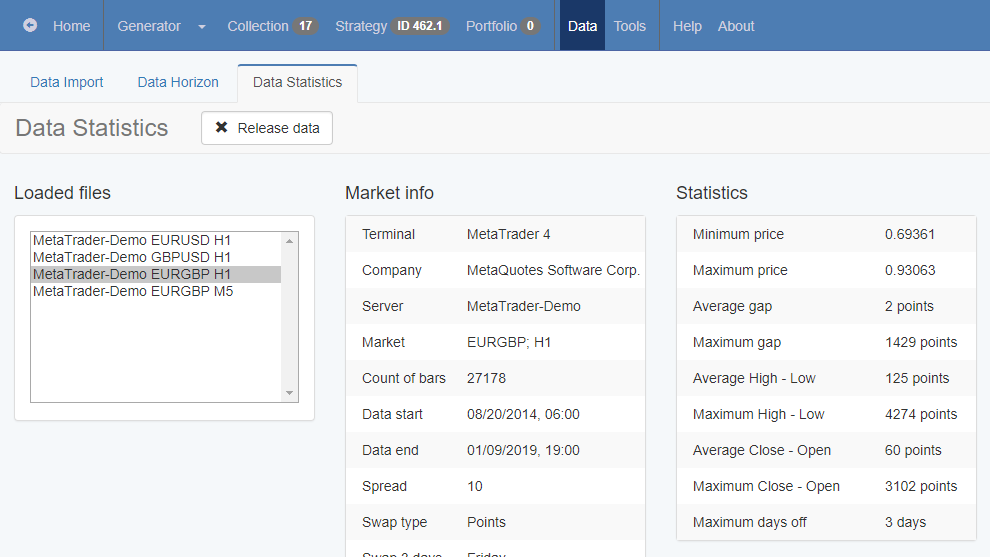
			<content type="html"><![CDATA[<p>Hello Traders,</p><p>We have new page - Data Statistics. It shows all data loaded in the browser&#039;s memory, the data properties and additional statistics.</p><p>There is a button for releasing the loaded data from the memory. Normally the button releases all files and when you visit the Editor or the Generator, they load the required file again. This is a way to reload a file without refreshing EA Studio.</p><p>If the Generator works, the currently used file is not released.</p><p>By moving the market stats in a separate page, we have now more space in the Report page for additional backtesting statistics.</p><br /><p><a href="https://image-holder.forexsb.com/store/eas-data-statistics.png"><span class="postimg"><img src="https://image-holder.forexsb.com/store/eas-data-statistics-thumb.png" alt="https://image-holder.forexsb.com/store/eas-data-statistics-thumb.png" /></span></a></p><p>When Data Statistics page loads, it shows the currently loaded data in the Editor.</p>]]></content>
			<author>
				<name><![CDATA[Popov]]></name>
				<uri>https://forexsb.com/forum/user/2/</uri>
			</author>
			<updated>2019-01-09T21:26:46Z</updated>
			<id>https://forexsb.com/forum/post/53720/#p53720</id>
		</entry>
</feed>