<?xml version="1.0" encoding="utf-8"?>
<feed xmlns="http://www.w3.org/2005/Atom">
	<title type="html"><![CDATA[Forex Software — EA Studio - News and updates]]></title>
	<link rel="self" href="https://forexsb.com/forum/feed/atom/topic/7582/" />
	<updated>2026-03-20T10:26:57Z</updated>
	<generator>PunBB</generator>
	<id>https://forexsb.com/forum/topic/7582/ea-studio-news-and-updates/</id>
		<entry>
			<title type="html"><![CDATA[Re: EA Studio - News and updates]]></title>
			<link rel="alternate" href="https://forexsb.com/forum/post/83173/#p83173" />
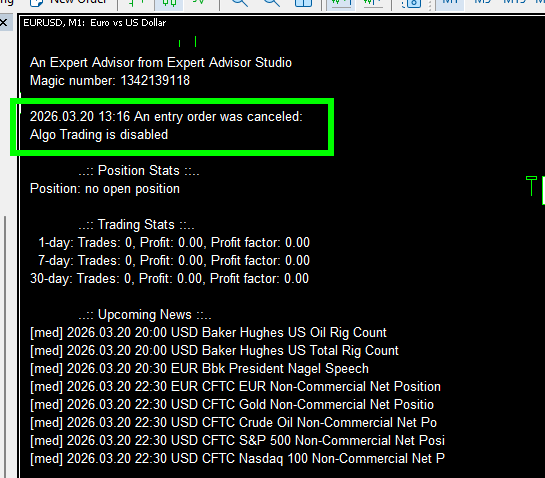
			<content type="html"><![CDATA[<p>Hello, Traders,</p><p>The base code of the EA Studio&#039;s Expert Advisors is updated.</p><p>The new Expert Advisors have improved behavior when the Algorithmic Trading is disabled:<br /> - The expert cancels the Entry, Exit, or Modify signal instead of repetitively &quot;waiting&quot; for trading to be enabled.<br /> - It prevents multiple log messages<br /> - The Expert shows a proper status message on the chart</p><p><a href="https://image-holder.forexsb.com/store/ea-studio-expert-advisor-message-trade-disabled.png"><span class="postimg"><img src="https://image-holder.forexsb.com/store/ea-studio-expert-advisor-message-trade-disabled-thumb.png" alt="https://image-holder.forexsb.com/store/ea-studio-expert-advisor-message-trade-disabled-thumb.png" /></span></a></p><p>This issue was reported by Poteree in this post: <a href="https://forexsb.com/forum/post/83171/#p83171">https://forexsb.com/forum/post/83171/#p83171</a></p><p>There are no changes to the Experts&#039; trading logic, so re-exporting them is not necessary.</p><br /><p>Trade Safe!</p>]]></content>
			<author>
				<name><![CDATA[Popov]]></name>
				<uri>https://forexsb.com/forum/user/2/</uri>
			</author>
			<updated>2026-03-20T10:26:57Z</updated>
			<id>https://forexsb.com/forum/post/83173/#p83173</id>
		</entry>
		<entry>
			<title type="html"><![CDATA[Re: EA Studio - News and updates]]></title>
			<link rel="alternate" href="https://forexsb.com/forum/post/83166/#p83166" />
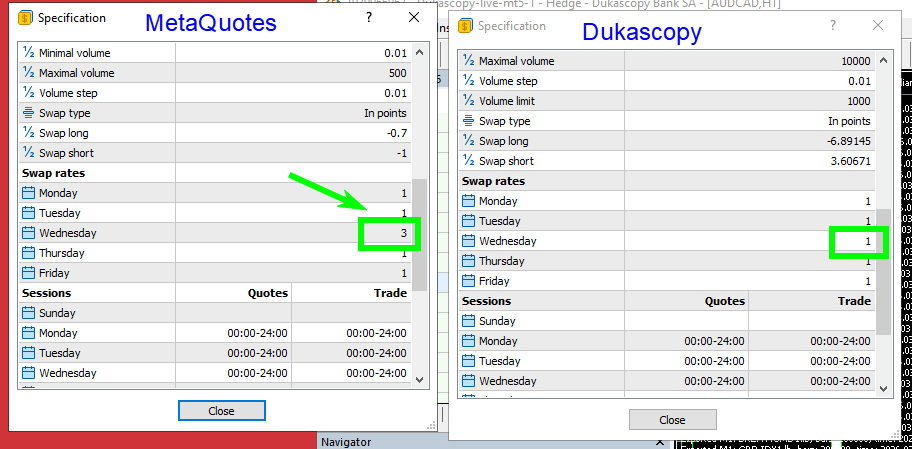
			<content type="html"><![CDATA[<p>Hello, Traders,</p><p><strong>Expert Advisor Studio v26.3.17</strong> is uploaded.</p><p><strong>New:</strong><br /> - &quot;Premum&quot; data feed loads real swaps from Dukascopy&#039;s MetaTrader 5.</p><p> - Added new option &quot;None&quot; for the symbol&#039;s &quot;Swap 3 days&quot; parameter. It was necessary because Dukascopy does not set &quot;Three days swap&quot; and probably other brokers do not either.</p><p><a href="https://image-holder.forexsb.com/store/dukascopy-no-three-day-swap.png"><span class="postimg"><img src="https://image-holder.forexsb.com/store/dukascopy-no-three-day-swap-thumb.png" alt="https://image-holder.forexsb.com/store/dukascopy-no-three-day-swap-thumb.png" /></span></a></p><p>We have a &quot;three-day swap&quot; in which the broker charges a 3x higher swap rate for a rollover on a weekday as compensation for the weekend. The usual three-day swap is on Wednesday or Friday.</p><p>- Added a &quot;time of update&quot; internal parameter for the strategies in EA Studio. The program sets it every time we generate a new strategy or modify a strategy in the Editor or Optimizer. This parameter will allow us to add &quot;Out of Sample&quot; sorting and filtering in the Collection. I&#039;m sure you will find it useful when it is released.</p><p>Please report any issues you may discover in EA Studio.</p><p>Have a great trading session!</p>]]></content>
			<author>
				<name><![CDATA[Popov]]></name>
				<uri>https://forexsb.com/forum/user/2/</uri>
			</author>
			<updated>2026-03-17T11:31:08Z</updated>
			<id>https://forexsb.com/forum/post/83166/#p83166</id>
		</entry>
		<entry>
			<title type="html"><![CDATA[Re: EA Studio - News and updates]]></title>
			<link rel="alternate" href="https://forexsb.com/forum/post/83165/#p83165" />
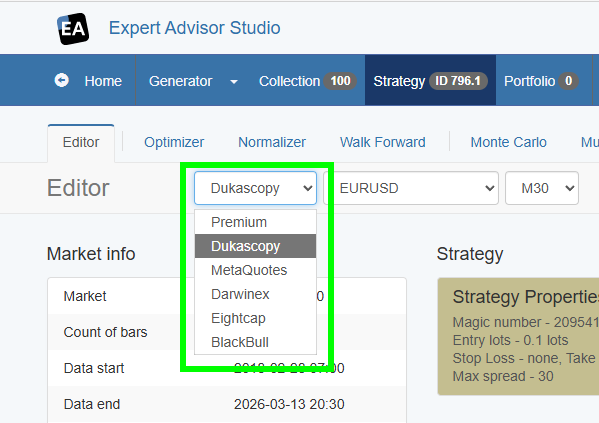
			<content type="html"><![CDATA[<p>Hello Traders,</p><p><strong>Expert Advisor Studio v26.3.15</strong> is uploaded.</p><br /><p>Please reload EA Studio wth <strong>Ctrl</strong>+<strong>F5</strong> to be sure it is fully updated.</p><p><strong>New:</strong><br /> - Added a new data feed: <strong>Dukascopy</strong><br />The &quot;Dukascopy&quot; data comes from a live MetaTrader 5 account. The actual server name is &quot;Dukascopy-live-mt5-1&quot;.<br />It provides the same symbols as the &quot;Premium&quot; data feed. Though there are minor differences in the indices&#039; names.</p><p><strong>Upadates:</strong></p><p> - Some of the provided server names are renamed:<br />&nbsp; - &quot;Premium Data&quot; becomes &quot;<strong>Premium</strong>&quot;<br />&nbsp; - &quot;MetaTrader-Demo&quot; becomes &quot;<strong>MetaQuotes</strong>&quot;</p><br /><p><a href="https://image-holder.forexsb.com/store/ea-studio-added-dukascopy-data-feed.png"><span class="postimg"><img src="https://image-holder.forexsb.com/store/ea-studio-added-dukascopy-data-feed-thumb.png" alt="https://image-holder.forexsb.com/store/ea-studio-added-dukascopy-data-feed-thumb.png" /></span></a></p><p>Expert Advisor Studio should properly import previously generated strategies and collections from the renamed servers.</p><p>Please report any misbehaviours so I can fix them ASAP.</p><p>The reasoning for adding a separate Dukascopy data source is that the current Premium data feed imports only historical data. The Dukascopy data server does not provide metadata like swaps. With MT5, it is much easier to have quality data with real spreads and swaps.</p><p>Now Dukascopy provides its own MetaTrader 5 platform, so I opened a live account there to test it.<br />It appeared that the MetaTrader data slightly differs from the directly provided tick data.</p><p>I think the MetaTrader data is as useful as the composed-from-ticks data, or even more.<br />Dukascopy allows us to open a real account with only 25 CHF, which is excellent for testing.</p><p>Have a great and successful trading week!</p>]]></content>
			<author>
				<name><![CDATA[Popov]]></name>
				<uri>https://forexsb.com/forum/user/2/</uri>
			</author>
			<updated>2026-03-15T17:04:08Z</updated>
			<id>https://forexsb.com/forum/post/83165/#p83165</id>
		</entry>
		<entry>
			<title type="html"><![CDATA[Re: EA Studio - News and updates]]></title>
			<link rel="alternate" href="https://forexsb.com/forum/post/83112/#p83112" />
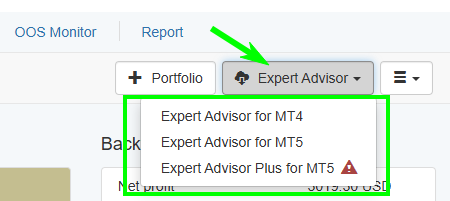
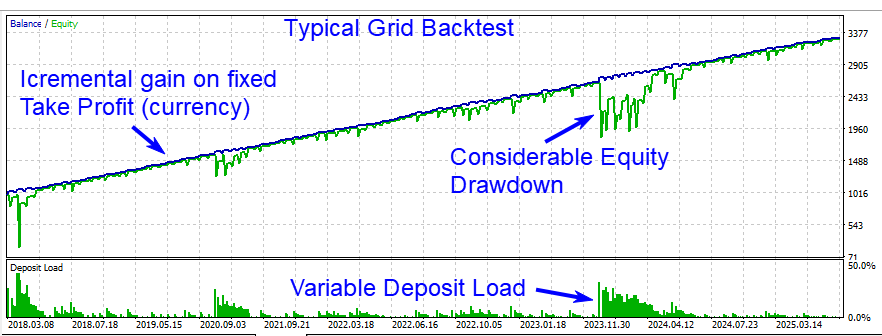
			<content type="html"><![CDATA[<p>Hello, Traders,</p><p><strong>Expert Advisor Studio v26.2.12</strong> is uploaded.</p><p>It includes a new type of Expert Advisor called <strong>Expert Advisor Plus</strong>. This expert includes features, which are possible to test in the MetaTrader&#039;s Tester only.</p><br /><p><a href="https://image-holder.forexsb.com/store/eas-editor-export-expert-advisors.png"><span class="postimg"><img src="https://image-holder.forexsb.com/store/eas-editor-export-expert-advisors-thumb.png" alt="https://image-holder.forexsb.com/store/eas-editor-export-expert-advisors-thumb.png" /></span></a></p><br /><p>The current <strong>Expert Advisor Plus v1.5</strong> comes with Grid functionality - <strong>Averaging Down</strong>. It is capable of opening new positions during a losing position in the same direction at particular steps and entry volume.</p><br /><p><a href="https://image-holder.forexsb.com/store/eas-expert-plus-typical-grid-backtest.png"><span class="postimg"><img src="https://image-holder.forexsb.com/store/eas-expert-plus-typical-grid-backtest-thumb.png" alt="https://image-holder.forexsb.com/store/eas-expert-plus-typical-grid-backtest-thumb.png" /></span></a></p><br /><p>Please see this forum discussion for the ideas and the development steps: <a href="https://forexsb.com/forum/topic/10043/grid-trading-with-ea-studio-experts-averaging-down/"> Grid Trading with EA Studio Experts (Averaging Down)</a></p><p>See the documentation here: <a href="https://forexsb.com/wiki/eas-guide/expert-advisors-plus">Expert Advisor Plus</a></p><p><strong>The Grid works until it blows-up your account.</strong> You can reduce the risk by starting the initial trade with the minimal lots (0.01) and limit the count of the added positions. However, the Grid trading is considered as riskier than the trading with the default EA Studio experts with one position and fixed lots only.</p><p>Please test this expert carefully with the MetaTrader&#039;s Tester.</p><p>Trade Safe!</p>]]></content>
			<author>
				<name><![CDATA[Popov]]></name>
				<uri>https://forexsb.com/forum/user/2/</uri>
			</author>
			<updated>2026-02-15T08:37:23Z</updated>
			<id>https://forexsb.com/forum/post/83112/#p83112</id>
		</entry>
		<entry>
			<title type="html"><![CDATA[Re: EA Studio - News and updates]]></title>
			<link rel="alternate" href="https://forexsb.com/forum/post/83001/#p83001" />
			<content type="html"><![CDATA[<div class="quotebox"><cite>Popov wrote:</cite><blockquote><p><strong>Expert Advisor Studio v25.10.30</strong> is uploaded.</p><p>The MT5 Expert Advisors and the MT5 Portfolio Experts use native MQL5 commands to collect news events from the MetaTrader terminal.</p><p>These commands are available only in MT5.</p><p>The MT4 experts still need to connect to the <strong>forexsb.com</strong> server to load news data. The news data is the same because I load it from MetaQuotes.</p><p>The reason for this update is to make it easier for you to set up an Expert Advisor. You don&#039;t need to allow connection to &quot;https://forexsb.com&quot; in the Expert&#039;s options. It also reduces the robots&#039; reliance on native MQL functionality only.</p><p>It is important to note that the News time is the <strong>Server time</strong>. It may be different from your local time.</p><p><a href="https://image-holder.forexsb.com/store/mt5-news-filter-activated.png"><span class="postimg"><img src="https://image-holder.forexsb.com/store/mt5-news-filter-activated-thumb.png" alt="https://image-holder.forexsb.com/store/mt5-news-filter-activated-thumb.png" /></span></a></p><p>Trade Safe!</p></blockquote></div><br /><p>Hi Popov, just asking because maybe I missed that out. But is there a way to avoid trading during news on backtests or what? I didn&#039;t saw any option relative to news on EA studio.</p><p>On a separate note: can you please briefly break down how the sharpe ratio is calculated on EA studio? I get strange values.. Like if I make a portfolio of strategies that performs amazingly well, and subsequently the profit metrics of the portfolio are really good, I get a sharpe of 0.15... Which is trange given that all other metrics outperform an hypotetical benchmark with a sharpe of 0.7. Just for refence, I&#039;m using 15m data on XAUSUD, if that can help.</p><p>Thanks <img src="https://forexsb.com/forum/img/smilies/big_smile.png" width="15" height="15" alt="big_smile" /></p>]]></content>
			<author>
				<name><![CDATA[ironhak]]></name>
				<uri>https://forexsb.com/forum/user/19108/</uri>
			</author>
			<updated>2025-11-05T16:01:36Z</updated>
			<id>https://forexsb.com/forum/post/83001/#p83001</id>
		</entry>
		<entry>
			<title type="html"><![CDATA[Re: EA Studio - News and updates]]></title>
			<link rel="alternate" href="https://forexsb.com/forum/post/82990/#p82990" />
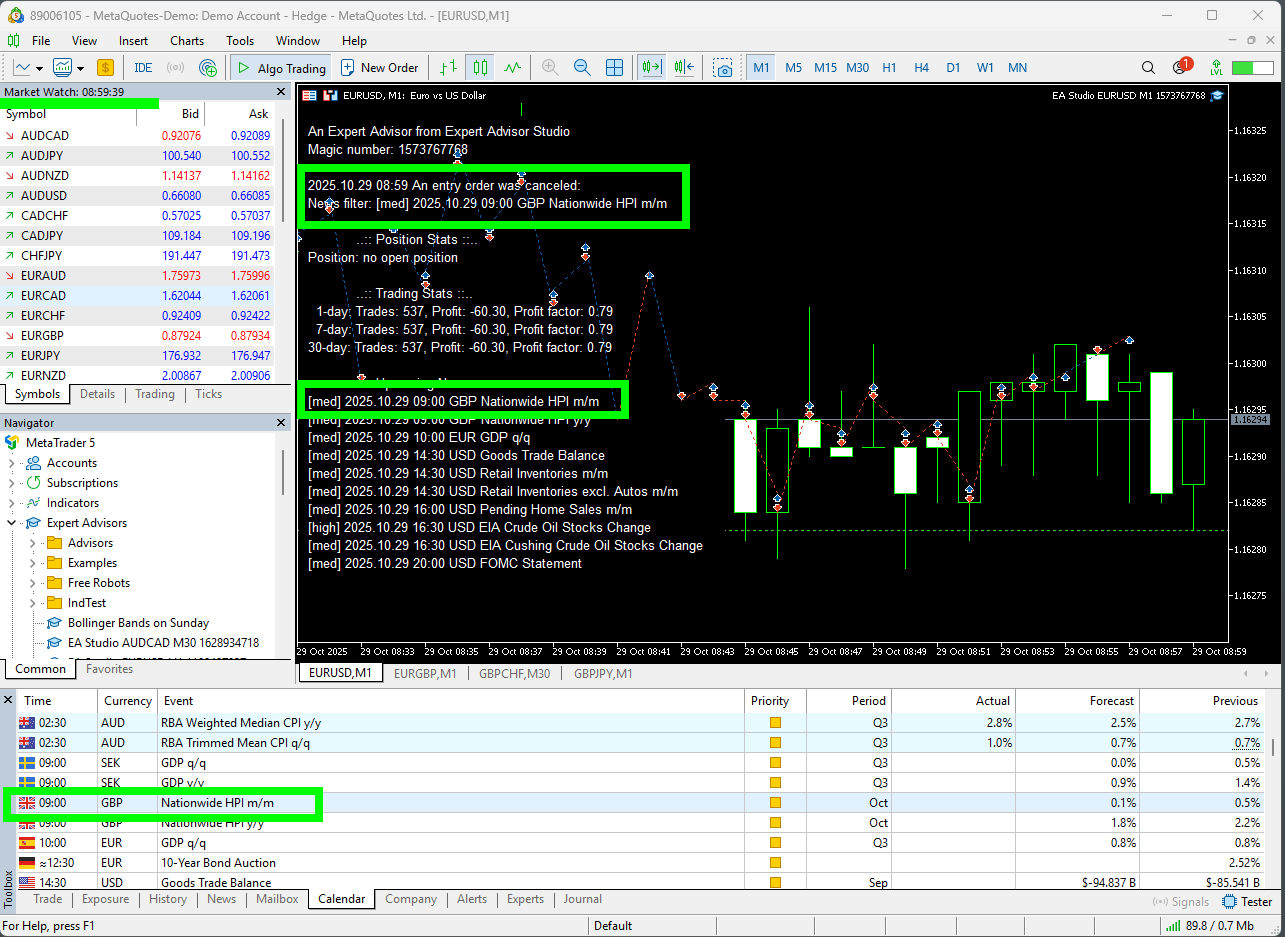
			<content type="html"><![CDATA[<p><strong>Expert Advisor Studio v25.10.30</strong> is uploaded.</p><p>The MT5 Expert Advisors and the MT5 Portfolio Experts use native MQL5 commands to collect news events from the MetaTrader terminal.</p><p>These commands are available only in MT5.</p><p>The MT4 experts still need to connect to the <strong>forexsb.com</strong> server to load news data. The news data is the same because I load it from MetaQuotes.</p><p>The reason for this update is to make it easier for you to set up an Expert Advisor. You don&#039;t need to allow connection to &quot;https://forexsb.com&quot; in the Expert&#039;s options. It also reduces the robots&#039; reliance on native MQL functionality only.</p><p>It is important to note that the News time is the <strong>Server time</strong>. It may be different from your local time.</p><p><a href="https://image-holder.forexsb.com/store/mt5-news-filter-activated.png"><span class="postimg"><img src="https://image-holder.forexsb.com/store/mt5-news-filter-activated-thumb.png" alt="https://image-holder.forexsb.com/store/mt5-news-filter-activated-thumb.png" /></span></a></p><p>Trade Safe!</p>]]></content>
			<author>
				<name><![CDATA[Popov]]></name>
				<uri>https://forexsb.com/forum/user/2/</uri>
			</author>
			<updated>2025-10-30T07:13:37Z</updated>
			<id>https://forexsb.com/forum/post/82990/#p82990</id>
		</entry>
		<entry>
			<title type="html"><![CDATA[Re: EA Studio - News and updates]]></title>
			<link rel="alternate" href="https://forexsb.com/forum/post/82818/#p82818" />
			<content type="html"><![CDATA[<p>Hello, Traders,</p><p>A new <strong>Expert Advisor Studio v25.9.18</strong> is released.</p><p>New features:</p><ul><li><p>Introduced <strong>Max Spread</strong> protection in the Strategy Properties and the Generator / Reactor.</p></li><li><p>The strategy Backtester prevents position entries when the data spread is higher than the protection value</p></li><li><p>The Max Spread protection is set in the exported Expert Advisors and works in the real trading</p></li><li><p>EA Studio shows detailed spread statistics in the Data -&gt; Data Statistics page</p></li><li><p>The Indicator Chart correctly plots the Long positions entries at the Ask price</p></li></ul><p><a href="https://image-holder.forexsb.com/store/ea-studio-editor-max-spread-protection.png"><span class="postimg"><img src="https://image-holder.forexsb.com/store/ea-studio-editor-max-spread-protection-thumb.png" alt="https://image-holder.forexsb.com/store/ea-studio-editor-max-spread-protection-thumb.png" /></span></a></p><p>Please find more details for this update here: <a href="https://forexsb.com/forum/topic/9992/max-spread-protection-in-the-backtester/">Max Spread Protection in the Backtester</a></p><p>Trade Safe!</p>]]></content>
			<author>
				<name><![CDATA[Popov]]></name>
				<uri>https://forexsb.com/forum/user/2/</uri>
			</author>
			<updated>2025-09-18T05:58:40Z</updated>
			<id>https://forexsb.com/forum/post/82818/#p82818</id>
		</entry>
		<entry>
			<title type="html"><![CDATA[Re: EA Studio - News and updates]]></title>
			<link rel="alternate" href="https://forexsb.com/forum/post/82814/#p82814" />
			<content type="html"><![CDATA[<p>&gt; Can you add this to the ExGen</p><p>Yes, of course. It will be in the next release of ExGen.</p><p>I&#039;m currently working on implementing Max Spread protection in both the Strategy Properties and the Backtester. It is super cool. I&#039;ll release it on Tuesday.</p>]]></content>
			<author>
				<name><![CDATA[Popov]]></name>
				<uri>https://forexsb.com/forum/user/2/</uri>
			</author>
			<updated>2025-09-14T10:27:27Z</updated>
			<id>https://forexsb.com/forum/post/82814/#p82814</id>
		</entry>
		<entry>
			<title type="html"><![CDATA[Re: EA Studio - News and updates]]></title>
			<link rel="alternate" href="https://forexsb.com/forum/post/82813/#p82813" />
			<content type="html"><![CDATA[<p>Can you add this to Express Generator</p>]]></content>
			<author>
				<name><![CDATA[Roughey]]></name>
				<uri>https://forexsb.com/forum/user/10939/</uri>
			</author>
			<updated>2025-09-14T09:34:14Z</updated>
			<id>https://forexsb.com/forum/post/82813/#p82813</id>
		</entry>
		<entry>
			<title type="html"><![CDATA[Re: EA Studio - News and updates]]></title>
			<link rel="alternate" href="https://forexsb.com/forum/post/82808/#p82808" />
			<content type="html"><![CDATA[<p>Uploaded <strong>Expert Advisor Studio v25.9.12</strong></p><p>This release comes with an improved Monte Carlo simulation - &quot;Randomize backtest starting bar&quot;.</p><p>Now, this simulation searches for shadowed (cancelled) opposite orders during an open position and starts the backtest from there. This effectively means that we start the backtest with an opposite position. <br />The purpose of this new algorithm is to determine if a strategy fails if we start with an opposite order.&nbsp; Specifically: &quot;Why the strategy trades in the opposite direction in my account compared with the EA Studio backtest?&quot;</p><p><a href="https://image-holder.forexsb.com/store/ea-studio-monte-carlo-randomize-backtest-start-bar.png"><span class="postimg"><img src="https://image-holder.forexsb.com/store/ea-studio-monte-carlo-randomize-backtest-start-bar-thumb.png" alt="https://image-holder.forexsb.com/store/ea-studio-monte-carlo-randomize-backtest-start-bar-thumb.png" /></span></a></p><p>Here is a video for that new feature</p><p><div class="fancy_video_tag_player"><iframe class="youtube-player" type="text/html" width="640" height="385" src="https://www.youtube.com/embed/eH5STC1ncMo" frameborder="0" allowfullscreen></iframe></div></p><p>Have a productive trading session!</p>]]></content>
			<author>
				<name><![CDATA[Popov]]></name>
				<uri>https://forexsb.com/forum/user/2/</uri>
			</author>
			<updated>2025-09-12T08:03:41Z</updated>
			<id>https://forexsb.com/forum/post/82808/#p82808</id>
		</entry>
		<entry>
			<title type="html"><![CDATA[Re: EA Studio - News and updates]]></title>
			<link rel="alternate" href="https://forexsb.com/forum/post/82804/#p82804" />
			<content type="html"><![CDATA[<p>Uploaded <strong>Expert Advisor Studio v25.9.8</strong></p><p>Hello Traders,</p><p>I&#039;m pleased to announce EA Studio v25.9.8.</p><p>This update includes two significant improvements:<br /> 1) more precise indicator calculations<br /> 2) up to 60% increase in the backtesting speed.</p><p>See more details in this post: <a href="https://forexsb.com/forum/topic/9986/the-fastest-ea-studio-is-online/">https://forexsb.com/forum/topic/9986/th … is-online/</a>.</p>]]></content>
			<author>
				<name><![CDATA[Popov]]></name>
				<uri>https://forexsb.com/forum/user/2/</uri>
			</author>
			<updated>2025-09-09T10:43:33Z</updated>
			<id>https://forexsb.com/forum/post/82804/#p82804</id>
		</entry>
		<entry>
			<title type="html"><![CDATA[Re: EA Studio - News and updates]]></title>
			<link rel="alternate" href="https://forexsb.com/forum/post/82319/#p82319" />
			<content type="html"><![CDATA[<p>Uploaded <strong>Expert Advisor Studio v25.1.8</strong></p><p>The application shows better information for the position entry value in the Strategy Properties panel and the Generator.</p><p>Now, we see:<br /> - the actual asset amount for an entry,<br /> - the entry amount in Account currency<br /> - the margin required in Account currency<br /> - the required margin % from the account size.</p><p>EA Studio calculates the values by using the entry lots, the symbol&#039;s lot size, the account size, the leverage and the current exchange rates.</p><br /><p>Example for GBPUSD:</p><p><a href="https://image-holder.forexsb.com/store/eas-entry-amount-gbpusd.png"><span class="postimg"><img src="https://image-holder.forexsb.com/store/eas-entry-amount-gbpusd-thumb.png" alt="https://image-holder.forexsb.com/store/eas-entry-amount-gbpusd-thumb.png" /></span></a></p><br /><p>Example for DAX:</p><p><a href="https://image-holder.forexsb.com/store/eas-entry-amount-dax.png"><span class="postimg"><img src="https://image-holder.forexsb.com/store/eas-entry-amount-dax-thumb.png" alt="https://image-holder.forexsb.com/store/eas-entry-amount-dax-thumb.png" /></span></a></p><p>Trade Safe!</p>]]></content>
			<author>
				<name><![CDATA[Popov]]></name>
				<uri>https://forexsb.com/forum/user/2/</uri>
			</author>
			<updated>2025-01-08T16:10:39Z</updated>
			<id>https://forexsb.com/forum/post/82319/#p82319</id>
		</entry>
		<entry>
			<title type="html"><![CDATA[Re: EA Studio - News and updates]]></title>
			<link rel="alternate" href="https://forexsb.com/forum/post/82305/#p82305" />
			<content type="html"><![CDATA[<p>Hello, Traders,</p><p>I&#039;m improving the user interface and the behaviour of EA Studio.</p><p>Now, we have improved <strong>Log in</strong> form as follows:<br /> - EA Studio does not log out the user if the browser is closed for short or the page is reloaded unwillingly even without &quot;Remember me&quot;<br /> - the password is encrypted in the browser before being sent to the server, so your internet provider cannot sniff it<br /> - added better user data validations<br /> - added more intuitive messages in case of wrong input or failed sign-in<br /> - using some of the browser&#039;s assistive features</p><p>Here are some examples of browser messages.</p><p>Missing email:</p><p><a href="https://image-holder.forexsb.com/store/eas-the-email-is-required.png"><span class="postimg"><img src="https://image-holder.forexsb.com/store/eas-the-email-is-required-thumb.png" alt="https://image-holder.forexsb.com/store/eas-the-email-is-required-thumb.png" /></span></a></p><p>Short password:</p><p><a href="https://image-holder.forexsb.com/store/eas-the-password-is-too-short.png"><span class="postimg"><img src="https://image-holder.forexsb.com/store/eas-the-password-is-too-short-thumb.png" alt="https://image-holder.forexsb.com/store/eas-the-password-is-too-short-thumb.png" /></span></a></p><p>Trade Safe!</p>]]></content>
			<author>
				<name><![CDATA[Popov]]></name>
				<uri>https://forexsb.com/forum/user/2/</uri>
			</author>
			<updated>2025-01-07T09:10:05Z</updated>
			<id>https://forexsb.com/forum/post/82305/#p82305</id>
		</entry>
		<entry>
			<title type="html"><![CDATA[Re: EA Studio - News and updates]]></title>
			<link rel="alternate" href="https://forexsb.com/forum/post/82299/#p82299" />
			<content type="html"><![CDATA[<p>Today, I spent several hours thinking about how to better show the strategy&#039;s&nbsp; Magic Numbers.<br />It was plotted on the Balance chart so far, which was not the best place for that.</p><p>Now, I show the Magic number in the Strategy Properties slot in the Editor. It is also shown in the header of the collection records panels.</p><p>I hope you will like it <img src="https://forexsb.com/forum/img/smilies/smile.png" width="15" height="15" alt="smile" /></p><p><a href="https://image-holder.forexsb.com/store/eas-editor-magic-number.png"><span class="postimg"><img src="https://image-holder.forexsb.com/store/eas-editor-magic-number-thumb.png" alt="https://image-holder.forexsb.com/store/eas-editor-magic-number-thumb.png" /></span></a></p><p>Trade Safe!</p>]]></content>
			<author>
				<name><![CDATA[Popov]]></name>
				<uri>https://forexsb.com/forum/user/2/</uri>
			</author>
			<updated>2025-01-06T19:00:47Z</updated>
			<id>https://forexsb.com/forum/post/82299/#p82299</id>
		</entry>
		<entry>
			<title type="html"><![CDATA[Re: EA Studio - News and updates]]></title>
			<link rel="alternate" href="https://forexsb.com/forum/post/82290/#p82290" />
			<content type="html"><![CDATA[<p>Added Indices to <strong>Eightcap</strong>: <strong>US30</strong>, <strong>NDX100</strong>, <strong>SPX500</strong>, <strong>GER40</strong>, <strong>UK100</strong></p><p>Trade Safe!</p>]]></content>
			<author>
				<name><![CDATA[Popov]]></name>
				<uri>https://forexsb.com/forum/user/2/</uri>
			</author>
			<updated>2025-01-05T17:47:39Z</updated>
			<id>https://forexsb.com/forum/post/82290/#p82290</id>
		</entry>
</feed>