<?xml version="1.0" encoding="utf-8"?>
<feed xmlns="http://www.w3.org/2005/Atom">
	<title type="html"><![CDATA[Forex Software — Commands and Workflow]]></title>
	<link rel="self" href="https://forexsb.com/forum/feed/atom/forum/72/" />
	<updated>2026-06-01T10:55:10Z</updated>
	<generator>PunBB</generator>
	<id>https://forexsb.com/forum/</id>
		<entry>
			<title type="html"><![CDATA[Genetic Selection… the next rabbit hole]]></title>
			<link rel="alternate" href="https://forexsb.com/forum/topic/10079/genetic-selection-the-next-rabbit-hole/new/posts/" />
			<summary type="html"><![CDATA[<p>Full disclosure: I got Claude to write this up, because I fancied documenting my failures about as much as you&#039;d expect. The journey&#039;s mine though — promise.</p><p>I wanted to share where I&#039;ve gotten to and ask the people who&#039;ve gone further than me for some pointers.</p><p>Chapter 1 — The textbook pipeline. Built the full walk-forward: In-Sample to generate, Out-of-Sample to filter, a true held-out Forward as the final judge. Multi-asset, multi-timeframe, multiple brokers&#039; data, Monte-Carlo, all of it. The plumbing&#039;s solid — I&#039;ve stress-tested it.</p><p>Chapter 2 — Rich pools don&#039;t translate. I can churn out big, healthy-looking pools: nice IS curves, survive OOS, pass the usual robustness gates. But none of that richness carries into Forward. Every metric I&#039;d rank on (expectancy, R²/linearity, stability ... I (think) I&#039;ve tried them all) shows basically zero correlation with what the strategy actually does forward.</p><p>Chapter 3 — ML didn&#039;t save it. So I did the obvious next thing: build features from the IS/OOS walk-forward behaviour, label by forward outcome, train a model to pick survivors. Same wall. The IS side (IS/OOS degradation etc) just doesn&#039;t carry enough signal about the future. The model can re-rank a useless ranking, but it can&#039;t invent signal that isn&#039;t there.</p><p>Chapter 4 — A genetic-selection wrapper around gen.js. Latest move: I wrapped gen.js in my own GA — breeding strategies generation-to-generation with my own fitness functions, instead of leaning on the built-in search. Lots more control, and some encouraging signs… but I keep bumping into the same questions about what to actually select on, which is why I&#039;m here.</p><p>The questions:</p><p>1. Any IS/OOS metric that actually correlates with forward, not just looks good in backtest?<br />2. Shorter / more recent in-sample windows — do they transfer better for you than long ones?<br />3. Is the real edge in constraining what you generate (skeletons, regime typing, indicator grammar) rather than filtering after?</p><p>Happy to share more on the methodology. Where am I being naive?</p><p>Cheers.<br />Ben</p>]]></summary>
			<author>
				<name><![CDATA[begoodall]]></name>
				<uri>https://forexsb.com/forum/user/16312/</uri>
			</author>
			<updated>2026-06-01T10:55:10Z</updated>
			<id>https://forexsb.com/forum/topic/10079/genetic-selection-the-next-rabbit-hole/new/posts/</id>
		</entry>
		<entry>
			<title type="html"><![CDATA[8-Phase Automated Validation Pipeline]]></title>
			<link rel="alternate" href="https://forexsb.com/forum/topic/10046/8phase-automated-validation-pipeline/new/posts/" />
			<summary type="html"><![CDATA[<p><strong>8-Phase Automated Validation Pipeline</strong></p><p>Hi everyone,</p><p>I&#039;ve been using EA Studio and Express Generator for years now, and after a long journey of trial and error — testing different robustness approaches, losing money to overfitted strategies, and slowly figuring out what actually works — I&#039;ve finally built a fully automated validation pipeline that I&#039;m genuinely happy with.</p><p>I wanted to share it with the community because this forum and Mr. Popov&#039;s continuous work on Express Generator have been instrumental in getting me here. The speed, the scriptability, the constant updates — Express Generator is truly a lovely system, and I owe a big thank you to Mr. Popov for making it all possible. Every new version brings something useful, and the tool just keeps getting better.</p><p>So here&#039;s my complete workflow. I hope it helps some of you avoid the mistakes I made along the way.</p><p>---</p><p><strong>The Problem: Overfitting is the Silent Killer</strong></p><p>We all know the story. You generate a beautiful strategy with a perfect equity curve, put it on a demo or live account, and within weeks, it&#039;s underwater. The strategy was curve-fitted to historical data and had no real edge.</p><p>I spent a long time trying simple IS/OOS splits and basic Monte Carlo tests, but strategies kept failing in live trading. The turning point was realizing that <strong>one robustness test is not enough</strong>. You need multiple independent tests that challenge the strategy from completely different angles. If a strategy survives all of them, the probability that it&#039;s genuinely capturing a market pattern goes up dramatically.</p><p>---</p><p><strong>The 8-Phase Pipeline Overview</strong></p><p>Here&#039;s the full pipeline. Each phase tests a different dimension of robustness:</p><div class="codebox"><pre><code>+---+---------------------------------+----------+---------+----------------------------------------------+
| # | Test                            |Data Range| Server  | Purpose                                      |
+---+---------------------------------+----------+---------+----------------------------------------------+
| 1 | Generate In-Sample              |  0%– 50% | Premium | Strategy discovery                           |
| 2 | Out-of-Sample Validation        | 50%– 80% | Premium | Overfit filter                               |
| 3 | Monte Carlo — Execution Stress  |  0%– 80% | Premium | Survives real-world execution?               |
| 4 | Monte Carlo — Param Sensitivity |  0%– 80% | Premium | Overfit to specific indicator values?        |
| 5 | Multi-Timeframe Validation      |  0%–100% | Premium | Captures a real pattern, not timeframe noise?|
| 6 | Multi-Instrument Validation     |  0%–100% | Premium | Works on related markets?                    |
| 7 | Cross-Broker Validation         |  0%– 80% | Eightcap| Real pattern or data artifact?               |
| 8 | Forward Test                    | 80%–100% | Premium | Performs on completely unseen data?          |
+---+---------------------------------+----------+---------+----------------------------------------------+</code></pre></div><p>The key insight: <strong>Phases 1–4 use 80% of the data maximum, reserving 20% that the strategy has NEVER seen for the final forward test.</strong> Phases 5 and 6 use 100% data because they test on different timeframes/instruments entirely — the strategy has never been optimized on those markets.</p><p>---</p><p><strong>Phase 1: Generate In-Sample (0%–50%)</strong></p><p>Generation uses only the first half of the available data. This is deliberate — it gives us three more independent data segments to validate against.</p><p>I typically run this for 24 hours per instrument using `max_working_minutes = 1440`. The more strategies generated, the better the chances of finding genuinely robust ones.</p><p>---</p><p><strong>Phase 2: Out-of-Sample Validation (50%–80%)</strong></p><p>Feed the Phase 1 collection into Express Generator with <em>data_start_percent = 50</em> and <em>data_end_percent = 80</em>. No generation, pure validation.</p><p>This 30% data window is completely unseen during generation. Strategies that were curve-fitted to the first 50% will typically fail here. This is your first major filter.</p><p>Settings are slightly relaxed compared to Phase 1 because the data window is smaller.</p><p>---</p><p><strong>Phase 3: Monte Carlo — Execution Stress (0%–80%)</strong></p><p>This is where I learned an important lesson. I used to combine all Monte Carlo tests into one phase, and it was eliminating 99.8% of strategies. <strong>Separating execution stress from parameter sensitivity into distinct phases was a game-changer</strong> — it gives you much better diagnostics about WHY a strategy failed.</p><p>Phase 3 tests execution robustness only — what happens when real-world conditions degrade?</p><p>---</p><p><strong>Phase 4: Monte Carlo — Parameter Sensitivity (0%–80%)</strong></p><p>Now test the opposite dimension: are the indicator parameters fragile?</p><p>Criteria are more lenient here than in Phase 3:</p><p><strong>Why more lenient?</strong> Because parameter changes can legitimately shift a strategy&#039;s behavior more than execution noise does. A strategy using RSI(14) that still works at RSI(12) or RSI(16) is robust. It doesn&#039;t need to be equally profitable — just not broken.</p><p><strong>Important lesson:</strong> I initially used 5% parameter variation, and it was too small to be meaningful. Use 15–20% for real stress testing. If a strategy breaks with 15% parameter variation, it&#039;s dangerously overfit.</p><p>---</p><p><strong>Phase 5: Multi-Timeframe Validation (0%–100%)</strong></p><p>This is where it gets interesting. A strategy generated on H1 should show <em>some</em> viability on adjacent timeframes (M30 and H4). If it completely falls apart, it&#039;s likely exploiting timeframe-specific noise rather than a real market pattern.</p><p>The workflow automatically maps adjacent timeframes:<br /></p><div class="codebox"><pre><code>- M5 → M1, M15
- M15 → M5, M30
- M30 → M15, H1
- H1 → M30, H4
- H4 → H1, D1
- D1 → H4</code></pre></div><p><strong>Criteria are very lenient</strong> — we&#039;re not expecting profitability, just &quot;not catastrophic&quot;:</p><p>- Must pass at least <strong>1 of 2</strong> adjacent timeframes (50% pass rate)</p><p>The workflow automatically fetches data for adjacent timeframes before testing. This uses 100% of data since it&#039;s a completely different timeframe — there&#039;s no &quot;seen/unseen&quot; concern.</p><p>---</p><p><strong>Phase 6: Multi-Instrument Validation (0%–100%)</strong></p><p>Same idea but across related currency pairs. A EURUSD strategy should show some viability on structurally related pairs that share market dynamics.</p><p>The workflow has a hardcoded mapping of related instruments:<br /></p><div class="codebox"><pre><code>- EURUSD → GBPUSD, USDCHF, EURGBP, EURJPY, EURCAD
- USDJPY → EURJPY, GBPJPY, AUDJPY, CHFJPY, CADJPY
- GBPUSD → EURUSD, EURGBP, GBPJPY, GBPAUD, GBPCAD
- AUDUSD → NZDUSD, AUDJPY, AUDCAD, AUDCHF, AUDNZD</code></pre></div><br /><p><strong>Pass requirement is percentage-based:</strong> <em>min_pass = max(1, floor(count / 3))</em> — roughly 33%:<br />- 3 related instruments → minimum 1 must pass<br />- 6 related instruments → minimum 2 must pass</p><p><strong>Tagging system:</strong> The results get tracked as tags like <em>MI4of5</em> (passed 4 out of 5 instruments). These tags flow through to the final output filename, so at the end you can see at a glance:<br />- <em>P8_EURUSD_H1_TF2of2_MI5of5.json</em> = fully validated, strong<br />- <em>P8_EURUSD_H1_TF1of2_MI2of6.json</em> = passed minimums, borderline</p><p>---</p><p><strong>Phase 7: Cross-Broker Validation (0%–80%)</strong></p><p>Test the strategy against a different broker&#039;s data feed. I use Eightcap as the cross-broker (ECN with tight spreads, which makes it a slightly tougher test).</p><p>This answers: is the strategy capturing a real market pattern, or is it an artifact of Premium&#039;s specific price feed?</p><p>---</p><p><strong>Phase 8: Forward Test (80%–100%)</strong></p><p>The final boss. The last 20% of data that the strategy has <strong>never seen</strong> in any form. No generation, no optimization, no Monte Carlo — just pure validation on unseen data.</p><p>This is the closest simulation to what will happen when you go live. If a strategy survives all 7 previous phases and still performs well on completely unseen forward data, you can have much higher confidence it has a genuine edge.</p><p>Settings are moderate (the 20% data window is smaller, so absolute metrics will be lower)</p><p>---</p><p><strong>Real Results: USDJPY H1 Through All 8 Phases</strong></p><p>Here&#039;s an actual strategy that made it through the entire pipeline:</p><div class="codebox"><pre><code>+---------------+-----------------------+------------------------+-----------------------+
| Metric        | Phase 3 (80% Premium) | Phase 7 (80% Eightcap) | Phase 8 (20% Forward) |
+---------------+-----------------------+------------------------+-----------------------+
| Profit        | $3,939                | $4,528                 | $3,763                |
| Profit/day    |  $0.84                |  $0.96                 |  $3.22                |
| Profit Factor |   1.43                |   1.13                 |   1.33                |
| R-squared     |  86.21                |  37.61                 |  72.22                |
| Return/DD     |   4.87                |   2.41                 |   3.66                |
| Max Drawdown  |   6.6%                |  18.5%                 |  8.31%                |
| Stagnation    |  19.3%                |  42.6%                 | 16.15%                |
| Trades        |    517                |    907                 |    346                |
+---------------+-----------------------+------------------------+-----------------------+</code></pre></div><p>The strategy actually <strong>improved</strong> on forward data — profit per day jumped from $0.84 to $3.22 and drawdown stayed low at 8.3%. It also passed all adjacent timeframes (M30, H4) and all 5 related JPY instruments (EURJPY, GBPJPY, AUDJPY, CADJPY, CHFJPY).</p><p>Final output: <em>P8_USDJPY_H1_TF2of2_MI5of5.json</em></p><p>---</p><p><strong>How It All Runs: Automation</strong></p><p>The entire pipeline is a single Windows batch script.</p><p>The script:<br />1. Fetches data for the main instrument<br />2. Runs all 8 phases sequentially<br />3. Automatically fetches data for adjacent timeframes before Phase 5<br />4. Automatically fetches data for related instruments before Phase 6<br />5. Prints statistics after each phase<br />6. Tags the final output with TF and MI results</p><p>---</p><p><strong>Lessons Learned the Hard Way</strong></p><p>&nbsp; 1. <strong>Separate your Monte Carlo tests.</strong> Combined MC (execution + parameters) was killing 99.8% of strategies. Separated, I get much better survival rates AND know exactly why a strategy failed.</p><p>&nbsp; 2. <strong>Don&#039;t be too strict too early.</strong> I spent months with overly tight criteria and getting zero strategies through. Better to have moderate filters across many phases than one impossibly strict filter.</p><p>&nbsp; 3. <strong>5% parameter variation is useless.</strong> Use 15–20% to actually stress test. If your strategy breaks at 15% variation, it WILL break in live trading.</p><p>&nbsp; 4.<strong><em>valid_tests_percent = 80</em> is too strict for initial discovery.</strong> Start with 65–75% and only tighten later if needed.</p><p>&nbsp; 5. <strong>Reserve 20% of data for forward testing.</strong> Never touch it during any other phase. This is your reality check.</p><p>&nbsp; 6. <strong>Multi-instrument testing reveals a lot.</strong> A strategy that works on 5+ related pairs is much more likely to capture a real pattern than one that only works on a single instrument.</p><p>---</p><p><strong>Final Thoughts</strong></p><p>This pipeline isn&#039;t magic — no system can guarantee profitable strategies. But it dramatically reduces the probability of deploying an overfitted strategy. The philosophy is simple: <strong>test from every angle, and only trust what survives everything.</strong></p><p>A huge thank you again to Mr. Popov for Express Generator. The speed, the command-line interface, the INI configuration system, and the data percentage splits — all of these features made this kind of automated pipeline possible. And the continuous updates keep making it better. This community and this tool have been invaluable.</p><p>Let&#039;s build robust strategies together!</p><p>Cheers,</p><p>Hani</p>]]></summary>
			<author>
				<name><![CDATA[quantbot]]></name>
				<uri>https://forexsb.com/forum/user/14524/</uri>
			</author>
			<updated>2026-02-16T10:22:26Z</updated>
			<id>https://forexsb.com/forum/topic/10046/8phase-automated-validation-pipeline/new/posts/</id>
		</entry>
		<entry>
			<title type="html"><![CDATA[Multi-Market validator in Express Generator]]></title>
			<link rel="alternate" href="https://forexsb.com/forum/topic/10045/multimarket-validator-in-express-generator/new/posts/" />
			<summary type="html"><![CDATA[<p>Hello Traders,</p><p>I&#039;ve started working on a <strong>Multi-Market</strong> functionality for Express Generator.</p><p><strong>Why is it necessary?</strong></p><p>I&#039;m using Express Generator on two servers to generate and validate strategies for the <a href="https://top-10.forexsb.com/">Top 10 Robots App</a>.</p><p>My current workflow is:<br /> 1) Generate strategies for each symbol and period (16 symbols and 4 periods). The Generator exports collections with capacitty of 1000 strategies.<br /> 2) Validate the strategies against the Acceptance Criteria (AC). The exported collections are up to 100 strategies.<br /> 3) Validate the AC collections with Monte Carlo (MC).<br /> 4) Cross-validation - Validate passed MC collections with data from another server sequentially. I validate M15, M30, and M30 on one additional server, and M5 on 5 servers. M5 collections also go to an application called <a href="https://prop.forexsb.com/">Prop Firm Robots</a>.<br /> 5) All new strategies are validated with already collected strategies.</p><p>My Acceptance Criteria are rather strict, and only a few strategies can progress through the workflow.</p><p>Now I decided to change the approach. Instead of throwing off the strategies at the beginning of the workflow, I want to reduce the AC and to move it into the Application itself.<br />Instead of strict AC, I want to use a Multi-Market validation, like:<br /> 1) Generator<br /> 2) Monte Carlo<br /> 3) Multi-Market<br /> 4) Cross-validation<br /> 5) AC in the applications</p><p>The problem is that the current implementation of Express Generator makes it easy to do sequential validations:<br /> - generate<br /> - test on the market A<br /> - which pass A, test on market B<br /> - ...</p><p>We cannot test strategies on 5 markets and take those that pass 3 markets.</p><p>I&#039;m going to solve that problem this week.</p>]]></summary>
			<author>
				<name><![CDATA[Popov]]></name>
				<uri>https://forexsb.com/forum/user/2/</uri>
			</author>
			<updated>2026-02-16T07:41:46Z</updated>
			<id>https://forexsb.com/forum/topic/10045/multimarket-validator-in-express-generator/new/posts/</id>
		</entry>
		<entry>
			<title type="html"><![CDATA[Statistics for dropping strategies]]></title>
			<link rel="alternate" href="https://forexsb.com/forum/topic/9993/statistics-for-dropping-strategies/new/posts/" />
			<summary type="html"><![CDATA[<p>How can I see how many strategies were dropped when backtested in a workflow for not meeting specific criteria, for example, a profit factor greater than 1.1?</p><p>I have a workflow of 6 stages, stage 1 is generating, stage 2 is testing out-of-sample, stage 3 is testing on another market, etc.</p><p>I need to see how many strategies were dropped after each stage and the criteria they were dropped on, for example, less than 100 trades, or PF is less than 1, etc.</p>]]></summary>
			<author>
				<name><![CDATA[quantbot]]></name>
				<uri>https://forexsb.com/forum/user/14524/</uri>
			</author>
			<updated>2025-09-21T11:11:48Z</updated>
			<id>https://forexsb.com/forum/topic/9993/statistics-for-dropping-strategies/new/posts/</id>
		</entry>
		<entry>
			<title type="html"><![CDATA[Multi Market Validation]]></title>
			<link rel="alternate" href="https://forexsb.com/forum/topic/9991/multi-market-validation/new/posts/" />
			<summary type="html"><![CDATA[<p>Hello all</p><p>I tried to make a Multi Market validation workflow that will pass a strategy if it passes validation on x amount of markets.<br />For this I made a node js script with AI.</p><p>Disclaimer, I did not test this thorougly yet. Use at your own risk.</p><p>- Put MultiMarket.mjs in bin folder.</p><p>- You need to have an input folder with singular strategy collections. Use auto_save_at_collected parameter when generating&nbsp; &nbsp; a batch you want to validate MM on and output_replace = false.</p><p>- It will run Multi market validation on pairs which are also in eastudio. </p><p>- If you choose --markets 8 it will choose the first 8 pairs like on the website</p><p>- You can also choose your own list use these parameters for that; <br />--custom_markets true --custom_markets_list &quot;EURUSD,USDJPY,AUDNZD,NZDCHF&quot;</p><p>- validation_limit is the amount of markets it should pass to be valid.</p><p>- validated files should be in your output folder + /validated</p><br /><p>Example:</p><br /><br /><div class="codebox"><pre><code>set &quot;symbol=%1&quot;
set &quot;period=%2&quot;
set &quot;startdate=%3&quot;
set &quot;enddate=%4&quot;
set &quot;timer=%5&quot;

REM |Generate Normally
node .\bin\gen.js ^
 --settings                   wf_start.ini ^
 --symbol                  %symbol% ^
 --period                 %period% ^
 --data_start             %startdate% ^
 --data_end                  %enddate% ^
 --max-working-minutes    %timer% ^
 --output              ./collections/coll_[server]_[symbol]_[period].json ^
 --auto_save_at_collected  1 ^
 --output_replace  false

REM | Validate Multi Market
node .\bin\MultiMarket.mjs ^
 --settings               wf_MultiMarket.ini ^
 --symbol                   %symbol% ^
 --period                 %period% ^
 --data_start             %startdate% ^
 --data_end               %enddate% ^
 --input                  ./collections/ ^
 --output                 ./collections/MultiMarket ^
 --markets                8 ^
 --validation_limit       4</code></pre></div><br /><br /><br /><p>So in this case it will go through 8 market pairs validations and the strategy needs to be valid for 4 pairs.</p><p>I hope people can use this. If you find this of use please share a nice workflow with me since I still struggle myself.</p>]]></summary>
			<author>
				<name><![CDATA[psmnac]]></name>
				<uri>https://forexsb.com/forum/user/14643/</uri>
			</author>
			<updated>2025-09-14T19:34:05Z</updated>
			<id>https://forexsb.com/forum/topic/9991/multi-market-validation/new/posts/</id>
		</entry>
		<entry>
			<title type="html"><![CDATA[Exit at TP or SL only]]></title>
			<link rel="alternate" href="https://forexsb.com/forum/topic/9820/exit-at-tp-or-sl-only/new/posts/" />
			<summary type="html"><![CDATA[<p>Hello Traders,</p><p>With Express Generator v2.57, we can create strategies that exit at SL or TP only.</p><p>We do it by forcing the Generator to use the &quot;Do not Exit&quot; indicator as the only option.</p><p>Please follow these steps:</p><p>1. Disable all the exit indicators except &quot;Do not Exit&quot;:</p><div class="codebox"><pre><code>;; Exit indicators
...
exit_directional_indicators = false
exit_do_not_exit            = true
exit_donchian_channel       = false
...</code></pre></div><p>2. Set the Generator to use only one exit slot:<br /></p><div class="codebox"><pre><code>; Max number of indicators to use
max_exit_slots  = 1</code></pre></div><p>3. Set the Generator always to use SL and TP. Set also the corresponding ranges<br /></p><div class="codebox"><pre><code>stop_loss_usage   = AlwaysUse
take_profit_usage = AlwaysUse</code></pre></div><br /><p>Please see the attached ini file as an example.<br />If you have another ini file, set this one last.</p><div class="codebox"><pre><code>node .\bin\gen.js --server Premium --symbol EURUSD --period M15 --settings do-not-exit.ini</code></pre></div><p>Trade Safe!</p><p>.</p>]]></summary>
			<author>
				<name><![CDATA[Popov]]></name>
				<uri>https://forexsb.com/forum/user/2/</uri>
			</author>
			<updated>2024-08-24T08:43:04Z</updated>
			<id>https://forexsb.com/forum/topic/9820/exit-at-tp-or-sl-only/new/posts/</id>
		</entry>
		<entry>
			<title type="html"><![CDATA[Revalidate and Expand a Collection]]></title>
			<link rel="alternate" href="https://forexsb.com/forum/topic/9281/revalidate-and-expand-a-collection/new/posts/" />
			<summary type="html"><![CDATA[<p>You can easily revalidate an old collection on new data and merge newly generated strategies into it.</p><div class="codebox"><pre><code>node .\bin\gen.js ^
  --settings               my-settings.ini ^
  --generate-then-validate            true ^
  --output-replace                    true ^
  --input  my-collection-[SYMBOL]-[PERIOD] ^
  --output my-collection-[SYMBOL]-[PERIOD]</code></pre></div><br /><p>How it works:<br /> - <strong>generate-then-validate</strong> sets the Express Generator to continue generating new strategies after validation of the &quot;input&quot;.<br /> - <strong>output-replace</strong> - save the &quot;output&quot; over the existing file instead of adding a suffix. It will be helpful because you will not need to change the name at the next run.<br /> - <strong>input</strong> and <strong>output</strong> point to the same file.</p><p>Additional:<br /> It costs nothing to make it save the output at a particular interval adding: <strong>auto-save-at-minutes 5</strong>. It will leave the output over the same file every 5 minutes.</p>]]></summary>
			<author>
				<name><![CDATA[Popov]]></name>
				<uri>https://forexsb.com/forum/user/2/</uri>
			</author>
			<updated>2022-10-31T18:36:09Z</updated>
			<id>https://forexsb.com/forum/topic/9281/revalidate-and-expand-a-collection/new/posts/</id>
		</entry>
		<entry>
			<title type="html"><![CDATA[Workflow Runner]]></title>
			<link rel="alternate" href="https://forexsb.com/forum/topic/9279/workflow-runner/new/posts/" />
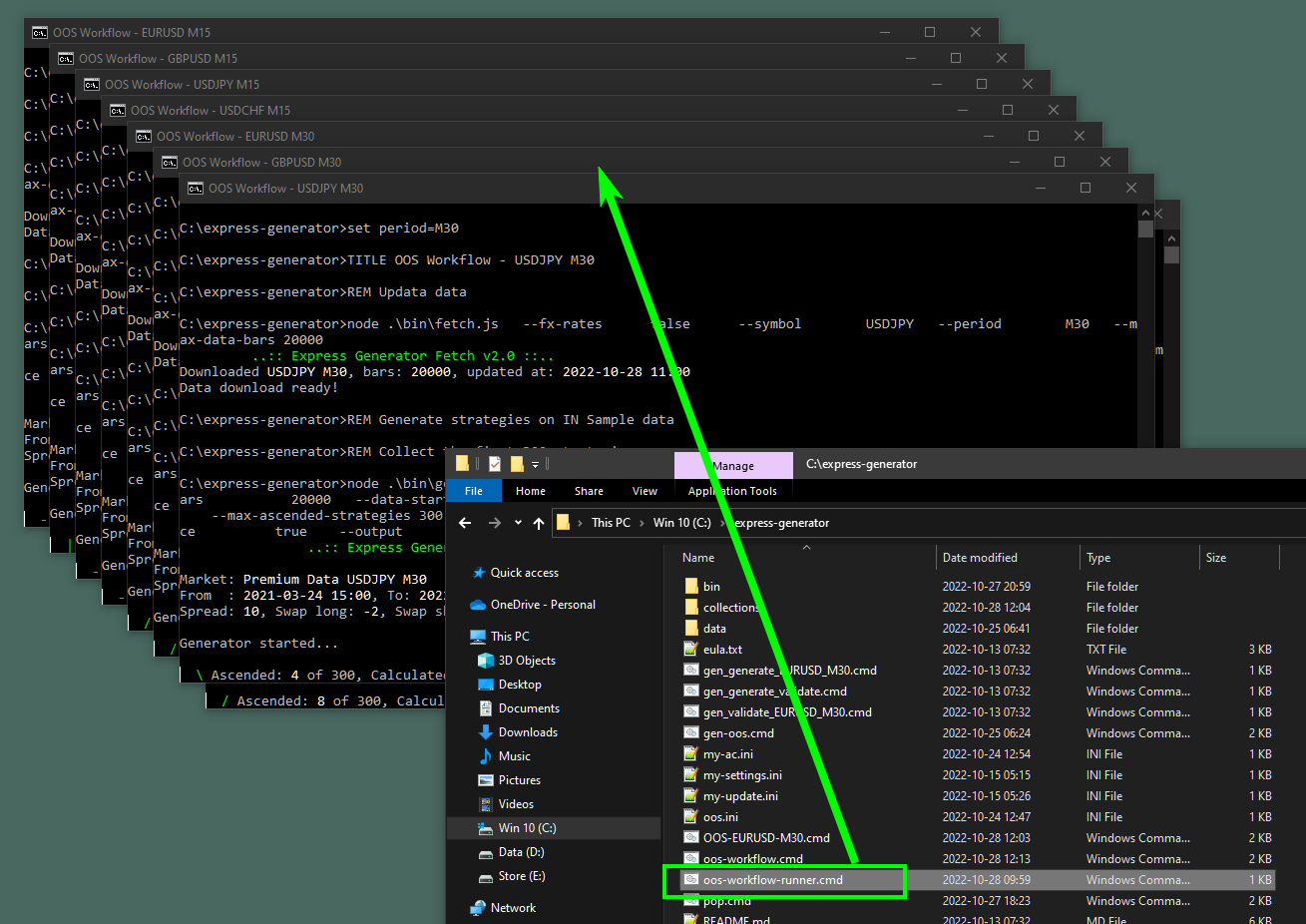
			<summary type="html"><![CDATA[<p>We can make a command that runs another command with different parameters.</p><p>Please see the OOS example here: <a href="https://forexsb.com/forum/topic/9278/generate-in-sample-and-validate-oos/">https://forexsb.com/forum/topic/9278/ge … idate-oos/</a></p><p>I&#039;ll use the same workflow but will make a command that runs it on 8 different markets.</p><p>To make it work, I modify the OOS example to accept parameters.</p><p>Here I set a variable <strong>symbol</strong> to take the first param and a variable <strong>period</strong> to accept the second param.</p><div class="codebox"><pre><code>set symbol=%1
set period=%2</code></pre></div><p>Then I use the symbol and period params instead of hardcoding the symbol and period.<br />We use a variable by surrounding it with <strong>%</strong>.</p><div class="codebox"><pre><code>node .\bin\fetch.js ^
  --fx-rates      false    ^
  --symbol        %symbol% ^
  --period        %period% ^
  --max-data-bars 20000
...
node .\bin\gen.js ^
  --symbol        %symbol% ^
  --period        %period% ^
  --max-data-bars 20000 ^</code></pre></div><br /><p>By having the symbol and the period as parameters, I can run this command from another.</p><p><strong>oos-workflow-runner.cmd</strong></p><div class="codebox"><pre><code>START oos-workflow EURUSD M15
START oos-workflow GBPUSD M15
START oos-workflow USDJPY M15
START oos-workflow USDCHF M15

START oos-workflow EURUSD M30
START oos-workflow GBPUSD M30
START oos-workflow USDJPY M30
START oos-workflow USDCHF M30</code></pre></div><p>Now I can start the <strong>oos-workflow-runner.cmd</strong> command and it will run 8 different oos-workflow commands in 8 separate CMD instances.</p><p><a href="https://image-holder.forexsb.com/store/workflow-runner.png"><span class="postimg"><img src="https://image-holder.forexsb.com/store/workflow-runner-thumb.png" alt="https://image-holder.forexsb.com/store/workflow-runner-thumb.png" /></span></a></p><p>Now I have 8 sets of generated In Sample collections and validated top 10 collections with 1 click.</p><p><a href="https://image-holder.forexsb.com/store/workflow-runner-collections.png"><span class="postimg"><img src="https://image-holder.forexsb.com/store/workflow-runner-collections-thumb.png" alt="https://image-holder.forexsb.com/store/workflow-runner-collections-thumb.png" /></span></a></p><p>This is the true magic of the Express Generator <img src="https://forexsb.com/forum/img/smilies/smile.png" width="15" height="15" alt="smile" /></p>]]></summary>
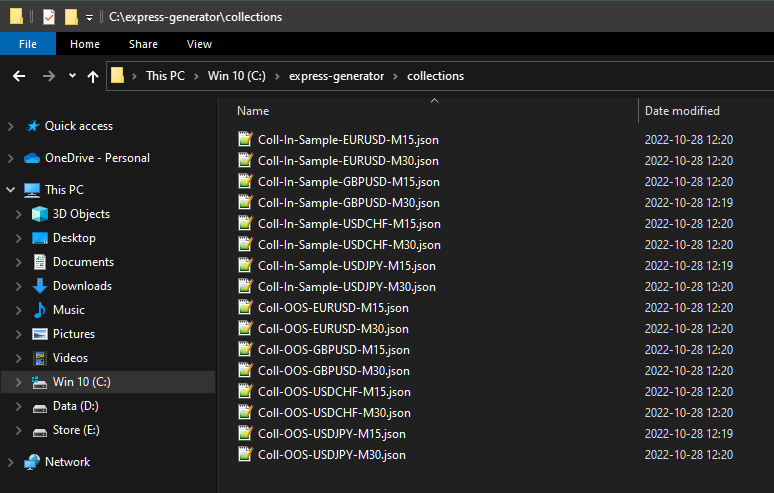
			<author>
				<name><![CDATA[Popov]]></name>
				<uri>https://forexsb.com/forum/user/2/</uri>
			</author>
			<updated>2022-10-28T12:21:25Z</updated>
			<id>https://forexsb.com/forum/topic/9279/workflow-runner/new/posts/</id>
		</entry>
		<entry>
			<title type="html"><![CDATA[Generate In Sample and validate OOS]]></title>
			<link rel="alternate" href="https://forexsb.com/forum/topic/9278/generate-in-sample-and-validate-oos/new/posts/" />
			<summary type="html"><![CDATA[<p>I&#039;m using three separate commands in this CMD file.<br />I&#039;ll show them separately.</p><br /><p><strong>1. Update the historical data</strong></p><p>We update the data first - 20000 bars EURUSD M30</p><div class="codebox"><pre><code>TITLE OOS Workflow - EURUSD M30

REM Fetch EURUSD M30

node .\bin\fetch.js ^
  --fx-rates      true   ^
  --symbol        EURUSD ^
  --period        M30    ^
  --max-data-bars 20000</code></pre></div><br /><p><strong>2. Generate strategy on the first 75% of the data. ( In Sample )</strong></p><p>Here we set &quot;gen&quot; to load 20000 bars of EURUSD M30 and to use from 0% to 75%<br />&nbsp; --data-start-percent&nbsp; &nbsp; &nbsp; 0 <br />&nbsp; --data-end-percent&nbsp; &nbsp; &nbsp; &nbsp; 75</p><p>I&#039;m collecting the first 300 strategies. This is different from the usual practice of running the Generator for some time and getting the collection.<br />&nbsp; --collection-capacity&nbsp; &nbsp; &nbsp;300<br />&nbsp; --max-ascended-strategies 300</p><p>I set the Express Generator to update the best strategy on the screen (default behaviour) and not show the top strategies after the generator finishes.<br />&nbsp; --update-best&nbsp; &nbsp; &nbsp; &nbsp; &nbsp; &nbsp; &nbsp;true<br />&nbsp; --show-top&nbsp; &nbsp; &nbsp; &nbsp; &nbsp; &nbsp; &nbsp; &nbsp; 0</p><p>I set the generator to export the collection to &quot;Coll-In-Sample-EURUSD-M30&quot; file.<br />Here&nbsp; &quot;--output-replace true&quot; sets the generator to overwrite a previous file with the same name. This is important because I&#039;&#039; load the file for validation in the next section.</p><div class="codebox"><pre><code>node .\bin\gen.js ^
  --symbol                  EURUSD ^
  --period                  M30    ^
  --max-data-bars           20000  ^
  --data-start-percent      0      ^
  --data-end-percent        75     ^
  --collection-capacity     300    ^
  --max-ascended-strategies 300    ^
  --update-best             true   ^
  --show-top                0      ^
  --output-replace          true   ^
  --output                  Coll-In-Sample-EURUSD-M30</code></pre></div><br /><p><strong>3. Validate strategies on 25% OOS and get top 10</strong></p><p>Here I set the Generator to load 20000 bars of EURUSD M30 but only use the latest 25%.<br />&nbsp; --max-data-bars&nbsp; &nbsp; &nbsp; &nbsp; &nbsp; &nbsp;20000<br />&nbsp; --data-start-percent&nbsp; &nbsp; &nbsp; 75&nbsp; <br />&nbsp; --data-end-percent&nbsp; &nbsp; &nbsp; &nbsp; 100 </p><p>I collect only the top 10 by setting the collection capacity to 10 strategies<br />&nbsp; --collection-capacity&nbsp; &nbsp; &nbsp;10 </p><p>I want strategies with min 10 trades (100 by default)<br /> --min-count-of-trades&nbsp; &nbsp; &nbsp;10</p><br /><p>I don&#039;t want to see the best one updated but want to see all the top 10 printed<br /> --update-best&nbsp; &nbsp; &nbsp; &nbsp; &nbsp; &nbsp; &nbsp;false<br />&nbsp; --show-top&nbsp; &nbsp; &nbsp; &nbsp; &nbsp; &nbsp; &nbsp; &nbsp; 10&nbsp; &nbsp;</p><p>I set the generator to work in validation mode by providing &quot;--input&quot; parameter<br />&nbsp; --input&nbsp; &nbsp; &nbsp; &nbsp; &nbsp; &nbsp; &nbsp; &nbsp; &nbsp; &nbsp;Coll-In-Sample-EURUSD-M3<br />The program loads the previously generated IN sample collection</p><div class="codebox"><pre><code>node .\bin\gen.js ^
  --symbol                  EURUSD ^
  --period                  M30    ^
  --max-data-bars           20000  ^
  --data-start-percent      75     ^
  --data-end-percent        100    ^
  --collection-capacity     10     ^
  --min-count-of-trades     10     ^
  --update-best             false  ^
  --show-top                10     ^
  --input                   Coll-In-Sample-EURUSD-M30 ^
  --output                  Coll-OOS-EURUSD-M30</code></pre></div><br /><p><a href="https://image-holder.forexsb.com/store/oos-eurusd-m30-express-generator.png"><span class="postimg"><img src="https://image-holder.forexsb.com/store/oos-eurusd-m30-express-generator-thumb.png" alt="https://image-holder.forexsb.com/store/oos-eurusd-m30-express-generator-thumb.png" /></span></a></p><br /><p>This is an example of how we can use several actions to compose a workflow. I&#039;m using the default Acceptance Criteria, but you may modify the code.</p>]]></summary>
			<author>
				<name><![CDATA[Popov]]></name>
				<uri>https://forexsb.com/forum/user/2/</uri>
			</author>
			<updated>2022-10-28T12:07:55Z</updated>
			<id>https://forexsb.com/forum/topic/9278/generate-in-sample-and-validate-oos/new/posts/</id>
		</entry>
		<entry>
			<title type="html"><![CDATA[Update Historical Data]]></title>
			<link rel="alternate" href="https://forexsb.com/forum/topic/9277/update-historical-data/new/posts/" />
			<summary type="html"><![CDATA[<p>Express Generator can fetch historical data from our Premium Data server.</p><br /><div class="codebox"><pre><code>TITLE Update Data

node .\bin\fetch.js ^
  --fx-rates  true  ^
  --symbols       EURUSD USDJPY GBPUSD USDCHF ^
  --periods       M15 M30 H1 ^
  --max-data-bars 100000 ^
  --time-zone 0

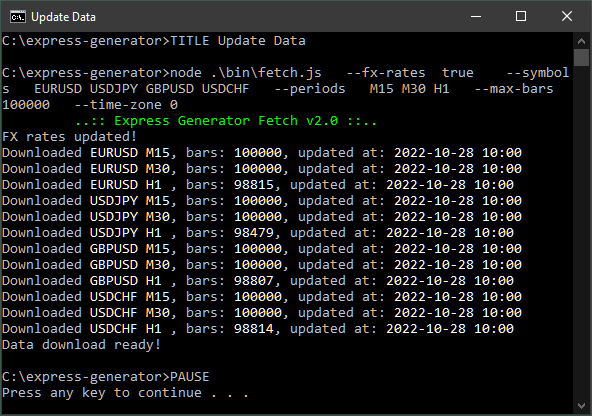
PAUSE</code></pre></div><br /><p>How it works:<br /> <strong>--fx-rates&nbsp; true</strong> - sets the fetch command to update the FX exchange rates. They are needed to convert the profit into the account currency.<br /> <strong>--symbols&nbsp; &nbsp;EURUSD USDJPY GBPUSD USDCHF</strong> - these are the symbols we will download<br /> <strong>--periods&nbsp; &nbsp;M15 M30 H1</strong> - periods to download for each of the above symbols<br /> <strong>--max-data-bars 100000</strong> - the maximum number of bars to download<br /> <strong>--time-zone 0</strong> - &quot;fetch&quot; can change the data timezone. We specify the timezone shift in hours. Here 0 means UTC.</p><p><span class="postimg"><img src="https://image-holder.forexsb.com/store/express-generator-fetch-premium-data.png" alt="https://image-holder.forexsb.com/store/express-generator-fetch-premium-data.png" /></span></p>]]></summary>
			<author>
				<name><![CDATA[Popov]]></name>
				<uri>https://forexsb.com/forum/user/2/</uri>
			</author>
			<updated>2022-10-28T11:03:46Z</updated>
			<id>https://forexsb.com/forum/topic/9277/update-historical-data/new/posts/</id>
		</entry>
		<entry>
			<title type="html"><![CDATA[Upgrade Express Generator]]></title>
			<link rel="alternate" href="https://forexsb.com/forum/topic/9276/upgrade-express-generator/new/posts/" />
			<summary type="html"><![CDATA[<p>Express Generator checks for new versions and updates automatically when we use the <strong>fetch</strong> command.</p><p>However, it checks for updates in 24 hours intervals by default.</p><p>Here is a command for forcing an upgrade to a newer version:</p><div class="codebox"><pre><code>TITLE Upgrade Express Generator

node .\bin\fetch.js ^
  --check-for-update      true ^
  --automatic-update      true ^
  --update-check-interval 0

PAUSE</code></pre></div><p><span class="postimg"><img src="https://image-holder.forexsb.com/store/upgrade-express-generator.png" alt="https://image-holder.forexsb.com/store/upgrade-express-generator.png" /></span></p><br /><p>How it works:<br /> <strong>--check-for-update true</strong> - sets the fetch command to check for a new version<br /> <strong>--automatic-update true</strong> - if a new version is available, the fetch command installs it (instead of only showing that it is available)<br /> <strong> --update-check-interval 0</strong> - sets the interval for checking for updates to 0 hours. This effectively forces the update.</p><p>Additional:<br /> The <strong>TITLE</strong> sets the text in the CMD window. Now it shows &quot;Upgrade Express Generator&quot;</p><p> <strong>PAUSE</strong> at the end of the command keeps it open when finishes.</p><br /><p>Note: Download the reattached command and put it in the Express Generator folder.</p>]]></summary>
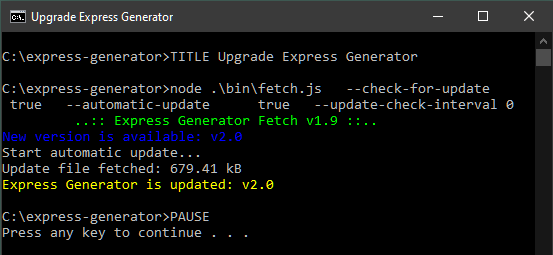
			<author>
				<name><![CDATA[Popov]]></name>
				<uri>https://forexsb.com/forum/user/2/</uri>
			</author>
			<updated>2022-10-28T10:47:08Z</updated>
			<id>https://forexsb.com/forum/topic/9276/upgrade-express-generator/new/posts/</id>
		</entry>
</feed>